
Table of Contents
Some links on The Justifiable are affiliate links, meaning we may earn a small commission at no extra cost to you. Read full disclaimer.
Hiring an Upwork web developer can be both exciting and nerve-wracking—especially when you’re trying to avoid overpaying for a project that might not deliver.
Have you ever wondered why some clients end up spending double while others seem to get top-quality work for a fraction of the price?
In this guide, we’ll break down exactly how to navigate Upwork like a pro—from evaluating developers and writing a clear job post to negotiating rates and managing quality—so you can get the results you want without burning through your budget.
Understand The True Cost Of An Upwork Web Developer
Before hiring any Upwork web developer, it’s worth understanding where your money actually goes.
Many clients assume higher prices equal better results—but that’s not always true. On Upwork, value is tied more to clarity, trust, and experience than just the hourly rate.
How Upwork Pricing Models Affect Your Budget
Upwork offers two main pricing models: hourly contracts and fixed-price projects. Each has its pros and cons.
- Hourly Contracts: Best for long-term or flexible projects. You’re billed weekly based on tracked time via Upwork’s Work Diary (a time tracker showing screenshots and activity levels). For example, a developer charging $40/hour who works 10 hours per week costs $400 weekly.
- Fixed-Price Projects: Ideal when your scope is crystal clear. You agree to milestones and only pay once each is completed and approved.
Pro Tip: I usually recommend starting with a small fixed milestone first—even for larger projects. It lets you gauge a developer’s speed and quality before committing more funds.
Comparing Hourly vs. Fixed-Price Projects
Hourly projects give flexibility but can lead to budget creep if you’re not tracking progress closely. Fixed-price jobs provide certainty but demand well-defined specs.
| Model | Best For | Risk Level | Payment Flexibility |
| Hourly | Ongoing maintenance or evolving projects | Moderate | Weekly billing, flexible |
| Fixed-Price | Defined tasks or deliverables | Low (if scoped well) | Pay after milestones |
If you’re building something like a custom WordPress website or bug fixes on existing code, go fixed-price. But if it’s an ongoing SaaS project, hourly is safer.
Evaluating Skill Level vs. Cost Efficiency
Here’s where most clients overspend: paying senior rates for junior tasks.
A simple landing page redesign shouldn’t need a senior full-stack engineer at $80/hour. Instead, look for mid-level developers ($25–50/hour) who’ve completed at least 20 projects with strong client feedback.
Ask yourself:
- Does this developer’s skill actually match my needs?
- Am I paying for expertise I won’t use?
Example: A basic Shopify theme tweak can be done by a mid-level developer in 3–4 hours ($100–200 total), whereas a senior dev might charge the same per hour.
Common Pricing Traps To Avoid
- Vague Scopes: The fastest way to overspend is unclear project requirements. Always list exact features and deliverables.
- “Too Good to Be True” Low Bids: Underpriced freelancers can lead to poor quality and delays—costing more long-term.
- Overly High Hourly Rates With No Justification: Rates should match experience, portfolio, and communication level.
- Paying Outside Upwork: Never do this—it removes your payment protection and makes dispute resolution impossible.
Quick Tip: Check the “Project Catalog” on Upwork to compare typical package pricing before posting your job. It gives you a realistic sense of what’s fair for your project size.
Write A Job Post That Attracts Qualified Developers
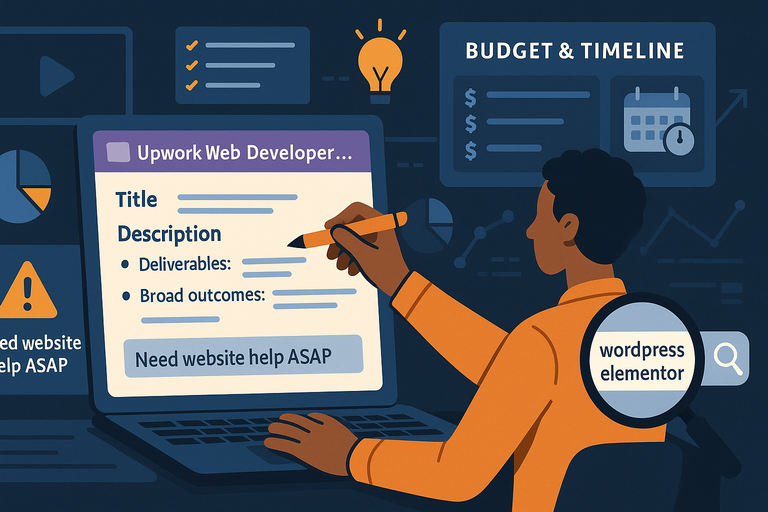
Most clients don’t realize this, but your job post determines who applies. If you’re not specific, you’ll attract everyone—and end up wasting hours filtering through poor fits. Let’s fix that.
Crafting A Clear, Specific Project Description
Start with clarity. Your project post should explain what you need, why you need it, and what success looks like.
Example job structure:
- Title: “Upwork Web Developer Needed to Build WordPress Landing Page”
- Description: Explain the purpose (e.g., “to collect leads for a SaaS product”) and main tasks (“custom theme setup, mobile optimization”).
- Deliverables: Define outcomes (e.g., “A fully responsive homepage delivered within 10 days”).
I suggest including 3–5 bullet points for clarity. Developers love specificity—it helps them give accurate bids.
Setting Realistic Budgets And Timelines
On Upwork, your budget signals project seriousness. Undervaluing your project attracts underqualified freelancers.
Use this guideline:
- Simple sites: $300–800
- Mid-level business websites: $1,000–3,000
- Custom applications: $3,000+
If unsure, post with “Expert Needed – Budget Negotiable.” This invites fair proposals while signaling flexibility.
Pro Tip: Always include a deadline with wiggle room. Example: “Delivery by October 20th (flexible by 3 days).” Developers appreciate honesty around timelines.
Including The Right Keywords To Filter Applicants
Upwork’s search system works like Google—it matches developers based on keywords.
Use key terms like:
- “WordPress developer”
- “React developer”
- “Shopify customization”
For instance, write: “I’m looking for an experienced Upwork web developer skilled in WordPress and Elementor.”
This tells the algorithm (and developers) exactly what you need.
Avoiding Overly Broad Or Generic Job Posts
A post like “Need website help ASAP” screams chaos. Instead, be clear about your scope and stage:
Bad: “Need someone to fix my website.”
Good: “Need an Upwork web developer to optimize load speed on an existing WordPress site using WP Rocket and image compression.”
That one line alone can reduce irrelevant applicants by 70%.
Shortlist Developers Based On Proven Experience
Once you post your job, the real sorting begins. The goal is to filter efficiently without missing hidden gems.
Reviewing Portfolios For Relevant Work
Don’t just glance at design—look for context. A good portfolio should show similar functionality to what you need.
Ask yourself:
- Have they built similar sites or tools?
- Do their examples show problem-solving or just templates?
Example: If you need an eCommerce site, check for live Shopify or WooCommerce samples, not just mockups.
Checking Client Feedback And Ratings Critically
High stars aren’t everything. Look for pattern consistency. A developer with consistent 4.8–5.0 ratings across 20+ jobs is often more reliable than one with a single 5-star project.
Read feedback for details on communication, problem-solving, and timeliness. Words like “responsive,” “proactive,” or “fixed bugs quickly” signal reliability.
Pro Tip: Filter developers by “Job Success Score 90%+” for safer bets.
Identifying Red Flags In Developer Profiles
Watch out for these signs:
- Incomplete Profiles: Missing descriptions or no portfolio.
- Unrelated Skills: A profile listing “logo design, copywriting, and web development” usually means shallow focus.
- Frequent Job Cancellations: Shows inconsistency or poor client fit.
When I see more than two “No feedback given” jobs in a row, I dig deeper—it might signal dropped projects.
Using Skills Tests And Sample Tasks For Screening
Before committing, test them with a small, paid task.
Example process:
- Assign a 1-hour trial task (like fixing a CSS bug or adding a form).
- Evaluate delivery speed, communication, and quality.
- If all’s well, expand to full milestones.
Pro Tip: I always say, “Let’s start with a small milestone to make sure we’re a good fit.” It builds mutual trust and protects your budget.
Conduct Interviews That Reveal True Expertise
Before you hit “hire,” take the time to actually talk to your shortlisted developers. An interview isn’t just about confirming skills—it’s about understanding how they think, communicate, and solve problems.
Even a short 15-minute chat can reveal more than a 20-page portfolio.
Asking Technical Questions That Test Problem-Solving
You don’t need to be a developer yourself to ask smart questions. The goal is to see how they approach problems, not whether they give textbook answers.
Here’s what I suggest:
- Scenario-Based Questions: Instead of “Do you know React?”, try “If a React app suddenly stops rendering, what’s your first step to diagnose it?” Their answer should show logical thinking.
- Code Example Reviews: Ask them to walk you through a previous project briefly—what problem they solved, what tools they used, and why.
- Tool Familiarity Checks: If your project uses WordPress or Shopify, ask about specific plugins or workflows. For instance: “How would you optimize page speed using WP Rocket or LiteSpeed Cache?”
Pro Tip: Take notes during the interview—especially about how they explain things. A developer who can explain a complex fix in simple terms will save you hours later.
Assessing Communication And Responsiveness
Technical brilliance means nothing if the person goes silent for days. Communication is one of the most overlooked factors when hiring on Upwork.
Here’s what I look for:
- Response Time: Do they reply within 24 hours to messages?
- Clarity: Are their messages easy to follow, or full of jargon?
- Proactivity: Do they ask clarifying questions about your goals before quoting prices?
You can test this early. After your first message, see how long they take to respond and how thoroughly they answer. Developers who care about communication usually perform better long-term.
Quick Scenario: I once hired a developer who was lightning-fast with code but painfully slow at replying. We lost three days waiting for answers. The lesson? Responsiveness is just as valuable as technical skill.
Evaluating Their Understanding Of Your Project Goals
A strong Upwork web developer doesn’t just follow instructions—they understand your project’s purpose. During the interview, gauge how much they grasp the “why” behind your request.
Try asking:
- “What would success look like for this project, in your view?”
- “What’s your process for ensuring design matches business goals?”
If they echo your intent or suggest improvements, that’s gold. If they seem detached or vague, that’s a red flag.
Pro Tip: Ask them to restate your goals in their own words. If they can articulate your needs clearly, you’ve found someone who listens.
Comparing Candidates Objectively
It’s easy to get lost comparing personalities, rates, and portfolios. I like to use a simple scorecard method:
| Criteria | Weight | Developer A | Developer B |
| Technical Skills | 30% | 8/10 | 9/10 |
| Communication | 25% | 9/10 | 7/10 |
| Problem Solving | 25% | 7/10 | 9/10 |
| Budget Fit | 20% | 10/10 | 8/10 |
This table helps you keep decisions data-driven instead of emotional.
Pro Tip: Always end interviews by asking: “Why do you think you’re a good fit for this specific project?” Their answer often tells you whether they actually listened—or just applied blindly.
Negotiate Rates Without Undermining Quality
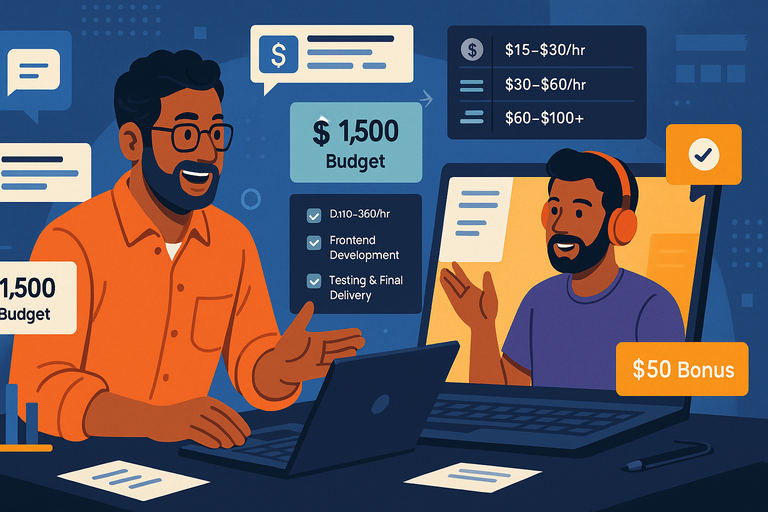
Talking about money can feel awkward, but it doesn’t have to be. The goal isn’t to undercut the developer—it’s to align expectations so both sides feel respected and confident.
How To Discuss Pricing Confidently
Be upfront. I usually start by saying something like, “I’ve budgeted around $1,500 for this project—does that align with your usual rate for similar work?”
This does two things:
- It signals seriousness.
- It invites an honest discussion without sounding like haggling.
If their rate’s higher, ask why. Often, a developer will justify it with efficiency or added expertise. You can then decide whether the premium’s worth it.
Pro Tip: Avoid phrases like “Can you lower your rate?” Instead, ask “Can you suggest a scope that fits within my budget?” It reframes negotiation as collaboration.
Understanding Market Rates For Similar Projects
Before you negotiate, do your homework.
- Junior developers (1–2 years): $15–30/hour
- Mid-level developers (3–5 years): $30–60/hour
- Senior developers (5+ years): $60–100+/hour
You can verify this directly on Upwork by filtering freelancers by “hourly rate” and “job success score.”
Example: For a WordPress landing page, expect about $400–800 total, depending on complexity.
Using Milestones To Manage Payment Fairly
Milestones are your best friend on Upwork. They let you pay in chunks as the project progresses—protecting both parties.
Example structure for a $1,000 project:
- Design Mockup – $200
- Frontend Development – $400
- Testing & Final Delivery – $400
You can set these up right from your Upwork contract dashboard by selecting “Add milestone > Set amount > Add due date.”
Pro Tip: Always review work before approving payment. Once released, refunds get tricky.
When And How To Offer Incentives For Efficiency
Reward good performance—it encourages developers to prioritize your project.
For instance:
- “If you deliver 3 days early with all QA checks passed, I’ll add a $50 bonus.”
- “I’ll increase the rate by 10% for ongoing work after successful delivery.”
Small incentives build trust and motivate efficiency. I’ve found developers who feel appreciated deliver faster and communicate better.
Manage The Project To Prevent Hidden Costs
Even the best contracts can go sideways if management slips. Staying organized helps prevent extra expenses, missed deadlines, and confusion.
Setting Clear Deliverables And Deadlines
Clarity is the antidote to hidden costs. Each milestone should have a specific deliverable (e.g., “Functional homepage with contact form integration”) and a deadline (“Due October 20”).
Use this structure in your contract message:
- Deliverable: Describe the task clearly.
- Deadline: Include both date and time zone.
- Acceptance Criteria: Define what “done” looks like.
That last one’s key—it keeps “scope creep” (extra work sneaking in) under control.
Using Upwork Tools For Time Tracking And Reporting
If you’re working hourly, Upwork’s built-in Work Diary is invaluable. It captures screenshots every 10 minutes and tracks mouse/keyboard activity.
To view it: Go to My Jobs > Contracts > Work Diary.
You’ll see the breakdown of hours logged, so you know exactly what you’re paying for.
Pro Tip: Review it weekly. If activity drops but hours rise, ask questions early. Transparency keeps everyone accountable.
Handling Scope Changes Without Overpaying
Scope changes are inevitable—but they don’t have to blow your budget.
When new tasks come up:
- Pause the current milestone.
- Discuss the new scope and get a cost estimate.
- Create a separate milestone for it.
This method keeps everything documented in Upwork’s system, so no one “forgets” what was agreed on later.
Example: You hired a developer to build 3 pages, but now you want a blog added. Instead of casually saying “just add it,” make a new $150 milestone titled “Add blog page layout.”
Maintaining Accountability And Transparency
Weekly check-ins work wonders. I usually send a quick message like:
“Hey, just checking in—how’s the timeline looking for this milestone? Any blockers?”
That small habit saves endless confusion. Developers appreciate proactive communication because it helps them plan better too.
Pro Tip: Keep all communication inside Upwork chat. It protects you if disputes arise and keeps everything time-stamped.
Protect Yourself With Smart Contracts And Policies
Before any code gets written or design delivered, the smartest move you can make is setting up solid foundations.
A well-structured contract and transparent communication inside Upwork can save you from every nightmare scenario—missed deadlines, ghosting, or disputes.
Structuring Contracts To Minimize Risk
On Upwork, your contract is more than a formality—it’s your safety net. Think of it as your digital handshake and your insurance policy.
When creating a new contract:
- Go to My Jobs > Create Contract > Start a New Contract.
- Choose Fixed-Price or Hourly, depending on your project.
- Define milestones—for example:
- Homepage Design ($200)
- Development & Integration ($400)
- Testing & Launch ($200)
Keep each milestone specific and measurable. That means “Create website layout using Figma, approved via client review” instead of “Design homepage.”
I recommend: Add a small first milestone—say $100—to test how the developer delivers. It’s a gentle way to confirm reliability before committing the full budget.
Pro Tip: Always include acceptance criteria in milestone notes, like “approved only if the page loads under 3 seconds and matches wireframe.” It removes guesswork and protects both parties.
Understanding Upwork’s Dispute Resolution System
If something goes wrong—and sometimes it does—Upwork’s dispute system exists to help.
Here’s how it works:
- For Fixed-Price Contracts: If you’re unhappy with a milestone, don’t release payment. You can click “Request Refund” directly from the contract.
- For Hourly Contracts: You can dispute logged hours within 5 days after the billing period ends.
To access it, navigate to My Jobs > Contracts > Resolve a Dispute.
Upwork first encourages both parties to talk it out. If that fails, their Mediation Team steps in. I’ve used this once—it’s surprisingly fair, as long as you have proof of communication and work logs.
Key Tip: Save project discussions and feedback inside Upwork messages—not on email or Slack. That’s what makes your claim verifiable.
Keeping Payment And Communication On The Platform
This rule isn’t just for compliance—it’s your shield. Paying outside Upwork voids all protection, meaning if the freelancer disappears, you’re on your own.
Why it matters:
- Upwork guarantees payment only when transactions stay on-platform.
- All time logs, chat records, and files are automatically stored as proof.
If a developer pushes for PayPal or crypto payments “to save fees,” politely decline. You’ll lose Upwork’s Payment Protection Policy, which ensures you get either your work—or your money—back.
Quick Script:
“I’m happy to keep everything on Upwork—it protects both of us and keeps the project transparent.”
Developers who respect professionalism will appreciate that boundary.
Documenting Work Progress For Proof And Security
The easiest way to prevent conflict is documentation. Keep a visible trail of every deliverable.
You can do this by:
- Uploading screenshots or files directly into the Messages tab.
- Using Work Diary (for hourly projects) to review what was done each week.
- Writing short feedback notes after each milestone, like “Received working contact form, approved.”
These little details build a record that proves good faith on both sides. If a dispute ever happens, you’ll thank your past self.
Pro Tip: Every Friday, take 2 minutes to summarize progress in chat. A single paragraph recap is enough to prevent 90% of future misunderstandings.
Evaluate Results And Build Long-Term Partnerships
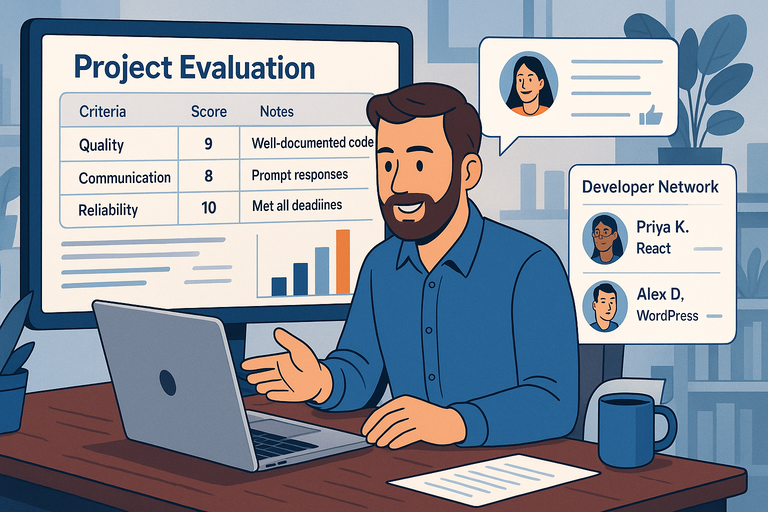
Once your project wraps up, it’s tempting to move on quickly—but the post-project phase is where real value compounds.
The best Upwork web developers become trusted partners for years if you nurture that relationship right.
Measuring Performance Beyond Cost
Don’t just measure success by “Did it stay within budget?” Instead, evaluate on three levels:
- Quality: Does the final product meet your standards and function smoothly?
- Communication: Were updates timely and transparent?
- Reliability: Did they meet deadlines and handle revisions professionally?
You can even score each 1–10 for an objective view.
| Criteria | Score | Notes |
| Code Quality | 9 | Clean, well-documented CSS |
| Communication | 8 | Responded within 12 hours |
| Timeliness | 10 | Delivered 2 days early |
That simple reflection helps you decide who’s worth hiring again.
Providing Constructive Feedback
When closing a contract, always leave detailed feedback—developers value it more than you might think.
Good feedback structure:
- Start with appreciation (“Really liked your attention to detail on the homepage.”)
- Mention one improvement (“Let’s align faster on timelines next time.”)
- End positive (“Would gladly work with you again.”)
Not only does this build goodwill—it also improves how developers view you as a client. Trust me, top-rated freelancers check your client profile before applying.
Building A Reliable Developer Network
As you complete more projects, start tracking your best performers. I recommend keeping a spreadsheet or a Notion table with columns like:
| Name | Specialty | Hourly Rate | Strengths | Notes |
| Alex D. | WordPress | $35/hr | Fast delivery | Used for landing pages |
| Priya K. | React/Next.js | $50/hr | Excellent problem solver | Full app builds |
After a few projects, you’ll have your own vetted network—no more hours of scrolling through Upwork listings.
Planning Future Projects More Efficiently
When you have ongoing work, efficiency comes from consistency. Use the same templates for briefs, milestones, and reviews each time.
I usually keep:
- A Job Post Template (so I can repost with tweaks in 5 minutes).
- A Checklist for deliverables before final payment.
- A Message Template for post-project feedback.
The more organized your system, the less time you’ll spend managing logistics—and the more time you’ll spend getting great work done.
Expert Tip To Maximize Value On Upwork
Once you’ve worked with a few dependable freelancers, the next step is building what I like to call your “Preferred Freelancer List.” This saves you from starting from scratch every time.
How To Build A “Preferred Freelancer” List For Future Work
Upwork actually makes this easy if you know where to look.
Here’s how:
- From your Upwork dashboard, go to Talent > My Freelancers.
- Click the star icon next to freelancers you’d rehire.
- Label them (e.g., “Design,” “Frontend,” “Maintenance”).
This creates your personal favorites database.
I suggest:
- Sending your best freelancers short check-in messages every few months. Something like, “Hey! Just finished a new site design, might need your help again next week.”
- Offering them repeat work before posting publicly. They appreciate the loyalty and often offer better rates.
It’s like having your own mini agency—without the overhead.
Pro Tip: When you find a truly exceptional developer, consider an ongoing weekly retainer. For instance:
“I’d like to reserve 5 hours/week at your usual rate for maintenance and updates.”
That small commitment keeps your site fresh and saves you from scrambling for help later.

I’m Juxhin, the voice behind The Justifiable.
I’ve spent 6+ years building blogs, managing affiliate campaigns, and testing the messy world of online business. Here, I cut the fluff and share the strategies that actually move the needle — so you can build income that’s sustainable, not speculative.
Related posts:
 How to Hire Web Developer Without Blowing Your Budget
 Freelance Website Developer Where to Find Trusted Experts
 10 Smart Questions to Ask a Freelancer for Website Development
 Python Freelance Jobs Where to Land High-Paying Projects
 Freelance Developer: How to Find the Perfect Fit for Your Project
 WordPress Freelancer: How to Hire Experts Without Overpaying