
Table of Contents
Some links on The Justifiable are affiliate links, meaning we may earn a small commission at no extra cost to you. Read full disclaimer.
When I first heard about Salehoo and Shopify, I was skeptical about how quickly they could actually turn into a profitable duo. But once I figured out how to connect them properly, things changed fast.
If you’ve been wondering how to link your Salehoo supplier network with your Shopify store to start selling without the hassle of sourcing or warehousing products, you’re in the right place.
This guide breaks down everything step by step so you can get your online business earning as soon as possible—without wasting time on trial and error.
Understanding How Salehoo and Shopify Work Together
Connecting Salehoo and Shopify is like pairing a reliable supplier network with a powerful selling machine.
Together, they help you find trusted products and seamlessly list them on your store—without touching a single piece of inventory.
How Salehoo Complements the Shopify Platform
Salehoo acts as your behind-the-scenes product sourcing engine. It’s a platform that connects you with over 8,000 verified suppliers and more than 2.5 million products ready to sell.
What makes Salehoo special is that every supplier is vetted for legitimacy, meaning fewer risks of scams or poor-quality products.
When paired with Shopify, Salehoo fills a major gap: trusted supply meets automated sales. Instead of spending weeks trying to find reliable dropshippers, you can pick from pre-vetted suppliers who already integrate smoothly with your store.
Here’s how they complement each other:
- Salehoo: Helps you find winning products and trustworthy suppliers.
- Shopify: Lets you showcase and sell those products with a professional storefront.
- Integration: Syncs both sides so pricing, inventory, and fulfillment stay up to date automatically.
In short, Salehoo brings you the products, and Shopify brings you the customers.
Why Dropshippers Prefer Salehoo for Product Sourcing
Most dropshippers love Salehoo because it saves them time, headaches, and guesswork. Instead of gambling on suppliers from random directories, you get access to verified sellers with real track records.
A few reasons why Salehoo stands out for sourcing:
- Pre-vetted suppliers: Salehoo manually reviews suppliers for reliability, communication, and product quality.
- Comprehensive product database: You can browse millions of products across niches—from beauty to electronics—complete with wholesale prices and competition insights.
- Market research tools: Salehoo Labs shows product demand, average profit margins, and competition levels, helping you make smarter decisions before adding items to your store.
From my experience, using Salehoo early on helps you avoid bad suppliers and jump straight into selling products that actually move.
The Role of Shopify in Managing Your Online Store
Once you’ve chosen your suppliers and products, Shopify takes the lead. It’s your store’s control center—where design, payments, and customer experience all come together.
Here’s what Shopify handles beautifully:
- Store design: You can build a sleek, professional-looking store without coding.
- Order management: Every sale, order, and customer message flows into one dashboard.
- Automation: Shopify’s ecosystem of apps connects directly with Salehoo, ensuring your inventory and pricing always stay updated.
- Analytics: Shopify reports show exactly what’s selling, who’s buying, and how to optimize pricing for better margins.
In essence, Salehoo gets you the right products, while Shopify helps you sell them efficiently and profitably.
Step-By-Step Process to Connect Salehoo and Shopify
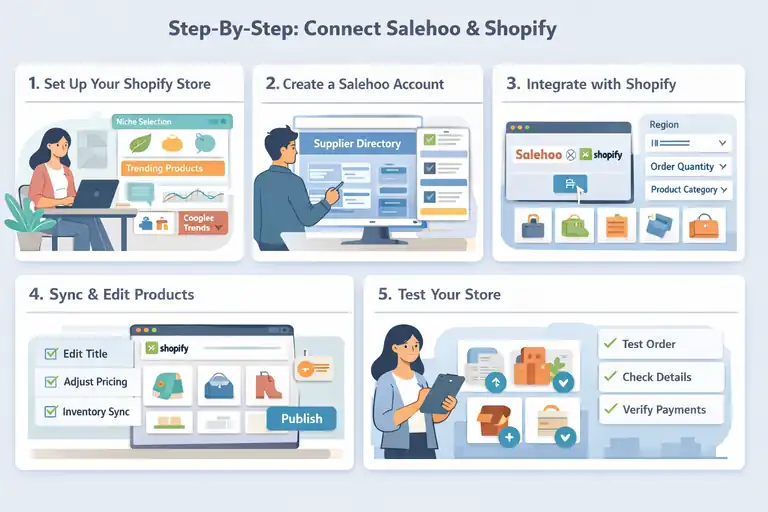
Now that you understand how they work together, let’s break down how to connect Salehoo and Shopify—the right way—for a fast, smooth setup.
Step 1: Set Up Your Shopify Store and Choose a Niche
Start by creating your Shopify account. Choose a store name that fits your brand and resonates with your target audience. Once you’re in, pick a niche that aligns with both your interests and market demand.
To narrow down a profitable niche:
- Browse Salehoo’s Trending Products section.
- Look for consistent search demand on Google Trends.
- Check competition levels using Salehoo Labs.
For example, instead of selling “home decor,” narrow it to “eco-friendly kitchen storage.” A specific niche helps you attract a focused audience and stand out in crowded markets.
Step 2: Create a Salehoo Account and Explore Verified Suppliers
Head to Salehoo and create an account. You’ll instantly gain access to their supplier directory.
Use filters like:
- Shipping region (to target local suppliers or global ones)
- Minimum order quantity (to suit your business size)
- Product category (to match your chosen niche)
Spend time reading supplier reviews and contacting a few to gauge response times and professionalism. Good communication is a major indicator of reliability.
Step 3: Integrate Salehoo with Shopify via the Salehoo App
Next, you’ll install the Salehoo Dropship app directly from the Shopify App Store. This tool bridges both platforms automatically.
Here’s how:
- Install the Salehoo Dropship app.
- Log in to your Salehoo account within Shopify.
- Choose your preferred products from Salehoo’s catalog.
- Sync them directly to your Shopify store with one click.
The app automatically imports product descriptions, images, and pricing—saving hours of manual work.
Step 4: Import Products and Sync Inventory Automatically
Once the integration is complete, start importing your selected products. You can edit titles, pricing, and images directly in Shopify before publishing.
The best part? Inventory updates in real-time. When a supplier runs out of stock, your Shopify store adjusts automatically. No more selling products that don’t exist.
Tip: Always adjust product descriptions and titles for SEO. For instance, instead of “Bluetooth Speaker,” write “Portable Bluetooth Speaker with Deep Bass.” Small tweaks like this boost visibility in Google and Shopify search.
Step 5: Test Product Listings Before Launching Your Store
Before you hit “publish,” test everything:
- Check that images load quickly.
- Ensure product details and pricing are accurate.
- Place a test order to confirm that payments and fulfillment flow correctly.
This small step prevents major issues once real customers start buying. Think of it as a soft launch—it’s better to catch errors early than fix them mid-sale.
Choosing the Right Products to Maximize Profit
Even with the best integration, profit depends on what you sell. The magic lies in finding the sweet spot—high-demand, low-competition products with solid margins.
How to Identify High-Demand Products Using Salehoo’s Data
Salehoo makes this surprisingly easy with its research tools. Inside Salehoo Labs, you can filter products based on demand, price, and competition.
Here’s what to look for:
- High sell rate (above 50%) — indicates strong demand.
- Consistent sales trend — not just seasonal spikes.
- Low number of competing sellers — helps you stand out faster.
For instance, a trending category like “pet grooming tools” might show stable monthly demand with decent margins. You can cross-check this by searching for the same products on Shopify stores or marketplaces like eBay to confirm their popularity.
Evaluating Supplier Reliability and Shipping Speed
Even the best product won’t sell profitably if your supplier is unreliable. Before committing, evaluate:
- Response time: Suppliers who reply within 24 hours are ideal.
- Shipping options: Look for suppliers offering tracked and fast shipping (under 10 days if possible).
- Return policies: Clear, fair policies reduce your risk with customer complaints.
One of my favorite tricks is to order a sample product first. It’s the simplest way to test quality, packaging, and delivery speed firsthand.
Finding Profitable Niches With Low Competition
This is where most new sellers go wrong—they chase trendy items everyone else is already selling. Instead, focus on micro-niches.
Here’s how to spot them:
- Combine Salehoo’s product data with Google Trends insights.
- Use keywords like “best” or “unique” on Salehoo’s search bar (e.g., “unique kitchen gadgets”).
- Search Shopify’s app marketplace to see what niches are thriving.
Some evergreen low-competition niches include:
- Eco-friendly home essentials
- Health recovery gear (like posture correctors)
- Pet lifestyle accessories
A well-chosen niche can make your Shopify store profitable much faster, especially when paired with Salehoo’s supplier network and Shopify’s marketing power.
Optimizing Your Shopify Store for Conversions
Once Salehoo and Shopify are connected and products are imported, your next big goal is turning browsers into buyers.
That means optimizing every detail of your store—from product pages to pricing—to build trust and drive conversions fast.
Crafting Product Descriptions That Build Trust and Drive Sales
Good product descriptions do more than list features—they sell emotions, trust, and outcomes. When writing yours, think about what the buyer actually wants to feel after purchasing.
Here’s a quick framework I use:
- Start with a hook: Describe the problem your product solves.
Example: “Tired of flimsy phone holders that fall off mid-drive?” - Add clear benefits: Instead of listing specs, explain real-life use.
Example: “This magnetic mount keeps your phone stable even on bumpy roads.” - Use sensory language: Help readers imagine the experience.
Example: “Smooth, matte finish that feels premium every time you pick it up.” - End with reassurance: Mention warranty, return policy, or trusted supplier credentials.
From experience, rewriting Salehoo-imported descriptions instead of using them as-is dramatically improves conversion rates. Keep it personal, conversational, and confidence-building—just like you’re recommending a product to a friend.
Using Smart Pricing Strategies to Maximize Profit Margins
Pricing can make or break your sales, especially in competitive dropshipping niches. You want prices that attract customers while still protecting your margins.
Here’s how to balance both:
- Use psychological pricing: Set prices like $24.99 instead of $25—it feels significantly cheaper to the human brain.
- Bundle products: Create small bundles (like “Buy 2, Get 10% Off”) to increase average order value.
- Factor in shipping and fees: Always calculate Shopify fees and Salehoo supplier shipping costs before finalizing your retail price.
- Test and adjust: Start with 30–40% markup, then tweak based on sales data.
Pro tip: Tools like Shopify Analytics can help you track real margins per sale so you don’t guess your way through pricing decisions.
Designing a Fast, Mobile-Friendly Storefront That Converts
Most Shopify sales—around 70%, according to Statista—happen on mobile. That’s why your store design has to be mobile-first, not just mobile-compatible.
To get it right:
- Choose a lightweight theme: I’ve found themes like Dawn or Turbo work great for speed and simplicity.
- Keep navigation minimal: Limit menu items to key pages—Home, Shop, About, Contact.
- Add trust signals: Display payment icons, return policies, and reviews near the “Add to Cart” button.
- Test loading speed: Use PageSpeed Insights or Shopify’s built-in performance report. Aim for under 3 seconds.
I also recommend testing your store on your own phone—if it takes more than 3 clicks to reach checkout, it’s time to simplify. The smoother your customer’s path, the faster you’ll see conversions rise.
Automating Your Sales Process for Faster Results
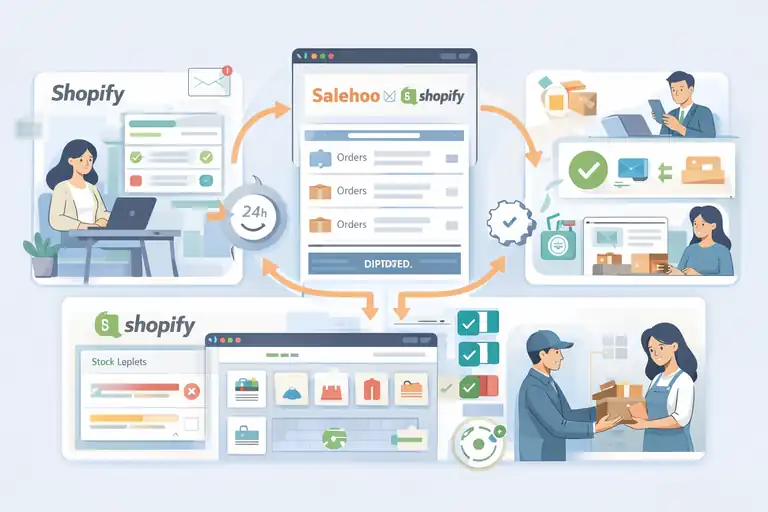
One of the biggest advantages of using Salehoo and Shopify together is how easy automation becomes.
Once everything’s set up, you can almost let the business run itself—orders sync, inventory updates, and even fulfillment happen in the background.
How to Set Up Order Automation Between Salehoo and Shopify
When a customer places an order in your Shopify store, automation ensures the supplier receives it instantly—no manual forwarding required.
Here’s how to set it up properly:
- Install the Salehoo Dropship app from the Shopify App Store.
- Enable auto-order fulfillment inside the app’s settings.
- Set your default shipping and payment preferences.
- Test the automation by placing a small test order.
Once this is running, every time a customer buys, the order gets sent to your Salehoo supplier, who then ships it directly to the buyer.
You can even send automated email updates through Shopify so customers always know where their package is.
Managing Inventory and Avoiding Out-of-Stock Errors
Nothing hurts a store’s reputation faster than selling something that’s out of stock. Thankfully, the Salehoo-Shopify integration keeps this in check.
Inventory automation means that if your supplier updates stock levels, your Shopify store adjusts automatically. No manual input, no embarrassing “Sorry, this item is unavailable” messages.
Best practices to stay on top of inventory:
- Check your Salehoo dashboard weekly for low-stock alerts.
- Use Shopify’s Inventory Reports to track fast-moving items.
- Set alerts for when stock drops below a certain threshold.
I always suggest having at least two suppliers per high-performing product when possible. That way, you can switch instantly if one runs out of inventory.
Using Shopify Apps to Streamline Fulfillment and Customer Service
Once automation handles your orders, you can take it further by adding Shopify apps that simplify the rest.
Here are some worth exploring:
- AfterShip: Automates shipping updates and tracking emails.
- Tidio: Live chat apps to handle customer questions instantly.
- ReConvert: Adds upsells and post-purchase offers on your thank-you page.
Automation doesn’t mean losing the personal touch—it just frees up time for you to focus on growing your business instead of micromanaging logistics.
Marketing Your Salehoo and Shopify Store Effectively
Even with great products and automation in place, no store can thrive without marketing.
This is where the real growth happens—bringing in consistent, qualified traffic that turns into repeat buyers.
Building a Solid Marketing Funnel With Paid and Organic Traffic
A marketing funnel is just a fancy way of saying: guide people from curiosity to purchase. With Salehoo and Shopify, you can build one using both paid and free methods.
Here’s a simple structure:
- Awareness: Use short videos or posts on TikTok, Instagram, and Pinterest showcasing your products in use.
- Consideration: Direct viewers to your store’s blog or landing page with benefits explained clearly.
- Purchase: Run targeted Facebook or Google ads with product bundles or discount codes.
I’ve found that combining organic social content with retargeting ads can cut ad costs by nearly 30%. People who’ve already visited your store are cheaper to convert than cold audiences.
Leveraging Email Marketing to Increase Repeat Sales
Email remains one of the highest ROI channels for eCommerce—roughly $42 for every $1 spent. Shopify makes it easy to set up automated email flows through tools like Kit (previously ConvertKit) or Brevo (formerly Sendinblue).
Here’s what to automate:
- Welcome emails: Introduce your brand and bestsellers.
- Abandoned cart emails: Remind shoppers to complete their purchase with a small discount.
- Post-purchase follow-ups: Ask for reviews and suggest complementary items.
Keep your tone conversational and helpful, not salesy. Think of your emails as friendly reminders, not pressure pitches.
Using Social Proof and Reviews to Boost Buyer Confidence
If there’s one thing that converts visitors faster than discounts, it’s trust. Adding real reviews, customer photos, and social proof can instantly boost sales.
Here’s how to do it effectively:
- Collect reviews through Shopify’s built-in review app or Loox.
- Feature real customer photos under product descriptions.
- Display the number of sales or ratings where appropriate.
A quick example: When I added photo reviews to one of my test stores, the conversion rate jumped from 2.4% to 3.8% within a week—without changing a single ad. People simply trust other buyers more than marketing claims.
Tracking Performance and Scaling Profitably
Once your Salehoo and Shopify store starts making sales, it’s tempting to relax. But this is actually where the real work begins.
Tracking performance and scaling intelligently can turn a small stream of orders into steady, predictable income.
Using Shopify Analytics to Measure ROI and Conversion Rates
Shopify Analytics is your profit compass. It tells you what’s working, what’s not, and where your efforts should go next.
Here’s what I recommend checking weekly:
- Conversion rate: Shows how many visitors actually make a purchase. Anything above 2% is decent; 3–5% means your store is converting well.
- Average order value (AOV): The higher your AOV, the less you need to spend on ads per sale.
- Traffic sources: Identify where your most profitable visitors come from—Google, Instagram, or email.
- ROI per campaign: Use Shopify’s marketing report or connect it to Google Analytics to calculate return on ad spend (ROAS).
A simple trick I use: Add UTM parameters (those small tracking codes at the end of URLs) to every ad or campaign link. It helps pinpoint exactly which source drives real profit—not just clicks.
Monitoring Supplier Performance Through Salehoo Insights
One often-overlooked factor in scaling profitably is supplier performance. If your supplier can’t keep up with growing demand, your reputation suffers.
Salehoo helps with this through supplier insights—a mix of order accuracy, response time, and product rating data.
Here’s what to watch:
- Order accuracy: Make sure suppliers consistently deliver the correct product variation.
- Delivery time: Average shipping time should stay consistent, even during busy seasons.
- Customer feedback: Pay attention to recurring issues, like packaging or quality complaints.
If a supplier starts slipping, don’t wait for things to worsen. Contact them early or diversify your supply base with a second vendor. It’s always safer to have a backup ready.
When and How to Scale Your Store for Maximum Growth
Scaling doesn’t mean spending more money blindly—it means doubling down on what’s already proven to work.
Here’s a method I personally use:
- Identify your top-performing product. Check which item has the best conversion rate and margin.
- Increase your ad budget slowly. Add 10–15% weekly while monitoring ROI.
- Expand your product line smartly. Add complementary products from Salehoo that align with your bestseller.
- Automate repeat tasks. Use Shopify Flow or Zapier integrations to save time as volume increases.
For example, if your top-selling item is a “travel toiletry organizer,” test upsells like “portable travel bottles” or “makeup pouches.” It keeps your brand cohesive and increases average order value without extra effort.
Common Mistakes to Avoid When Connecting Salehoo and Shopify
It’s easy to rush the setup process because you want to start selling fast. But a few common mistakes can quietly drain your profits and credibility if not caught early.
Ignoring Supplier Vetting Before Adding Products
This is the number one mistake I see beginners make. They trust that every Salehoo supplier is perfect just because it’s verified. While Salehoo does vet suppliers, it’s still smart to test them yourself.
Here’s what to do:
- Order a product sample before listing it.
- Check response times—fast replies mean reliable communication.
- Verify return and warranty policies.
It may take an extra few days upfront, but this step prevents weeks of customer service nightmares later.
Relying on Generic Product Listings Without Differentiation
Salehoo makes importing products easy, but don’t stop there. If you use the default product descriptions, you’ll look identical to hundreds of other stores.
To stand out:
- Rewrite product titles with descriptive, keyword-rich language.
- Use your own high-quality images or lifestyle mockups.
- Include short bullet lists that highlight emotional benefits, not just specs.
For example, instead of “Foldable Water Bottle,” write “Eco-Friendly Foldable Water Bottle for Hikers & Travelers.” It sounds more personal and searchable.
Overcomplicating Automation Tools Too Early
Automation is great—but only after your process works manually. Some sellers install dozens of Shopify apps before understanding what each does, which can slow down the store or cause conflicts.
Here’s my simple advice:
- Start with only the essentials: Salehoo Dropship, Shopify Inbox, and an email tool like Kit or Brevo.
- Automate order fulfillment only after verifying your first 10–20 sales flow smoothly.
- Review automation rules monthly to make sure they still match your workflow.
The goal is balance—enough automation to save time, but not so much that you lose visibility into what’s happening behind the scenes.
Expert Tips to Speed Up Profitability
If you’ve made it this far, you’re already ahead of most new dropshippers. Now let’s talk about acceleration—how to get profitable faster with Salehoo and Shopify using tested, realistic tactics.
Focus on Fast-Moving, Low-Risk Products First
It’s tempting to chase “high-ticket” products, but in my experience, lower-priced, fast-moving items bring faster profits early on.
Why? Because customers make impulse buys when the risk feels low.
To find them:
- Filter Salehoo Labs for products with high sell rates and low competition.
- Stick to retail prices under $50 for quicker conversion.
- Look for small, lightweight items to reduce shipping costs.
A good example: compact pet grooming tools or reusable kitchen gadgets. These sell consistently and ship easily.
Build Relationships With Top Salehoo Suppliers for Better Deals
Once you start seeing consistent sales, don’t just stay silent with your suppliers—reach out. Building a personal relationship can unlock hidden advantages.
Here’s what I usually do:
- Send a friendly email after a few successful orders thanking them for reliability.
- Ask if they offer bulk discounts for consistent volume.
- Request early notice of new products or upcoming stock changes.
Suppliers often prioritize responsive, loyal partners. That small gesture can lead to faster processing, better margins, or exclusive items.
Test, Optimize, and Scale Using Data-Driven Decisions
The most successful Shopify stores don’t rely on gut feelings—they rely on numbers.
To do this effectively:
- A/B test product photos, pricing, and descriptions.
- Use Shopify’s “Reports > Sales by Product” to identify consistent winners.
- Replace underperforming items quickly rather than trying to “fix” them forever.
I like to review my data every two weeks and make small, measurable changes. Over time, this habit compounds—turning decent sales into consistent profit growth.
Final Thoughts: Turning Salehoo and Shopify Into a Profit Engine
At this point, you’ve got all the moving parts—products, automation, marketing, and data. Now it’s about consistency and smart decision-making.
Why Consistency and Smart Strategy Trump Overnight Success
The truth? Most dropshipping stores fail not because the model doesn’t work, but because people give up too early. Success with Salehoo and Shopify isn’t about instant wins—it’s about daily habits.
Keep refining your listings, optimizing your ads, and improving your customer experience. The results often compound after 3–6 months of steady effort.
One of my favorite reminders: Small consistent steps create the biggest jumps in sales.
How to Keep Improving Your Store as the Market Changes
Ecommerce shifts fast. What sells today may cool off next month. That’s why it’s important to keep testing and learning.
To stay ahead:
- Review Salehoo Labs monthly for trending products.
- Update your store design or theme at least once a year for freshness.
- Stay active in Shopify and Salehoo communities to spot new strategies early.
If you treat your store like a long-term business, not a side project, it will start performing like one. Over time, Salehoo and Shopify can become more than just tools—they can be your engine for financial independence.
Pro Tip: Keep a “growth journal.” Track what you test, what works, and what fails. Looking back on that record six months from now will show you how far you’ve come—and remind you that progress is always worth the patience.
FAQ
How do Salehoo and Shopify work together?
Salehoo and Shopify work together by letting you source verified dropshipping products from Salehoo and sell them through your Shopify store using direct app integration and automation.
Can you connect Salehoo to Shopify automatically?
Yes. You can connect Salehoo to Shopify using the Salehoo Dropship app, which allows one-click product imports, automatic inventory syncing, and streamlined order fulfillment.
Is using Salehoo and Shopify profitable for beginners?
Yes. Salehoo and Shopify are beginner-friendly because they reduce supplier risk, automate fulfillment, and make it easier to test profitable products with low upfront costs.

I’m Juxhin, the voice behind The Justifiable.
I’ve spent 6+ years building blogs, managing affiliate campaigns, and testing the messy world of online business. Here, I cut the fluff and share the strategies that actually move the needle — so you can build income that’s sustainable, not speculative.
Related posts:
 How To Start A Dropshipping Business With No Money
 The Best Way to Dropship Without Wasting Money
 How to Become a Dropshipper With No Experience
 Dropshipping How to Start: Your Complete Beginner’s Guide
 Shopify Dropshipping Guide: How to Build and Scale a Store That Sells
 How to Start a Dropshipping Business in 5 Easy Steps