
Table of Contents
Some links on The Justifiable are affiliate links, meaning we may earn a small commission at no extra cost to you. Read full disclaimer.
Is Leadpages worth it for freelancers? In my experience, that depends less on the software itself and more on how you sell. If you rely on discovery calls, lead magnets, service packages, webinar sign-ups, or client funnels, Leadpages can absolutely earn its keep.
But if you just need a simple portfolio or one contact page, it can feel like paying for a gym membership you barely use.
I went through the pricing, feature set, and real freelancer use cases so you can decide based on workload, ROI, and actual business stage instead of hype.
What Leadpages Is And Why Freelancers Even Consider It
Leadpages is a landing page and lead generation platform, not a full business operating system.
For freelancers, that distinction matters because the value comes from turning traffic into inquiries, bookings, and sales faster than a normal website usually does.
What Leadpages Actually Helps You Do
Core idea: Leadpages is built to help you publish focused pages that ask a visitor to do one thing, such as book a call, download a lead magnet, sign up for a workshop, or buy a small offer.
That sounds simple, but it solves a real freelancer problem. Many freelance websites try to do too much at once. Your homepage talks about your services, your blog, your about page, your testimonials, and maybe five different offers. A landing page cuts all that noise. One page. One action. One goal.
Leadpages also includes drag-and-drop editing, A/B testing, custom domains, forms, pop-ups, alert bars, sales and payment features, and template-based page creation. Its marketing angle is speed and conversion, not deep custom design freedom.
Leadpages says its builder is used by 466,000+ businesses, includes 250+ templates, and supports unlimited A/B testing on paid plans, with faster page loads and conversion guidance through its Leadmeter feature.
For a freelancer, that usually translates into this: less time messing with design and more time getting leads into your pipeline.
Why Freelancers Start Looking At Leadpages In The First Place
Pain point: Most freelancers do not buy Leadpages because they love landing page software. They buy it because they are tired of patching together forms, pages, plugins, and slow site edits.
I see three common triggers:
- Lead flow is inconsistent: You have referrals, but not a predictable inquiry system.
- Your website is too broad: Visitors land there and do not know what to click next.
- You want campaigns: Maybe you are launching a niche package, a mini-audit, an email list freebie, or a seasonal offer.
This is where Leadpages becomes attractive. It is designed for campaign-style pages you can spin up fast without waiting on a developer. G2 review summaries consistently highlight ease of use and fast page creation, while Capterra reviewers regularly mention that non-technical users can publish pages quickly.
That combination matters more to freelancers than flashy enterprise features. When you are juggling client delivery and prospecting at the same time, speed is not a luxury. It is survival.
How Leadpages Fits Into A Real Freelance Sales Process
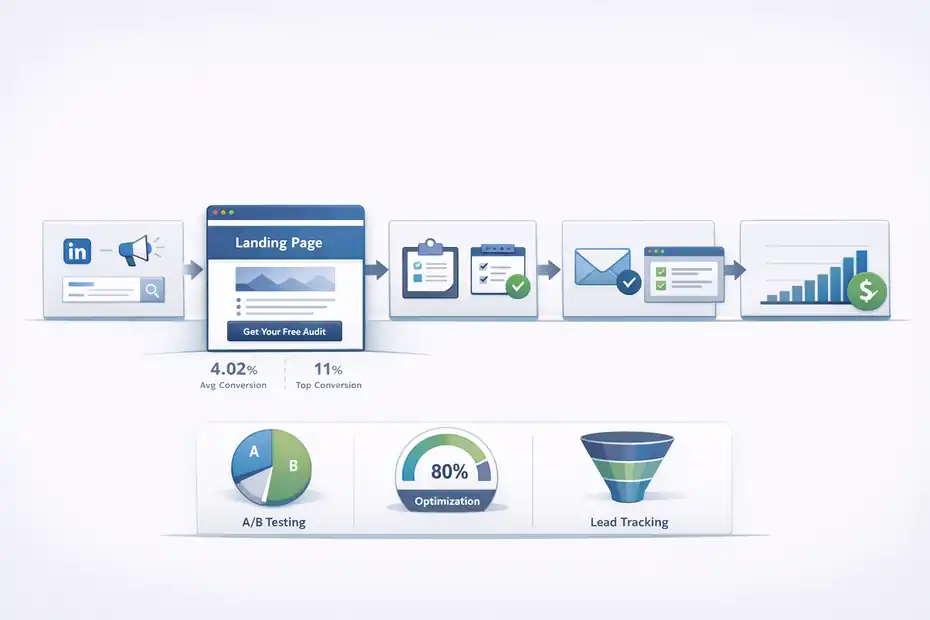
Before you judge the price, you need to see where Leadpages sits in the sales flow. On its own, it is not magic. Used in the right system, it can remove friction and increase conversion opportunities.
The Simple Funnel Most Freelancers Need
Real-world setup: Most freelancers do not need a complex automation machine. They need a clean path from attention to inquiry.
A basic workflow often looks like this:
- Someone sees your LinkedIn post, ad, SEO article, or referral link.
- They land on a page built for one offer.
- They either submit a form, book a call, or grab a free resource.
- They move into your follow-up process.
- You qualify, pitch, and close.
Leadpages is strongest in step two. It helps you build the “decision page” instead of sending traffic to a generic homepage.
Imagine you are a freelance email marketer. Instead of sending traffic to your site’s homepage, you send people to a page for “Email Audit For Shopify Stores.” That page includes a pain-driven headline, a short proof section, one form, one CTA, and maybe a few client outcomes. That is a much cleaner conversion path than “Welcome to my website.”
That logic matters because landing page performance varies widely, but recent benchmark reporting still places average landing page conversion rates around 4.02%, while top performers exceed 11%. The same report notes only 17% of marketers actively use A/B testing, which means many freelancers still leave easy improvements on the table.
Where Leadpages Helps More Than A Normal Website Builder
Difference in practice: A website builder helps you create a website. Leadpages helps you build a conversion page quickly, test versions, and launch campaigns with less friction.
That sounds like a subtle difference, but in practice it changes your workflow. If you are using a general website platform, you might need to think about global styles, navigation, page structure, plugin conflicts, mobile layout issues, and where forms sync.
With Leadpages, the workflow is narrower and more focused: choose a template, edit sections, connect your domain, set the form action, publish, test.
Leadpages also emphasizes real-time conversion guidance, template-based optimization, and built-in experimentation. That is useful for freelancers who want something “good enough to convert” without becoming landing page specialists themselves.
I believe that is the main reason freelancers stick with it: it reduces the mental overhead of launching pages.
Current Leadpages Pricing And Whether The Cost Makes Sense
This is the section most freelancers actually care about. If the monthly cost feels heavy compared with your current revenue, the software will feel annoying no matter how good it is.
Leadpages Pricing In 2026 At A Glance
Leadpages currently lists two visible self-serve plans on its pricing page, with a 14-day free trial. Standard starts at $37 per month when billed monthly, or $49 per month billed annually. Pro starts at $74 per month when billed monthly, or $99 per month billed annually.
Standard includes 5 landing pages, unlimited traffic and leads, 1 custom domain, standard integrations, unlimited A/B testing, sales and payments, blog monetization, client sub-accounts, and advanced integrations. Pro adds unlimited landing pages and 3 custom domains.
| Plan | Monthly Billing | Annual Billing | Best Fit |
|---|---|---|---|
| Standard | $37/month | $49/month billed annually | Solo freelancer with one core offer |
| Pro | $74/month | $99/month billed annually | Freelancer with multiple offers, brands, or client campaigns |
Source note: Pricing and plan limits pulled from Leadpages’ official pricing pages.
One thing I would look at carefully is not just the sticker price, but the opportunity cost. If one extra discovery call per month turns into one $800, $1,500, or $3,000 client, the subscription becomes trivial. If you do not have a clear acquisition offer yet, then even $37 can feel expensive because the page has nothing strong to sell.
The Real ROI Question Freelancers Should Ask
Better question: Do not ask, “Is $37 or $74 expensive?” Ask, “Can this tool help me close one more qualified client often enough to pay for itself?”
Let me break that down.
If your average project value is $1,000 and your close rate is 20%, then one extra qualified lead every few weeks could justify the cost. If your average retainer is $1,500 to $3,000, the math gets easier.
On the other hand, if you are still unclear on your niche, your offer, and your messaging, Leadpages will not fix that. It can package a weak offer neatly, but it cannot make a weak offer convert.
This is why I do not think Leadpages is “worth it” for every freelancer equally. It is best when you already have:
- a defined service,
- a clear target audience,
- a specific conversion goal,
- and enough traffic or outreach volume to feed the page.
Without those, the software becomes a shiny expense instead of a revenue tool.
The Biggest Reasons Leadpages Can Be A Smart Investment
Leadpages is not cheap enough to be an impulse buy for every solo business owner. So the reasons to pay for it need to be concrete.
It Saves Time For Non-Technical Freelancers
Why this matters: Time spent fighting your site builder is time you are not selling, delivering, or following up with leads.
This is one of Leadpages’ strongest arguments. Official messaging leans heavily on “no code,” quick publishing, and drag-and-drop editing, and third-party review summaries on G2 and Capterra repeatedly highlight ease of use for non-technical users.
That matters a lot if you are a freelancer who hates web design but still needs a page that looks credible. You do not need a masterpiece. You need a page that loads fast, looks trustworthy, works on mobile, and captures leads cleanly.
I have seen this especially with copywriters, consultants, ad managers, and coaches who want to launch pages around one offer fast. A homepage redesign can turn into a two-week detour. A targeted landing page can be live in an afternoon.
If you are the kind of freelancer who says, “I just need the page done so I can start sending traffic,” Leadpages fits that mindset very well.
It Is Better For Focused Offers Than General Websites
Conversion advantage: A portfolio website tells your story. A landing page asks for a decision.
That is a huge difference. If your goal is to showcase all your work, a full site may be better. If your goal is to get one kind of client to take one action, Leadpages often wins because it removes distractions.
Leadpages also emphasizes A/B testing and conversion guidance as part of the workflow. That means you can test different headlines, offers, forms, or CTA wording without rebuilding everything from scratch. With benchmark data showing many marketers still skip testing, even basic experiments can create a measurable edge.
A simple example: One version of your page says “Book A Free Consultation.” Another says “Get A 15-Minute Funnel Review.” Those two offers may attract very different lead quality. Testing lets you learn, not guess.
For freelancers, that is where the value compounds. Not just publishing faster, but learning faster.
Where Leadpages Can Feel Like A Waste Of Money
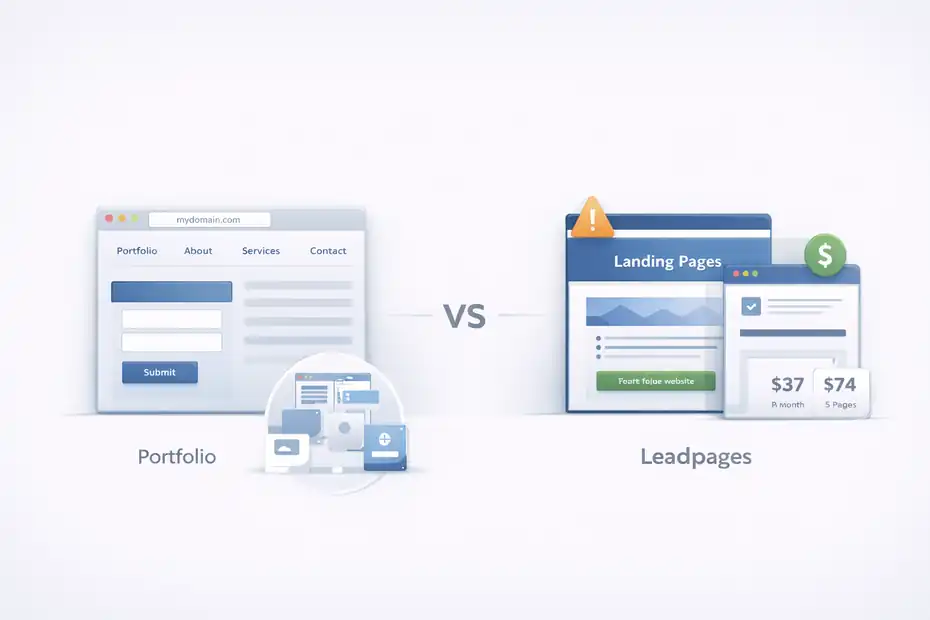
This is the part many reviews gloss over. Leadpages can be useful and still be the wrong tool for your business stage.
It Is Overkill If You Only Need A Basic Online Presence
Reality check: If all you need is a portfolio, an about page, a services page, and a contact form, Leadpages is probably more platform than you need.
That is not a knock on the product. It is just a mismatch.
A freelancer with one brochure-style site and no active campaigns may not use the A/B testing, multiple templates, dedicated offer pages, or conversion features enough to justify a recurring monthly tool. In that case, a simpler site builder or lower-cost one-page option can be more sensible.
This is especially true if your business is still referral-only and already full. You do not need lead generation software when you are not trying to generate more leads.
I suggest being honest here: are you buying a system you will use weekly, or are you buying motivation in software form?
Customization And Cost Can Both Become Friction
Tradeoff: Leadpages prioritizes speed and conversion over deep design freedom.
That is a strength for many freelancers, but it can feel limiting if you are very design-sensitive or need unusual layouts. G2’s review summary specifically notes that some users want more template variety and flexibility in customization.
The pricing can also pinch at lower revenue stages. A $37 monthly plan is manageable for an established freelancer. It feels very different if you are still trying to land your first few consistent clients.
And while Leadpages promotes 5 landing pages on Standard, some freelancers will outgrow that limit once they start building multiple lead magnets, service pages, or niche campaign pages. Pro solves that, but the jump to $74 monthly is a meaningful increase.
So yes, Leadpages can absolutely become a waste if you need either ultra-custom design or ultra-low software overhead.
The Freelancers Who Usually Get The Most Value From Leadpages
Not every freelancer should buy it. But some types of freelancers are unusually well matched to it.
Best Fit: Service Freelancers Selling One Clear Offer
Strongest match: Freelancers do best with Leadpages when they sell a defined outcome to a defined audience.
Think about these examples:
- a Facebook ads freelancer offering a free ad account audit,
- an SEO consultant offering a homepage teardown,
- an email marketer offering a welcome flow review,
- a brand designer offering a mini branding intensive,
- a career coach offering a paid strategy session.
In each case, the page can be tightly aligned with one pain point and one next step. That is exactly the environment where focused landing pages tend to outperform general site navigation.
Leadpages even groups template use cases around lead generation, consultations, demos, and offers, which lines up closely with how many freelancers package services.
If your business already runs on packaged services or lead magnets, Leadpages makes a lot of sense because it supports the way you already sell.
Best Fit: Freelancers Running Campaigns, Ads, Or Multiple Offers
Second strong match: Leadpages becomes more valuable as soon as your business moves from “website only” to “campaign mode.”
Campaign mode means you are doing things like:
- testing a new niche,
- running paid traffic,
- promoting a webinar,
- building your email list,
- launching a mini product,
- or creating dedicated pages for several services.
This is also where plan structure matters. Standard is enough if you have one main offer and a small set of pages. Pro becomes more logical if you need unlimited pages and multiple custom domains, especially if you manage separate offers or light client work.
I think this is the dividing line. If your business is static, Leadpages may be too much. If your business is actively testing, promoting, and iterating, Leadpages gets more compelling.
How To Use Leadpages The Right Way As A Freelancer
A tool like this pays off only when you use it with a clear strategy. Here is the setup I would recommend for most freelancers.
Build One “Money Page” Before Anything Else
Start simple: Do not begin by creating five pages. Build one page tied to one offer that could directly create revenue.
A smart first page usually includes:
- a headline tied to one client pain,
- a short promise or outcome,
- social proof,
- a simple form or booking CTA,
- and a low-friction next step.
Example: “Get A 15-Minute Landing Page Review For Your SaaS Demo Funnel.” That is more concrete than “Work With Me.”
Leadpages’ drag-and-drop builder, templates, and conversion-focused structure make this kind of page relatively quick to launch.
My advice is to skip fancy design decisions at first. The goal is not to create your forever page. The goal is to get a page live, send traffic, and learn from behavior.
Track Performance Like A Business Owner, Not A Designer
Metrics first: Once the page is live, pay attention to numbers that affect revenue, not vanity.
The most useful freelancer metrics are usually:
- visitor-to-lead conversion rate,
- lead-to-call booking rate,
- lead quality,
- cost per lead if you run ads,
- and close rate after inquiry.
Leadpages supports A/B testing and integrations, which means you can compare versions and improve based on real behavior rather than personal taste.
A realistic benchmark: if your landing page is converting around the broad average range of roughly 2.35% to 4.14%, there is room to improve. If you push higher through better messaging and tighter intent match, the economics of the platform usually get much better.
This is where freelancers often win. Not by making prettier pages, but by making clearer offers.
Common Mistakes That Make Leadpages Look Worse Than It Is
Sometimes the software is not the problem. The setup is.
Mistake 1: Sending Weak Traffic To A Good Page
Classic issue: A decent landing page cannot rescue irrelevant traffic.
If you send people from a vague Instagram bio, random cold outreach, or a blog post that attracts the wrong audience, the page may convert poorly no matter how polished it is. Then the freelancer concludes the platform “doesn’t work.”
Usually the real issue is message match. Your traffic source, headline, and offer need to feel connected.
For example, if your LinkedIn post is about email list growth for coaches, your landing page should not suddenly pitch general marketing services. It should continue the exact same problem and promise.
Leadpages can help with page creation and testing, but it cannot fix audience mismatch. That part is strategy.
Mistake 2: Building Pages Before Clarifying The Offer
Bigger problem: Many freelancers use software to avoid doing the harder thinking.
The harder thinking is this:
- Who is this for?
- What exact problem does it solve?
- Why should someone act now?
- What happens after they convert?
If those answers are fuzzy, the page will probably be fuzzy too.
This is why I usually suggest starting with one highly specific offer before expanding into multiple pages. Leadpages’ Standard plan already allows 5 landing pages, which is plenty for a freelancer who is still validating messaging.
A tight page for one niche beats five generic pages every time.
Leadpages Alternatives For Freelancers
This is where tool comparison makes sense. Not because one platform is universally best, but because “worth it” depends on what you are comparing it against.
Quick Comparison Table
| Platform | Entry Price | Main Strength | Main Weakness | Best For |
|---|---|---|---|---|
| Leadpages | $37/month monthly | Fast conversion-focused pages, A/B testing, freelancer-friendly workflow | Can feel expensive if you only need a basic site | Freelancers with one clear offer or active campaigns |
| Carrd Pro Lite / Standard / Plus | $9/year, $19/year, $49/year | Extremely low cost and simple one-page sites | Less conversion depth and fewer built-in optimization features | New freelancers, portfolios, lean landing pages |
| Unbounce | $149/month annually shown on pricing page | More advanced landing page optimization and scale | Much higher cost | Agencies and serious paid traffic teams |
| Webflow Starter / Site Plans | Free to start; paid site plans required to publish fully | Strong design control and broader website building | Higher setup complexity for many solo users | Freelancers who care more about brand site flexibility than campaign speed |
Source note: Pricing references are based on official Leadpages, Carrd, Unbounce, and Webflow pricing pages.
Which Alternative Makes More Sense In Different Scenarios
Use Carrd when: You are early-stage, cash-conscious, and only need a lightweight page with a custom domain. Carrd’s Pro plans start at $9, $19, and $49 per year, which is dramatically cheaper than Leadpages.
Use Unbounce when: You are more advanced, running real ad budgets, and need a heavier optimization stack. But the price jump is substantial, with Unbounce’s pricing page showing $149 per month for an entry paid plan shown annually.
Use Webflow when: Your main need is a highly branded website experience, not a fast campaign builder. Webflow is powerful, but for many freelancers it has a steeper setup and maintenance curve than Leadpages. Webflow’s pricing page shows free starter access and paid site plans for publishing.
My honest take: Leadpages sits in the middle. It is not the cheapest. It is not the most advanced. It is often the most balanced option for freelancers who want focused conversion pages without turning web design into a side career.
Final Verdict: Is Leadpages Worth It For Freelancers?
For the right freelancer, yes. For the wrong freelancer, no.
Smart Investment Or Waste? Here Is The Honest Answer
It is a smart investment if: You already have a clear offer, you want dedicated landing pages, you care about lead generation, and you will actively send traffic to those pages.
In that situation, Leadpages’ pricing, templates, A/B testing, custom domain support, and fast publishing workflow can make sense quickly.
It is a waste if: You only need a portfolio, you are not doing campaigns, your offer is still vague, or your revenue is too early for another recurring tool. In that case, a lower-cost option will usually be the better decision.
If you want my plain-English answer, it is this: Leadpages is worth it for freelancers who treat their freelance business like a lead generation system, not just a digital business card.
My Recommendation Based On Business Stage
New freelancer: Skip it unless you already know your niche and offer. A cheaper page setup is usually enough.
Established solo freelancer: Leadpages is often worth testing, especially if one additional client would easily cover the monthly cost.
Freelancer with packaged services or ads: This is where Leadpages makes the most sense. You are much more likely to use its strengths consistently.
Freelancer building a premium brand site first: You may be better off with a broader site platform and adding campaign pages later.
So, is leadpages worth it for freelancers? I believe the best answer is this: it is not automatically worth it, but it becomes very worth it once your business has a focused offer, active promotion, and a reason to optimize conversions instead of just looking professional.
FAQ
Is Leadpages worth it for freelancers in 2026?
Leadpages is worth it for freelancers who actively generate leads through landing pages, offers, or campaigns. If you rely on consistent client acquisition, it can pay for itself. However, for simple portfolios or low-traffic sites, it may feel unnecessary and overpriced.
What do freelancers use Leadpages for?
Freelancers use Leadpages to create focused landing pages for lead generation, client inquiries, and service offers. It helps convert traffic into booked calls or email subscribers by removing distractions and guiding visitors toward one clear action.
Is Leadpages better than a regular website builder?
Leadpages is better for conversion-focused pages, not full websites. It’s designed to drive actions like sign-ups or bookings, while traditional website builders are better for branding, portfolios, and multi-page navigation experiences.
How much does Leadpages cost for freelancers?
Leadpages starts at around $37 per month with limited pages and basic features. Higher plans unlock more pages and domains. For freelancers, the cost makes sense if even one additional client per month covers the subscription.
When should freelancers avoid using Leadpages?
Freelancers should avoid Leadpages if they don’t have a clear offer, consistent traffic, or a need for landing pages. In early stages, a simple and cheaper website builder may be more practical and cost-effective.

I’m Juxhin, the voice behind The Justifiable.
I’ve spent 6+ years building blogs, managing affiliate campaigns, and testing the messy world of online business. Here, I cut the fluff and share the strategies that actually move the needle — so you can build income that’s sustainable, not speculative.
Related posts:
 Astra Schema Pro Warning: What You Must Know Before Buying
 ManyChat Bot Benefits No One Talks About
 LearnWorlds Shopify Setup: What Works, What Fails
 Why CallRail Cost Might Be Worth the Investment
 How to Grow an Online Business That Scales While You Sleep
 How to Grow Online Presence Fast: Proven Steps That Actually Work