
Table of Contents
Some links on The Justifiable are affiliate links, meaning we may earn a small commission at no extra cost to you. Read full disclaimer.
ClickMagick features overview matters most when you are tired of guessing which clicks turn into revenue and which ones just burn budget.
If you run ads, promote affiliate offers, or manage funnels with multiple steps, ClickMagick is built to give you cleaner attribution, better optimization signals, and faster decisions.
In this guide, I’ll walk you through the platform’s core tools, where each one helps, where it can be overkill, and how to use the feature set in a way that actually improves ROI instead of just adding another dashboard to your week.
What ClickMagick Is And Why Its Feature Set Matters
ClickMagick is a tracking and attribution platform designed to show what happens between the click and the conversion, then help you act on that data faster.
Its official product positioning centers on click tracking, conversion attribution, real-time stats, ad optimization, anti-fraud protection, split testing, smart links, integrations, and team collaboration.
The company says it has served more than 122,000 accounts since 2014, which gives some context for why it talks so heavily about battle-tested tracking workflows rather than shiny surface-level reporting.
Tracking Is The Real Product, Not Just The Dashboard
When most people hear “tracking software,” they picture a link shortener with extra charts. That is too small a definition here. In practice, the platform is built around what ClickMagick calls TrueTracking, which aims to preserve attribution across longer buying cycles, multiple touchpoints, and cross-device behavior better than ad-platform-native data alone.
The official comparison pages repeatedly frame the value around filling attribution gaps, keeping first-party data usable, and sending cleaner conversion signals back to ad platforms.
I think that positioning is important because it changes how you should evaluate the tool. You are not really buying “more reports.” You are buying a better decision-making layer.
Imagine you are running Meta ads to a quiz funnel, then closing leads by phone three days later. Native ad reporting may show part of the story, but it will usually miss meaningful chunks of the journey. That gap is where wasted spend sneaks in.
The best way to understand this ClickMagick features overview is to separate the platform into six jobs: tracking clicks, attributing conversions, protecting traffic quality, testing pages, syncing data outward, and helping you decide what to scale.
Once you look at the product that way, the feature list stops feeling random and starts feeling like one connected system.
Who Gets The Most Value From ClickMagick
From what I’ve seen, ClickMagick makes the most sense for performance marketers, affiliate marketers, agencies, info-product sellers, ecommerce brands with paid traffic, and lead-generation businesses that need more precise source-level reporting.
The company explicitly highlights ecommerce, agencies, affiliate marketing, and phone or offline sales tracking in its product and agency pages.
That matters because not every business needs this level of visibility. If you only publish occasional blog posts and do not buy traffic, a simpler analytics stack may be enough. But if you are spending real money on ads, or your funnel has more than one step, tracking quality quickly becomes an ROI issue rather than a “nice to have.”
A simple example: Let’s say Campaign A gets cheaper leads than Campaign B, but Campaign B produces more buyers after a retargeting email and a phone follow-up. Without better attribution, you kill B because it looks weak at the top of the funnel. With stronger tracking, you see the deeper revenue picture. That is the kind of mistake ClickMagick is built to prevent.
Core Tracking And Attribution Features
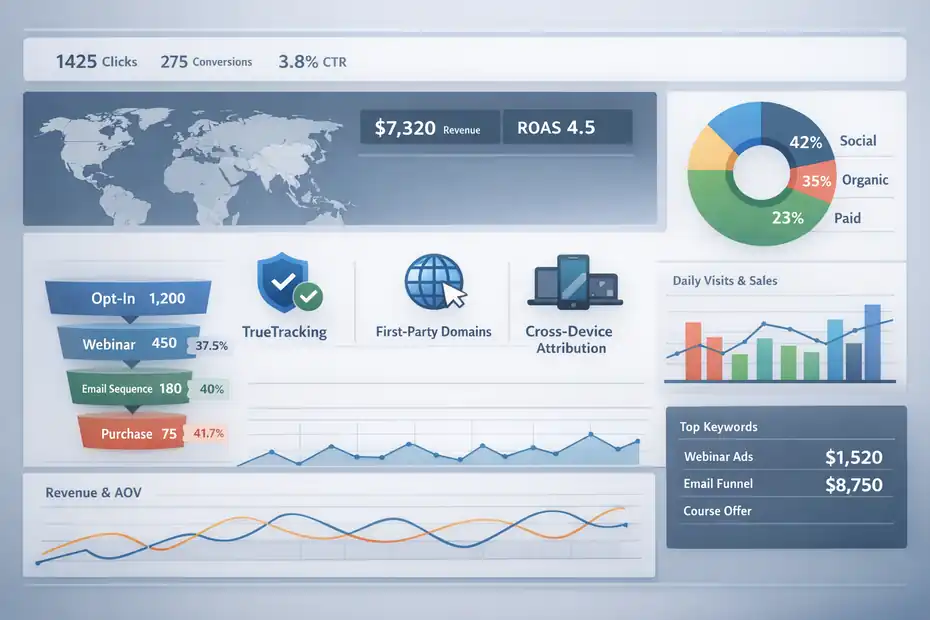
This is the heart of the platform. If the tracking layer is weak, the rest of the product becomes decoration.
TrueTracking, First-Party Tracking Domains, And Cross-Device Attribution
ClickMagick includes a first-party tracking domain setup and centers much of its product around its TrueTracking system. On the pricing page, first-party tracking domains are included even on the Starter plan, and official comparison pages emphasize long-term attribution, cross-device behavior, and persistent source-level tracking beyond typical ad-platform windows.
Here is why that matters in plain English: when a visitor clicks an ad today but buys later, often on a different visit or device, ordinary reporting gets messy fast. Attribution windows are limited. Channels over-claim credit.
Direct visits steal credit. The result is distorted performance data. ClickMagick’s pitch is that it keeps the original source connected to later outcomes more accurately, so your reports reflect actual buying paths more closely.
I suggest treating this as the foundation feature. Before split testing, before optimization, before automation, make sure your tracking domain and core event tracking are configured properly. A fancy report built on broken attribution is still a broken report.
A realistic scenario: You run YouTube ads to a webinar registration page, then sell a program seven days later from email. If the sale is only loosely tied back to the lead source, your optimization decisions will lean on incomplete data. When attribution improves, budget allocation usually improves too because you stop rewarding the wrong clicks.
Conversion Tracking Across Funnels, Offers, And Sales Events
ClickMagick is built to track not only clicks, but conversions across different funnel steps. Official pages mention deep funnel reports, conversion tracking, phone and offline sales tracking, affiliate campaign tracking, and the ability to track custom actions or conversions and send them back via Conversions API workflows.
This matters because modern funnels are rarely one page and one purchase. You may have an opt-in, a booking step, an application page, a deposit, and then a final close. Or in ecommerce, you may care about add-to-cart, initiated checkout, first purchase, rebill, and lifetime value. Strong tracking tools help you map each meaningful event, not just the final sale.
In my experience, this is where beginners often underuse the software. They track one end conversion and miss the signals in the middle. That makes optimization slower than it needs to be. A better setup tracks both micro and macro conversions. Micro conversions tell you whether traffic is engaged. Macro conversions tell you whether the campaign makes money.
If you are reviewing a ClickMagick features overview because you want “better ad results,” this is the feature cluster that actually creates those results. It lets you connect spend to outcomes instead of just traffic to pageviews.
Real-Time Stats, Deep Funnel Reports, And Revenue Visibility
ClickMagick promotes real-time stats and deep marketing insights as a major product category. It also highlights revenue-based reporting, automatic currency normalization, and visibility into metrics like average order value and lifetime value in its FAQ and comparison pages.
That sounds technical, but the practical benefit is simple: you can see what is happening while a campaign is still alive, not three days after the damage is done. If a page starts leaking conversions, or one traffic source sends junk clicks, real-time reporting gives you a chance to react before the budget disappears.
I recommend looking at reports in layers:
- Source layer: Which channel, ad set, or keyword is sending profitable traffic?
- Funnel layer: Where are people dropping off?
- Revenue layer: Which campaigns produce actual cash, not just cheap leads?
A lot of teams stop at the first layer. That is where confusion starts. Cheap clicks are not the same as profitable clicks. Cheap leads are not the same as sales-ready leads. When reporting includes deeper funnel and revenue context, your decisions become much less emotional and much more accurate.
Optimization Features That Can Lift ROI Fast
This is where ClickMagick tries to move from “measurement tool” to “profit tool.” Good tracking is useful.
Good tracking plus action-oriented optimization is where the ROI usually shows up.
Split Testing That Uses Better Data
ClickMagick includes built-in split testing, and the product page describes it as a way to test pages, headlines, funnel steps, and upsells without coding, plugins, or spreadsheets. The company’s messaging is blunt here: poor tracking creates bad split-test conclusions, so more accurate attribution should produce more reliable winners.
I believe this is one of the strongest practical features in the platform because it turns theory into action. You are not just observing conversion rates. You are routing traffic between competing destinations and learning from real outcomes.
A useful way to apply it:
- Step 1: Test one meaningful variable at a time, such as headline, offer angle, or landing page layout.
- Step 2: Measure beyond opt-ins when possible, especially if you can track sales.
- Step 3: Wait for enough data to avoid fake winners.
- Step 4: Move budget only after downstream quality looks solid.
Imagine two pages. Page A gets 28% more opt-ins. Page B gets fewer opt-ins but 35% more booked calls and better close rates. If you only test the front-end metric, you choose wrong. ClickMagick’s value here is not merely sending traffic 50/50. It is helping you compare pages using richer conversion context. That is how split testing actually boosts ROI fast instead of just making you feel busy.
ClickMagick Insights And Morning Magick
One of the newer pieces of the platform is ClickMagick Insights, which the pricing page says is included with all plans. It is described as an always-on analysis layer that reviews ad performance and sends a daily breakdown of what changed, what is working, and what needs attention. The site also calls out Morning Magick as a daily insights email built into every plan.
This feature matters because one of the biggest hidden costs in paid traffic is not just ad spend. It is analysis time. Many marketers spend too long checking dashboards manually, second-guessing patterns, and missing early shifts that matter. A daily insights layer tries to compress that work.
Now, I would not treat any automated recommendation system as a substitute for judgment. But I do think it can be a strong prioritization tool. If you manage multiple campaigns, your first problem each morning is usually deciding where to look. A useful insights summary narrows the field.
A practical example: if the system flags a campaign where cost per lead is stable but downstream sales value dropped, that is much more actionable than simply saying “traffic is down.” It tells you where the leak may be. Used well, this kind of feature saves attention, and attention is one of the most expensive resources in performance marketing.
Ad Cost Sync And Sending Better Signals Back To Platforms
ClickMagick also highlights automatic ad cost updates and Audience Optimization or CAPI capabilities on its pricing page, plus support for webhooks, Zapier, and API-based data sharing. Official FAQ and comparison pages repeatedly emphasize that cleaner first-party conversion data can be sent back to ad platforms to improve optimization.
That is a big deal because modern ad platforms optimize based on the data you feed them. If your event stream is incomplete or inaccurate, the algorithm chases the wrong users. Better signal quality can improve bidding and targeting indirectly, even when the creative stays the same.
I have seen many marketers obsess over ad copy while ignoring signal quality. That is backward. Creative matters, of course, but when the platform receives cleaner conversion feedback, it often learns faster and spends smarter.
Think of it this way: ClickMagick is not only helping you read performance. It is also helping your ad platform read performance. That feedback loop is why accurate tracking software can have a bigger impact on ROI than a lot of people expect.
Traffic Quality, Fraud Protection, And Link Management Tools
Not every click deserves your budget or your attention. Some features exist mainly to protect what you already built.
Bot Filtering And Click Fraud Protection
ClickMagick includes basic bot filtering on Starter and a more advanced Bot & Click Fraud Protection layer on higher plans. Official product pages describe the anti-fraud category as a way to block fake and unwanted clicks and protect ad spend.
This matters more than many people realize. If a meaningful share of your traffic is low quality, your conversion rates look worse, your tests become less reliable, and your ad decisions get polluted. Fraud protection is not only about saving money on obvious bad traffic. It is about preserving data quality.
A simple scenario: You are buying solo ads, native traffic, or broad display placements. Volume looks healthy, but lead quality is awful. Without filtering and source-level visibility, you may blame the page or the offer when the real problem is the traffic itself. That can send you into weeks of unnecessary funnel edits.
I would not promise that anti-fraud features magically solve all traffic quality issues. No tool can do that. But filtering obvious junk and surfacing suspicious activity earlier can save a lot of waste. In many accounts, preventing one bad traffic source from continuing unchecked pays for a large part of the software.
Smart Links, Short Links, And Affiliate Tracking
ClickMagick’s product page highlights best-in-class Smart Links, short-link functionality, and affiliate marketing tools. It says the platform integrates with 100+ affiliate networks through server-to-server postback tracking, which is a meaningful feature if you promote offers you do not control directly.
For affiliate marketers, this feature set is not cosmetic. It solves a very specific problem: you still need accurate attribution and optimization even when the final conversion happens on someone else’s property. Smart Links and affiliate tracking tools help bridge that gap.
For non-affiliates, smart links are still useful. They can simplify ugly destination URLs, make campaign management cleaner, and let you centralize routing logic. That sounds small, but it becomes powerful when campaigns scale. Clean links are easier to manage, share, test, and swap.
Here is where I would be practical: If you only need a branded shortener, ClickMagick is probably too much. But if link routing, source tracking, affiliate postbacks, and optimization live in the same workflow for you, then this is a meaningful advantage. The less you need to duct-tape separate tools together, the fewer reporting errors you create.
Mobile App, Public Stats, And Team Sharing
The product page also calls out a mobile app for iOS and Android, public shareable stats, invited team members, and permission controls. Standard allows additional team members, while Pro expands team capacity further. Agencies also get Business Manager functionality for organizing client accounts from one dashboard.
These features are not as flashy as attribution, but they matter operationally. A tracking tool becomes much more useful when stakeholders can access the right information without constantly asking for exported screenshots or custom reports.
For example, public stats links can help when you need to show campaign performance to a partner or client without giving them full account access. Role-based permissions matter when a founder, media buyer, assistant, and client all need different levels of visibility. And mobile access matters more than it sounds when you launch campaigns and want to spot early movement quickly.
I would not buy the product for these features alone. But once you are using ClickMagick seriously, they reduce friction enough to matter. Good tools do not only improve data. They improve the speed of communication around data.
Setup, Integrations, And Platform Fit
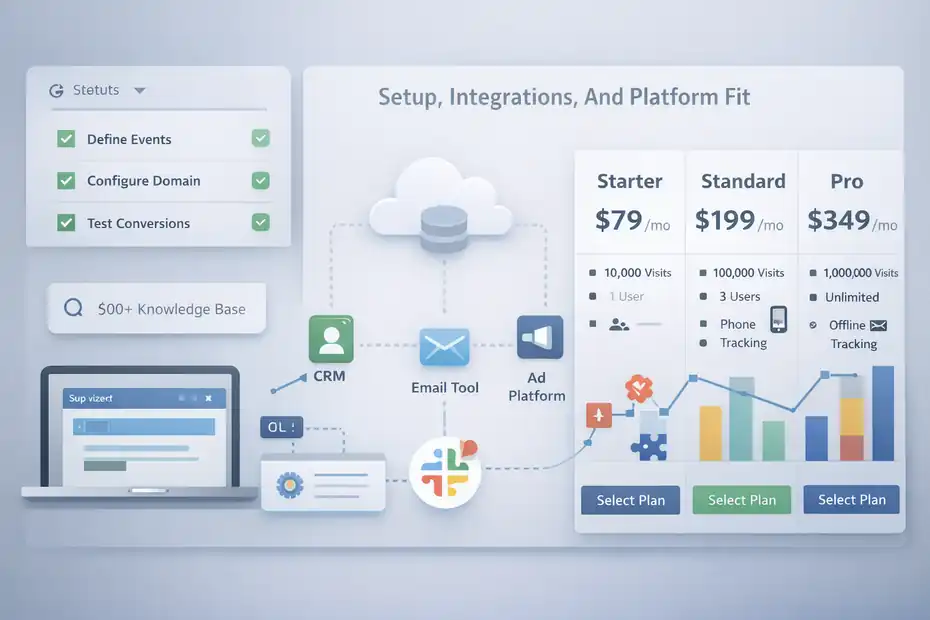
A tracking tool only helps if setup is realistic and the system fits how you actually market.
Setup Experience, Learning Curve, And Support
ClickMagick emphasizes fast setup, a step-by-step setup wizard, onboarding help, and training. The pricing page includes a setup wizard and Fundamentals of Tracking on Starter, while Standard adds a one-on-one onboarding call.
The product page also says the knowledge base contains 500+ searchable articles and tutorials, and that Standard and Pro users receive extensive live support coverage.
That tells me the company knows the main objection: tracking can feel intimidating. And honestly, that concern is fair. Even the best tracking platform still requires careful implementation. You need to define your funnel events, configure domains, verify traffic sources, and test conversions. There is no escaping that.
The good news is that ClickMagick appears to invest heavily in helping users cross that setup gap. In my experience, this matters almost as much as the product itself. Tracking tools do not fail only because the software is weak. They fail because users never finish implementation or do it halfway.
So the real question is not “Is ClickMagick easy?” It is “Is it easier than building a patchwork of separate trackers, spreadsheets, and ad-platform reports?” For most serious advertisers, I would say yes.
Integrations, Webhooks, Zapier, And API Flexibility
ClickMagick offers built-in webhooks, Zapier integration, and a full REST API, according to its product page. It also describes these features as a way to push conversion data to CRMs, email tools, ad platforms, and custom systems in real time.
This is one of those areas where the feature sounds boring until you need it. Then it becomes essential.
Let me break it down simply. Tracking creates data. Integrations decide whether that data becomes useful elsewhere. If your conversions stay trapped in one dashboard, the insight is limited. If the same event can update a CRM, trigger a workflow, notify a team, or improve ad optimization, the value multiplies.
A realistic use case: A lead books a call. That event gets tracked in ClickMagick, pushed to your CRM, sent back to the ad platform as a qualified lead, and triggers a Slack alert for sales. That is not just neat automation. That is tighter execution.
I recommend prioritizing integrations based on revenue impact first. Start with ad platforms and your CRM. Then add support systems like alerts, spreadsheets, or lower-priority automations later. The more complex the stack, the more discipline you need. But the flexibility is clearly there.
Pricing Tiers And Which Plan Fits Which Use Case
ClickMagick’s official pricing page shows three main plans: Starter at $79 per month billed monthly, Standard at $199, and Pro at $349. Starter includes 10,000 tracked visitors, one user, one site or store, one ad account per platform, AI insights for 10 active ads, six months of retention, and basic bot filtering.
Standard increases capacity to 100,000 tracked visitors, adds team members, stronger support, advanced attribution models, phone or offline sales tracking, bot and click fraud protection, and unlimited affiliate campaigns.
Pro expands to 1,000,000 tracked visitors, unlimited team members, and unlimited ad accounts.
| Plan | Best For | Notable Inclusions |
|---|---|---|
| Starter | Solo marketers or small campaigns | 10,000 tracked visitors, 1 user, 1 site/store, basic bot filtering |
| Standard | Growing brands and serious media buyers | 100,000 tracked visitors, extra team seats, advanced attribution, offline sales tracking |
| Pro | Agencies and high-volume teams | 1,000,000 tracked visitors, unlimited users, unlimited ad accounts |
My advice is simple: Choose based on tracking complexity, not ego. If you run one small funnel, Starter may be enough. If you need offline sales tracking, multiple collaborators, or stronger attribution control, Standard is usually the more realistic fit. Agencies and high-volume accounts will naturally lean Pro.
Common Mistakes, Best Use Cases, And Final Verdict
The feature set is strong, but it only produces results when used with the right expectations and setup discipline.
Mistakes People Make When Using ClickMagick
The biggest mistake is expecting the software to fix a broken marketing strategy. ClickMagick can improve attribution, testing, and optimization. It cannot rescue a weak offer, irrelevant traffic, or terrible creative. If your economics are upside down, better reporting will reveal the problem faster, but it will not erase it.
The second mistake is tracking too little. Many users only track the final sale and miss the middle of the funnel. That creates blind spots. You need micro conversions and macro conversions if you want to diagnose where performance improves or collapses.
The third mistake is overcomplicating setup from day one. I suggest starting with one funnel, one traffic source, and a handful of core events. Get that right. Then scale the implementation.
And the fourth mistake is reading reports without context. A campaign with a worse front-end conversion rate can still be the better campaign if lead quality and downstream revenue are stronger. That is exactly why a platform like this exists in the first place.
Where ClickMagick Shines Most
If I had to summarize the best use cases in one sentence, I’d say this: ClickMagick shines when revenue depends on understanding the full customer path, not just the first click or the last click.
That includes paid lead generation, affiliate marketing, multi-step funnels, webinar funnels, higher-ticket offers, ecommerce brands with multiple traffic sources, and agencies that need cleaner reporting for client accounts.
The official product, FAQ, and agency pages all point toward those use cases through features like deep funnel reporting, affiliate postbacks, offline sales tracking, business manager controls, and public stat sharing.
Where it shines less is in very simple businesses with little or no paid traffic. If your setup is basic, the extra power may not justify the extra implementation effort. That is not a weakness. It is just fit.
I also think the strongest practical value is not any single feature in isolation. It is the combination: accurate tracking, deeper attribution, split testing, fraud filtering, outward data sync, and a daily insights layer. Put together, those create a much tighter optimization loop than relying on ad-platform reporting alone.
Final Take On This ClickMagick Features Overview
My honest take is that ClickMagick is best understood as a profit-improvement system disguised as a tracking tool. The official messaging leans heavily into attribution accuracy, first-party data, anti-fraud controls, split testing, and daily performance insights, and that combination makes sense.
Those are exactly the levers that help marketers stop misreading performance and start reallocating budget with more confidence.
If your main goal is cleaner data and faster ROI decisions, the standout features are TrueTracking, first-party tracking domains, deep funnel conversion tracking, split testing, bot and click fraud protection, data syncing through webhooks or API, and ClickMagick Insights.
Those tools directly affect how you judge campaigns, how you feed platforms better signals, and how quickly you catch underperformance.
So, as a final verdict: this ClickMagick features overview points to a platform that is most valuable when you are serious about paid traffic, not just curious about analytics. If you are spending meaningful budget and need to know what truly drives revenue, it has the right feature mix to justify attention. But the ROI comes from disciplined implementation and smart decision-making, not from the software simply existing in your stack.
FAQ
What is ClickMagick used for?
ClickMagick is used to track clicks, monitor conversions, and analyze traffic quality across marketing campaigns. It helps you understand which traffic sources generate real revenue, not just clicks, so you can optimize ads, funnels, and offers more effectively and reduce wasted ad spend.
How does ClickMagick improve ROI?
ClickMagick improves ROI by providing accurate attribution and real-time performance data. It shows which campaigns, ads, and funnel steps lead to conversions, allowing you to shift budget toward profitable sources and eliminate underperforming traffic quickly.
Is ClickMagick suitable for beginners?
ClickMagick can be used by beginners, but it requires some setup and understanding of tracking concepts. With its guided onboarding and tutorials, new users can learn how to track clicks and conversions step-by-step, though it becomes more powerful as your campaigns grow.
What are the main features of ClickMagick?
The main features include click tracking, conversion tracking, split testing, bot filtering, and real-time analytics. It also offers first-party tracking domains, affiliate tracking, and integrations that help you send accurate conversion data back to ad platforms for better optimization.
Does ClickMagick track offline or phone conversions?
Yes, ClickMagick can track offline and phone conversions when properly configured. This allows you to connect leads generated online with actual sales outcomes, giving you a clearer picture of campaign performance beyond just online actions.

I’m Juxhin, the voice behind The Justifiable.
I’ve spent 6+ years building blogs, managing affiliate campaigns, and testing the messy world of online business. Here, I cut the fluff and share the strategies that actually move the needle — so you can build income that’s sustainable, not speculative.
Related posts:
 ClickMagick Pros And Cons For Marketers: Honest Deep Dive
 ClickMagick Pricing Explained: Which Plan Saves Money?
 How To Create Passive Income Online: 10 Best Ways
 ClickMagick Pricing: How to Get the Most for Your Money
 ClickMagick Affiliate Tracking Software Review For 2026
 ClickMagick Link Tracking Review: Boost Conversions Fast