
Table of Contents
Some links on The Justifiable are affiliate links, meaning we may earn a small commission at no extra cost to you. Read full disclaimer.
Apollo IO pricing explained in plain English comes down to one thing: The monthly seat price is only part of what you actually pay.
Apollo can be a powerful sales intelligence and outreach platform, but its real cost depends on credits, users, billing terms, add-ons, data usage, and how your team works day to day.
I’ll walk you through every plan, the limits that matter, and the small cost traps many teams miss. By the end, you should know which Apollo plan fits your workflow, when upgrading makes sense, and how to avoid paying for capacity you do not use.
Apollo IO Pricing Explained: What You Are Really Paying For
Apollo pricing is not just “Free vs Basic vs Professional vs Organization.” It is a mix of user seats, credits, prospecting limits, outreach features, enrichment, integrations, and billing choices.
Understanding Apollo As A Sales Platform, Not Just A Contact Database
Apollo is often described as a B2B database, but that undersells what you are buying. At its core, Apollo combines prospect search, contact data, sales engagement, enrichment, and some calling features in one workspace. That means your subscription is paying for more than access to email addresses.
The practical value comes from how many qualified contacts you can find, enrich, export, and contact without stitching together several tools. Apollo says email campaigns are included on every account, but non-paying plans are more limited in which email accounts can be connected. Paid plans unlock broader email-provider connections.
The important pricing question is not, “How much does Apollo cost?” It is, “How much does Apollo cost for the way I prospect?” A founder sending 200 targeted emails a month has a very different cost profile from a five-person SDR team exporting thousands of contacts, enriching CRM records, and dialing prospects daily.
In my experience, Apollo feels affordable when you use it as a focused outbound system. It starts to feel expensive when your team treats credits like an unlimited resource, exports broad lists, and then ignores half the contacts. That is where “cheap per user” becomes “expensive per useful conversation.”
The Main Apollo Cost Components
Apollo pricing usually has four cost layers. First, there is the plan subscription, which is the user-based monthly or annual fee. Second, there are credits, which control access to certain data and activities.
Third, there may be add-ons or extra credits when your plan does not cover your usage. Fourth, there is the operational cost of time, deliverability setup, CRM cleanup, and workflow management.
Apollo’s own documentation explains credits as the “currency” teams use for activities inside Apollo, with available credit amounts depending on the plan.
Credits can be used for actions such as accessing emails or phone numbers, enrichment, AI research, API usage, warmup beyond included allowances, mailbox generation, and dialer usage.
Here is the simple way to think about it:
| Cost Area | What It Means | Why It Matters |
|---|---|---|
| Plan fee | Monthly or annual seat cost | Sets your baseline budget |
| Email access | Revealing verified emails | Important for outbound volume |
| Mobile credits | Revealing phone numbers | Often the first limit phone-heavy teams hit |
| Export credits | Sending data outside Apollo | Matters for CRM, CSV, and sales engagement workflows |
| Enrichment | Updating CRM or contact data | Can become costly at scale |
| Add-ons | Extra functionality or extra credits | Raises real monthly cost |
| Billing term | Monthly vs annual | Annual is cheaper per month but less flexible |
Why “Unlimited” Does Not Always Mean Unlimited
One of the biggest misunderstandings in Apollo pricing is the word “unlimited.” Apollo’s pricing page says Unlimited plans are governed by a Fair Use Policy, with credit limits that differ for non-paying and paying accounts.
For non-paying accounts on an Unlimited Plan, Apollo lists a 10,000-credit monthly account limit; for paying accounts, the limit is the lesser of subscription dollars paid divided by $0.025 or 1 million credits per account per year.
That matters because “unlimited email credits” does not mean you can reveal infinite contacts without controls. It means Apollo allows broad usage within its fair-use boundaries.
Let me make this practical. If your team is doing careful account-based prospecting, fair-use limits may never feel restrictive. But if someone uploads huge lists, bulk-enriches aggressively, or exports contacts without qualification, credits and system limits can become very real.
I recommend treating Apollo as a precision tool, not a data vending machine. Better targeting usually reduces cost, improves reply rates, and keeps your database cleaner.
Apollo Pricing Plans: Free, Basic, Professional, Organization, And Custom
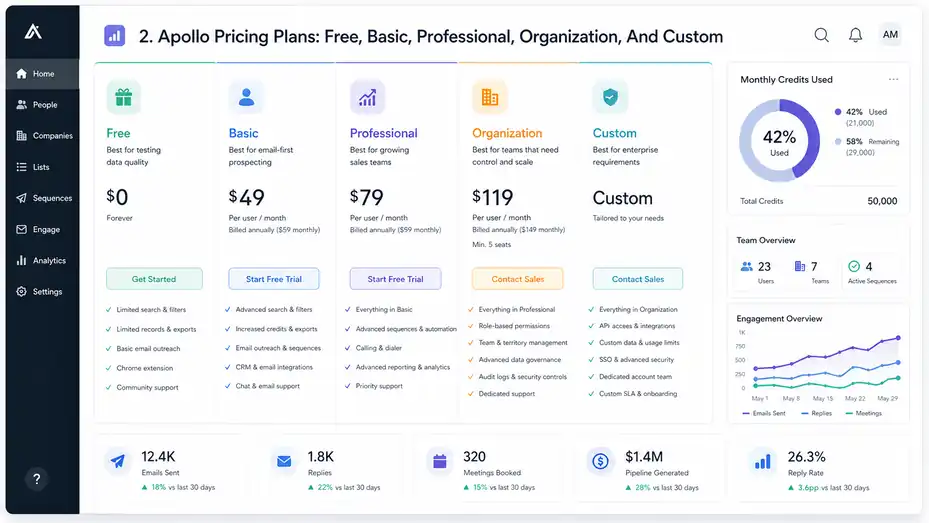
Apollo’s public pricing structure commonly centers around Free, Basic, Professional, Organization, and Custom-style options.
Exact inclusions can change, so always verify inside Apollo before buying, especially if your account is on a legacy credit system.
Apollo Free Plan: Best For Testing Data Quality
The Free plan is useful when you want to test Apollo’s database, search experience, Chrome extension workflow, and basic outreach flow before paying. It is not the plan I would build a serious outbound motion around.
Apollo’s trial and plan documentation confirms that Apollo offers Free, Basic, Professional, and Custom/Organization-type plans, and users can test Basic or Professional through a trial.
The Free plan is best for a solo founder, freelancer, or early sales hire asking, “Does Apollo have the right contacts in my market?” You can search your ideal customer profile, check data coverage, and manually inspect whether job titles, company filters, and email availability look promising.
The limitation is scale. Free accounts may have tighter record selection, credit, export, and sequence limits. Apollo also notes that some features on its pricing page are tied to its newer credit system, while some existing customers may still be on legacy systems.
Use Free for validation, not execution. If you are already planning weekly campaigns, CRM syncs, or serious list building, Free will probably slow you down quickly.
Apollo Basic Plan: Best For Email-First Prospecting
The Basic plan is usually the first serious Apollo tier for small teams. Third-party pricing breakdowns in 2026 commonly list Basic around $49 per user per month when billed annually and around $59 per user per month when billed monthly, though you should confirm live pricing in your own Apollo account before purchase.
Basic makes sense when your main goal is email-first prospecting. You want better filters, more usable prospecting capacity, and core integrations without jumping into more advanced calling, reporting, or governance needs.
Imagine you run a small B2B service agency and want to contact operations leaders at SaaS companies with 50–300 employees. Basic can be enough if your workflow is tight: build segmented lists, reveal only relevant emails, send small campaigns, and track replies.
Where Basic can become limiting is when your team needs heavy phone prospecting, advanced automation, sophisticated reporting, or more robust team controls. It is not necessarily “worse”; it is just designed for a leaner motion.
My advice: Choose Basic when your outbound strategy is still being proven. Once you have a repeatable message, reply benchmarks, and a clear pipeline model, then consider whether Professional adds enough workflow value.
Apollo Professional Plan: Best For Growing Sales Teams
Professional is often positioned as the plan for teams that have moved beyond simple list building and need stronger engagement, automation, and sales workflow features. Third-party 2026 pricing guides commonly list it around $79 per user per month annually or around $99 per user per month monthly.
Professional is usually where Apollo starts to feel like a fuller sales execution platform, not just a prospecting database. This is the tier many growing SDR or founder-led sales teams consider when they need better workflow depth.
Think of a three-person sales team where each rep manages campaigns, follows up, tracks meetings, and coordinates with a CRM. In that case, saving even a few hours per rep per week can justify the higher seat cost.
The trap is upgrading too early. Professional does not magically fix weak targeting, generic copy, poor offer-market fit, or bad deliverability. It gives you more capability, but your process still has to be disciplined.
I suggest upgrading to Professional when you already know your ICP, have working sequences, and need the platform to help you run the machine more consistently.
Apollo Organization Plan: Best For Teams That Need Control And Scale
Organization is built for larger or more structured teams. Public 2026 pricing summaries commonly place Organization around $119 per user per month when billed annually or around $149 monthly, often with a minimum seat requirement.
This plan makes sense when the cost of messy data, weak permissions, and inconsistent reporting is higher than the added subscription cost. That usually happens when multiple reps, managers, and operations people are working in the same account.
A small founder-led team may not need Organization. But a sales team with territory rules, manager reporting, compliance requirements, multiple workflows, and CRM hygiene standards may need stronger controls.
Apollo also says enterprise and large-company needs may require talking to sales about Custom plans for integrations, security, and governance.
In plain terms, Organization is less about “more contacts” and more about operational maturity. You pay for structure, control, and scalability.
Apollo Custom Plan: Best For Enterprise Requirements
Custom plans are usually for companies with complex data, API, security, compliance, or volume requirements. If your team needs advanced integrations, high-volume enrichment, custom governance, or negotiated usage limits, self-serve pricing may not be enough.
Apollo’s pricing page says API access is offered on Custom plans for more advanced integrations, and it suggests larger enterprises speak with sales for Custom plans when they need specific integrations, security, and governance.
Custom pricing is not just about getting a better deal. It is about aligning Apollo with your revenue operations system. If Apollo becomes part of your CRM enrichment, routing, outbound, and analytics stack, you need terms that match your real usage.
Before speaking with sales, prepare your numbers:
- Monthly contacts needed: How many net-new prospects you reveal or enrich.
- Phone usage: How many mobile numbers or dialer minutes your team needs.
- Export volume: How much data leaves Apollo for CRM or other systems.
- API use case: Whether your technical team needs automated data workflows.
- Security requirements: SSO, permissions, audit needs, or governance controls.
The more specific you are, the less likely you are to buy a plan that looks good in a demo but misses your real workflow.
Apollo Credits Explained: The Part That Changes The Real Cost
Credits are where Apollo pricing becomes more nuanced.
You can have the right plan but still run into limits if your team burns credits inefficiently.
What Apollo Credits Are
Apollo credits are usage units. You spend them when you complete certain data or workflow actions inside Apollo. Apollo’s documentation lists activities such as requesting verified emails or phone numbers, enrichment, waterfall enrichment, AI research, API usage, warmup beyond included allowances, mailbox/domain generation, dialer calling, and purchasing additional dialer phone numbers.
That sounds technical, so let me simplify it. Credits are Apollo’s way of controlling expensive or high-value actions. Searching the database is one thing. Revealing verified contact details, exporting them, enriching records, or using automation-heavy features is another.
This is why two teams on the same plan can have totally different real costs. One team reveals 500 highly targeted emails and books 12 meetings. Another reveals 5,000 weak-fit contacts, exports everything, and gets almost nothing back. Same platform. Very different economics.
I recommend tracking credits like you would track ad spend. Every credit should support a clear revenue action: identify, qualify, contact, enrich, or route a prospect.
Email Credits, Mobile Credits, And Export Credits
Apollo separates different usage categories because not all data has the same value or cost. Email credits usually relate to accessing new verified emails. Mobile credits relate to accessing phone numbers. Export credits matter when you move contact data outside Apollo through CSV, CRM, or related workflows.
Apollo says export credits are consumed whenever you export a contact outside Apollo, including CSV, CRM, or enrichment and syncing data into systems outside Apollo.
This matters if your process depends on exporting. For example, if you build lists in Apollo but run sequences somewhere else, your export credit usage may become a core cost driver. If you keep more activity inside Apollo, you may reduce unnecessary exports.
A phone-heavy team should pay close attention to mobile credits. Phone numbers are generally more limited and more expensive than email access across sales intelligence platforms. If your reps call every lead, Apollo’s headline seat price may understate your true cost.
For many teams, the smartest move is to reveal phone numbers only after a prospect passes a qualification threshold. For example, reveal email first, check fit, maybe engage with email or LinkedIn, then reveal mobile data for high-priority accounts.
Enrichment Credits And Why CRM Cleanup Can Get Expensive
Enrichment means updating or filling in missing data for contacts or companies. Apollo says credits can be used for CRM enrichment, CSV enrichment, job-change enrichment, waterfall enrichment, and API enrichment. It also notes that re-enriching existing contacts with new emails or phone numbers can cost credits.
This is helpful, but it can surprise teams. A revenue operations person might think, “Let’s clean the whole CRM.” Then they discover enrichment at scale can consume credits quickly.
A better approach is staged enrichment. Start with records that actually matter:
- Active opportunities: Enrich decision-makers and influencers first.
- Target accounts: Update contacts in accounts your sales team is actively working.
- Recent inbound leads: Enrich leads while intent is fresh.
- Old database segments: Only enrich if you have a campaign ready.
In most cases, I would not enrich an entire stale CRM just because the data exists. Enrich the data you intend to use. That one habit can save a surprising amount of budget.
Credit Renewal, Rollover, And Refund Rules
Apollo credits renew based on your billing cycle. Apollo’s documentation says credits renew on the first day of each billing cycle; annual billing renews annually, while monthly, quarterly, or semi-annual billing renews according to that cycle. It also says unused credits do not roll over and are non-refundable.
That makes planning important. If you buy far more capacity than you need, unused credits may disappear at renewal. If you buy too little, your team may hit limits mid-campaign.
The practical fix is simple: forecast usage before upgrading. Estimate how many contacts each rep needs per week, how many require phones, how many get exported, and how much enrichment you plan to run.
A lightweight formula can help: Monthly prospecting need = reps × weekly new contacts × 4.3
Then break that into email, mobile, export, and enrichment actions. It will not be perfect, but it gives you a grounded buying decision instead of a guess.
The Real Cost Of Apollo: Example Budgets By Team Size
The real cost of Apollo depends on seats, billing cadence, credits, add-ons, and how disciplined your outbound process is.
Let’s translate the pricing into realistic scenarios.
Solo Founder Or Freelancer Budget
A solo founder usually has one goal: find enough qualified prospects to validate an offer. In this case, the Free plan may be enough for testing, but Basic is often the first workable paid option once outreach becomes consistent.
Using commonly reported 2026 public pricing, a Basic annual seat at around $49 per month would cost about $588 per year before any add-ons or extra credits. Monthly billing may cost more, commonly listed around $59 per month in public pricing summaries.
For a solo user, the bigger question is not the $49 or $59. It is whether Apollo helps you create revenue conversations. If your offer has a $2,000 monthly contract value, one good customer can pay for the tool many times over. If your offer is unproven, even a cheap subscription can become waste.
Scenario: Imagine you sell a $1,500 website audit service to B2B companies. You use Apollo to find 300 tightly matched marketing leaders, send thoughtful emails, and book 5 calls. If one closes, Apollo looks inexpensive. But if you scrape broad lists and send generic pitches, the same plan may produce nothing.
For solo users, I suggest starting lean. Prove the list quality, message, and offer before buying more capacity.
Small Team Budget: 3 To 5 Users
A small team often faces the hardest decision because every seat adds cost, but not every user needs the same level of access. A five-user team on Basic at around $49 per user per month annually would be about $245 per month, or $2,940 per year.
On Professional at around $79 per user per month annually, that becomes about $395 per month, or $4,740 per year.
That difference is not huge if Professional saves rep time or replaces another tool. But it is expensive if only one or two users actually use the advanced features.
I recommend assigning seats based on workflow, not job title. For example, your founder, sales rep, and marketing lead may need Apollo access. Your designer, admin assistant, or inactive manager may not.
Here is a simple planning table:
| Team Type | Likely Best Fit | Watch Closely |
|---|---|---|
| Founder + 1 SDR | Basic or Professional | Mobile credits and sequence needs |
| 3 email-first reps | Basic | Export usage and list quality |
| 5 SDRs calling daily | Professional or Organization | Mobile credits, dialer needs, reporting |
| Sales + RevOps team | Organization | Permissions, enrichment, CRM sync |
In small teams, seat discipline matters. A forgotten seat on annual billing can quietly waste money for months.
Growing SDR Team Budget
A growing SDR team needs more than contact data. It needs repeatable campaigns, reporting, clean handoffs, and management visibility. This is where Professional or Organization often becomes easier to justify.
If you have 10 reps on Professional at a commonly listed annual price of around $79 per user per month, your subscription baseline is about $790 per month, or $9,480 per year. Add-ons, extra credits, and operations time can raise that number.
That may sound high, but compare it with sales payroll. If one SDR costs thousands per month, a platform that saves time and improves targeting can be worth it. The danger is buying software to compensate for weak management.
Metrics I would track before scaling Apollo:
- Contacts revealed per meeting booked: This shows data efficiency.
- Reply rate by segment: This shows targeting and messaging quality.
- Mobile reveals per connected conversation: This shows phone efficiency.
- Exported contacts actually used: This catches waste.
- Credits consumed by rep: This prevents one user from draining the account.
A growing team should not ask, “Can we afford Apollo?” It should ask, “Can we turn Apollo usage into predictable pipeline?”
Enterprise Or Revenue Operations Budget
For enterprise teams, Apollo’s cost is often part of a bigger go-to-market system. The subscription may be less important than data governance, CRM quality, permissions, API workflows, compliance, and security.
Apollo’s documentation notes that admins can track team credit usage from Settings > Billing > Credit usage, and users with permissions can check how much credit other users used. It also mentions API usage monitoring through the Apollo Developer Portal.
That admin visibility matters at scale. Without it, credits disappear into random workflows. With it, revenue operations can allocate usage by team, campaign, or business unit.
For enterprise buying, I recommend building a use-case map before negotiating:
- Prospecting use case: Who searches, saves, reveals, and sequences contacts?
- Enrichment use case: Which CRM objects get enriched, and how often?
- Export use case: Which systems need Apollo data?
- Governance use case: Who controls credits, fields, permissions, and sync rules?
- Reporting use case: Which metrics prove Apollo is paying off?
Enterprise teams should buy Apollo around process design, not just seat count.
Apollo Limits That Matter More Than The Plan Name
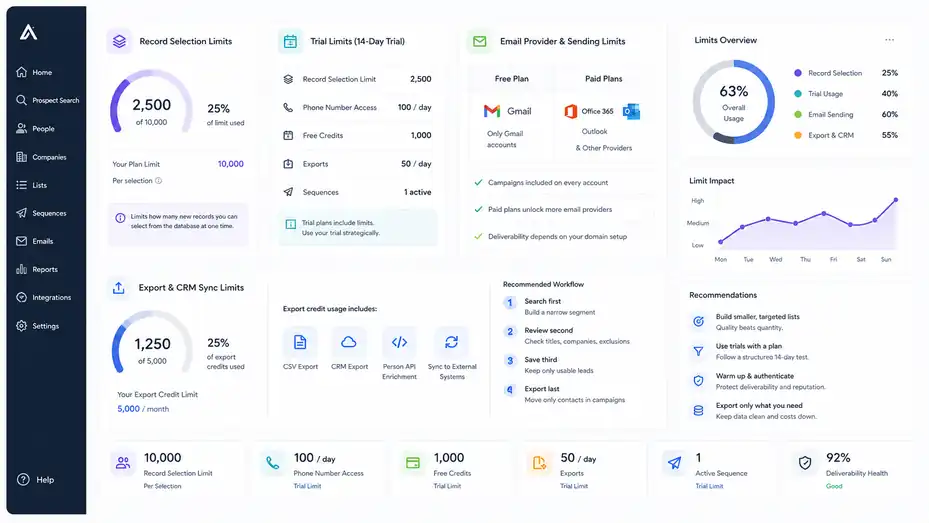
The plan name tells you the tier, but limits determine the day-to-day experience. These limits are where teams usually feel friction.
Record Selection Limits
Apollo explains record selection limits as limits on how many new records you can select from the database at one time. Without the limit, you could save and export a large group in one click; with the limit, you may have to repeatedly select smaller batches.
This sounds minor until you are building larger lists. If you need 10,000 leads and can only select small batches, your workflow becomes slow and repetitive.
For beginners, a record selection limit can be a blessing in disguise. It forces you to be selective. For high-volume teams, it can become a productivity bottleneck.
My practical advice is to avoid massive one-click list building anyway. Even if your plan allows it, large unsegmented lists usually perform worse. Build smaller lists around strong intent signals, firmographics, job titles, technologies used, hiring patterns, or market triggers.
A list of 500 highly matched prospects often beats 10,000 vaguely relevant contacts. It also uses your Apollo budget more intelligently.
Trial Limits
Apollo offers 14-day trials for Basic and Professional plans, but trial access has limits. Apollo says trial plans may include record selection limits, phone number access caps, and limited free credits. Its documentation states Basic and Professional trials last 14 days and allow users to test plan features with limited credits.
That means you should use the trial deliberately. Do not spend the trial clicking around randomly. Set up a small but realistic test:
- Day 1: Define your ideal customer profile.
- Day 2: Build 3 search segments.
- Day 3: Check data quality manually.
- Day 4: Create one simple sequence.
- Days 5–10: Run a controlled outreach test.
- Days 11–14: Review replies, bounces, credits, and workflow fit.
The goal of the trial is not to “try everything.” It is to answer whether Apollo can support your actual sales motion.
Email Provider And Sending Limits
Apollo says email campaigns are included on every account, but non-paying plans can only connect Gmail email accounts, while paid users can connect Microsoft Office or other providers.
This is a practical difference. If your company uses Microsoft 365, a free account may not reflect your real setup. Paid access may be required to test the workflow you will actually use.
Also, do not confuse platform sending ability with deliverability safety. Just because a tool lets you send campaigns does not mean your domain is ready for high-volume outreach. You still need proper authentication, warmup habits, low bounce rates, and relevant messaging.
In my experience, smaller sends with better targeting beat large sends with generic copy. Apollo can help you find people, but your domain reputation determines whether your emails land where they should.
Export And CRM Sync Limits
Export limits matter when Apollo is not your final workspace. If your team exports contacts to a CRM, another sequencer, a spreadsheet, or an enrichment workflow, export credits become a core part of pricing.
Apollo defines export credit usage broadly, including CSV, CRM, Person API enrichment, and syncing data to systems outside Apollo.
The mistake I see often is exporting contacts too early. Teams build a big list, export it, then realize half the contacts are poor fit. Now they have used credits, cluttered the CRM, and created cleanup work.
A better workflow is:
- Search first: Build a narrow segment.
- Review second: Check titles, companies, and exclusions.
- Save third: Keep only usable leads.
- Export last: Move only contacts that enter an actual campaign.
This keeps Apollo cleaner, your CRM cleaner, and your costs easier to defend.
Choosing The Right Apollo Plan For Your Use Case
The best Apollo plan depends on your motion: email-led, phone-led, enrichment-led, or operations-led. Start with workflow, then choose the plan.
When The Free Plan Is Enough
The Free plan is enough when your goal is research, testing, or light manual prospecting. It is not enough when Apollo becomes a daily revenue tool.
Choose Free when you are still answering basic questions: Are my target accounts in Apollo? Are the job titles accurate? Are emails available for my market? Does the search experience feel usable? Can I create a small list without friction?
A practical Free-plan test might be: Search for 50 target accounts, inspect 100 contacts, reveal a small number of contacts, and compare accuracy against LinkedIn profiles or company websites.
Do not judge Apollo only by one search. Test several segments. Some industries, regions, and seniority levels may have better coverage than others.
Free is also good for training yourself on Apollo’s interface before paying. If you cannot build a clean list manually, upgrading will not solve that problem.
When Basic Is The Best Value
Basic is often the best value for email-led outbound teams that need Apollo for prospecting, list building, and simple sales engagement. It is especially useful when you are still proving your outbound model.
Choose Basic when you have one to three users, a clear ICP, and a moderate monthly prospecting volume. You want to avoid expensive tool sprawl while getting enough functionality to run campaigns.
In my opinion, Basic is the “discipline plan.” It gives you enough to execute, but not so much that you can hide behind complexity. You still have to define your audience, write strong emails, and manage follow-up.
Basic may not be enough if you rely heavily on phone outreach, need richer reporting, or want more advanced team controls. But for many small teams, it is the sensible starting point.
When Professional Is Worth The Upgrade
Professional is worth considering when your team has a working outbound process and needs speed, automation, better engagement features, or more sales workflow depth.
Upgrade when you can clearly say, “This feature saves us time or creates more pipeline.” Do not upgrade just because the plan looks more complete.
Good reasons to choose Professional:
- Your reps use Apollo daily: More workflow efficiency compounds quickly.
- You need deeper campaign operations: More complex outreach requires better tools.
- You use phone and email together: Multichannel selling needs stronger coordination.
- You track performance seriously: Better reporting can improve coaching and decisions.
Professional is not a shortcut around strategy. If reply rates are poor because your offer is unclear, Professional will only help you send more poor emails faster. Fix the message first.
When Organization Or Custom Makes Sense
Organization or Custom makes sense when your biggest problems are no longer individual productivity. They are governance, control, scale, reporting, integrations, and data operations.
Choose this level when you have multiple users, multiple campaigns, CRM dependencies, and a manager or RevOps person responsible for keeping the system clean.
You may need Organization or Custom if you care about stronger permissions, larger-scale workflows, advanced reporting, security requirements, or deeper integrations. Apollo itself points larger enterprises toward Custom discussions for integrations, security, and governance needs.
The upgrade is worth it when messy process costs more than software. For example, if reps are exporting duplicate contacts, enriching the wrong records, or burning credits without accountability, stronger controls may pay for themselves.
How To Estimate Your Apollo Cost Before You Buy
Before you choose a plan, estimate usage. This helps you avoid both underbuying and overbuying.
Build A Simple Prospecting Forecast
Start with the number of people your team needs to contact each month. Not the number you wish you could contact. The number your team can actually research, personalize, send to, and follow up with.
Here is a simple model:
| Input | Example |
|---|---|
| Number of reps | 3 |
| New prospects per rep per week | 150 |
| Monthly weeks | 4.3 |
| Monthly new prospects | 1,935 |
| Phone reveals for top 20% | 387 |
| Exported contacts | 1,500 |
This example tells you the plan needs to support roughly 2,000 monthly prospects, several hundred phone reveals, and meaningful export activity. That is very different from casually comparing seat prices.
I recommend creating three forecasts:
- Conservative: What you will use if the campaign is careful.
- Expected: What you realistically plan to use.
- Aggressive: What happens if the campaign works and you scale.
Buy for expected usage, but understand the aggressive case before you commit.
Estimate Credit Burn By Workflow
Different workflows burn credits differently. Email-only prospecting may be relatively efficient. Phone-heavy prospecting can use mobile credits quickly. CRM enrichment can consume credits in batches. API-based workflows can scale usage faster than humans clicking manually.
Apollo’s credit documentation lists many activities that can consume credits, including emails, phones, enrichment, AI research, API usage, warmup, generated domains or mailboxes, and dialer calling.
Ask yourself these questions before choosing a plan:
- Will we reveal emails only, or phones too?
- Will we export contacts or run outreach inside Apollo?
- Will we enrich existing CRM records?
- Will we use AI research or automation-heavy workflows?
- Will multiple reps share the same credit pool?
- Who controls usage limits?
The goal is not perfect prediction. It is avoiding surprise.
Include Non-Subscription Costs
Apollo may replace several tools, but it may also require supporting costs. You might still need CRM seats, email inboxes, domains, deliverability monitoring, data validation, or workflow consulting.
Also include the human cost. Someone has to build lists, manage exclusions, write sequences, monitor replies, check bounces, update CRM fields, and review credit usage.
A realistic monthly budget might look like this:
| Cost Item | Example Monthly Cost |
|---|---|
| Apollo seats | $245–$395 for 5 users depending on plan |
| Extra credits or add-ons | Variable |
| Email inboxes/domains | Variable |
| CRM costs | Depends on CRM |
| Data cleanup time | Internal labor |
| Campaign management | Internal or outsourced labor |
I believe the best Apollo buyers think in cost per qualified meeting, not cost per seat. If Apollo helps you create qualified conversations at a lower cost than other channels, it is working.
Common Apollo Pricing Mistakes To Avoid
Most Apollo pricing problems are not caused by Apollo being confusing. They happen because teams buy before mapping their workflow.
Mistake 1: Buying Based On Seat Price Alone
Seat price is visible, so it gets too much attention. Credits, exports, enrichment, add-ons, and team behavior are less visible, but they often determine real cost.
A Basic plan may be cheaper per user, but if your team constantly needs features or credits outside that plan, it may become frustrating. A higher plan may look expensive, but if it replaces another tool and saves hours weekly, it may be cheaper in practice.
The fix: compare total workflow cost. Include seats, usage, replacement tools, and labor.
Mistake 2: Revealing Too Many Contacts Too Early
Many teams reveal contacts before qualifying them. This burns credits on people who never should have entered the campaign.
A better habit is to qualify first. Check company size, industry, location, title, seniority, technology, hiring activity, and relevance. Then reveal only the contacts worth pursuing.
This small discipline can improve your entire outbound system. It reduces credit waste, improves list quality, lowers bounce risk, and makes personalization easier.
Mistake 3: Exporting Everything To The CRM
Exporting broad lists creates hidden costs. Your CRM gets cluttered, reps waste time, duplicates increase, and future reporting becomes less reliable.
Apollo says export credits are used when contacts leave Apollo through CSV, CRM, API enrichment, or syncs into other systems.
The fix: only export campaign-ready contacts. If a contact is not going into a current sequence, sales play, or enrichment workflow, keep it out of the CRM.
Mistake 4: Ignoring Credit Renewal Rules
Unused credits do not roll over, and unused credits are non-refundable according to Apollo’s credit FAQ.
This means overbuying is not harmless. If you buy more than your team can use productively, the unused balance can expire.
The fix is a monthly credit review. Look at what was consumed, by whom, and for what outcome. If credits are being used but pipeline is not improving, you have a workflow problem, not just a pricing problem.
How To Get More Value From Apollo Without Overspending
Apollo becomes more cost-effective when you improve targeting, sequencing, enrichment discipline, and usage governance.
Create A Credit Budget By Rep Or Campaign
Apollo allows admins and permitted users to monitor credit usage, and its documentation notes that admins can track team usage from billing settings.
Use that visibility. Do not let credits become a shared bucket that nobody owns.
A simple structure works well:
- Rep budget: Each rep gets a monthly usage target.
- Campaign budget: High-priority campaigns get more credits.
- Phone budget: Mobile reveals are reserved for best-fit accounts.
- Enrichment budget: CRM cleanup is limited to active records.
This is not about micromanaging. It is about making sure credits support revenue priorities.
Build Smaller, Better Lists
The easiest way to lower Apollo cost is to stop building lazy lists. A lazy list uses broad filters like “VP Sales, United States, software.” A strong list uses sharper signals like company size, hiring stage, technology used, recent funding, department growth, geography, and pain-specific triggers.
Imagine two campaigns:
- Campaign A targets 5,000 broad contacts and gets a 0.4% positive reply rate.
- Campaign B targets 700 carefully selected contacts and gets a 3% positive reply rate.
- Campaign B uses fewer credits and creates more conversations.
That is the heart of Apollo ROI. Better targeting lowers cost and raises conversion.
Use Phone Credits Strategically
Phone data is valuable, so treat it like a premium resource. Do not reveal mobile numbers for every contact by default.
A better approach:
- Email first: Reveal emails for qualified prospects.
- Score engagement: Watch opens, clicks, replies, or account fit.
- Prioritize accounts: Identify high-value companies.
- Reveal phones: Use mobile credits for the best opportunities.
- Call with context: Reference relevant business reasons, not generic scripts.
This makes phone outreach feel more intentional and protects your budget.
Review Usage Every Month
Set a monthly Apollo review. Keep it short, but make it real.
Review these numbers:
| Metric | Why It Matters |
|---|---|
| Credits used | Shows consumption pace |
| Contacts added | Shows list volume |
| Exports completed | Shows data movement |
| Bounce rate | Shows data and deliverability quality |
| Positive replies | Shows message-market fit |
| Meetings booked | Shows business value |
| Cost per meeting | Shows ROI |
If credits go up but meetings do not, pause and diagnose. More data rarely fixes weak targeting.
Final Verdict: Is Apollo Worth The Price?
Apollo can be worth the price when you use it as a focused revenue workflow, not just a giant contact database.
The right plan depends on your team size, prospecting motion, and credit discipline.
Who Should Use Apollo
Apollo is a strong fit for B2B teams that need prospecting, verified contact data, email outreach, enrichment, and sales workflow tools in one place. It is especially useful for founder-led sales, SDR teams, agencies, recruiters, and revenue teams that need a repeatable outbound motion.
It works best when you already know your ideal customer profile or are actively testing one. The platform can help you find people, but it cannot decide your positioning for you.
If you have a clear market, a relevant offer, and a disciplined follow-up process, Apollo can become a cost-effective pipeline tool.
Who Should Be Careful
Be careful if you do not yet know your target customer, have no outreach strategy, or plan to buy Apollo mainly because competitors use it.
Also be careful if your team tends to export huge lists, ignore CRM hygiene, or send generic cold emails. Apollo will not protect you from bad process. It may actually make bad process faster.
If you are unsure, start with Free or a Basic/Professional trial and run a controlled test. Apollo says Basic and Professional trials last 14 days with limited credits and features for testing.
My Practical Recommendation
Here is the simplest way I would choose:
| Situation | Best Starting Point |
|---|---|
| Testing data quality | Free |
| Solo or small email-first outbound | Basic |
| Growing SDR team | Professional |
| Multi-user team needing controls | Organization |
| Enterprise data, API, security, or governance needs | Custom |
My honest view: Apollo is usually not expensive because of the seat price. It becomes expensive when teams use it without focus. If you define your ICP, reveal only useful contacts, control exports, and review credit usage monthly, Apollo can be a very reasonable investment.
The best plan is not the one with the most features. It is the one that supports your next revenue milestone without encouraging waste.
FAQ
What does Apollo IO pricing include?
Apollo IO pricing includes access to prospecting data, email outreach tools, credits, enrichment features, integrations, and user seats depending on the plan. The real cost depends on how many contacts you reveal, export, enrich, or contact each month.
Is Apollo IO free to use?
Yes, Apollo IO offers a free plan for basic prospecting and testing the platform. It is useful for checking data quality and exploring features, but serious outbound teams usually need a paid plan for higher limits, more credits, and better workflow options.
Which Apollo IO plan is best for small teams?
For many small teams, the Basic plan is the best starting point because it supports email-first prospecting without a large upfront cost. Teams that need stronger automation, reporting, calling, or scaling features may find the Professional plan more practical.
What are Apollo IO credits used for?
Apollo IO credits are used for actions like revealing emails, accessing phone numbers, exporting contacts, enriching records, and using certain advanced features. Credits matter because they can affect your real monthly cost beyond the listed subscription price.
Is Apollo IO worth the price?
Apollo IO is worth the price if your team has a clear target audience, a strong outbound process, and disciplined credit usage. It can become costly if you export broad lists, reveal too many contacts, or pay for features your team does not use.

I’m Juxhin, the voice behind The Justifiable.
I’ve spent 6+ years building blogs, managing affiliate campaigns, and testing the messy world of online business. Here, I cut the fluff and share the strategies that actually move the needle — so you can build income that’s sustainable, not speculative.
Related posts:
 Apollo IO Platform Walkthrough Guide: From Signup To First Leads
 Best Tips To Write Cold Emails
 How to Integrate Aweber with ClickFunnels
 10 Secrets to Generating Leads Online & Skyrocketing Sales
 How to Build Lead Pages That Convert Like Crazy
 10 Similar Sites To Apollo IO Every Marketer Should Try