Table of Contents
Some links on The Justifiable are affiliate links, meaning we may earn a small commission at no extra cost to you. Read full disclaimer.
Thinkific worth it for online course creators is a fair question because choosing the wrong course platform can quietly drain your time, money, and momentum.
I’ve seen creators get excited about launching, then get stuck comparing tools instead of building the actual offer.
Thinkific is strong when you want a professional course hub, clean student experience, built-in selling tools, and room to grow without hiring a developer. But it is not perfect for every creator.
In this guide, I’ll walk you through the real verdict, where Thinkific shines, where it feels limited, and how to decide with confidence.
Understand What Thinkific Actually Does
Thinkific is an online course platform built to help creators package knowledge into paid learning products.
Instead of stitching together video hosting, checkout pages, student logins, emails, and downloads manually, you get one central place to build and sell education-based products.
What Thinkific Is In Simple Terms
Thinkific is a hosted learning platform, which means you do not need to install software, manage servers, or build a custom student portal from scratch. You create your course, upload your lessons, design your course site, set prices, and enroll students inside one system.
For an online course creator, that matters because the course itself is only one part of the business. You also need a checkout flow, student accounts, progress tracking, content protection, payment options, and a reliable place where learners can return to continue the program.
Thinkific supports online courses, communities, memberships, digital downloads, and learning products for creators, academies, and companies.
Its official site describes it as an all-in-one platform for building courses, engaging learners, and growing an education business, with features like drag-and-drop course building, commerce tools, analytics, and support resources.
Think of it like this: Your course content is the “product,” but Thinkific is the storefront, classroom, payment desk, and student dashboard. You still need to bring the expertise, positioning, audience, and marketing. Thinkific gives you the infrastructure so you are not duct-taping everything together.
Who Thinkific Is Really Built For
Thinkific is best for creators who want to sell structured learning, not just upload random videos. That includes coaches, consultants, educators, YouTubers, niche experts, service providers, and small training businesses.
Imagine you teach beginner photography. You could sell a folder of videos, but students might get lost. With Thinkific, you can organize the course into modules like camera basics, lighting, editing, and portfolio building. Students can track progress, download worksheets, complete quizzes, and return later without hunting through emails.
I believe Thinkific becomes especially useful when your knowledge needs a clear learning path. If you sell a simple $9 PDF, it may be more platform than you need.
But if your product includes lessons, resources, community, certificates, coaching add-ons, or repeat customers, it starts to make more sense.
The best fit is usually someone who wants a branded course business rather than just a marketplace listing. You control the student experience, pricing, course structure, and brand presentation. That control is one of Thinkific’s strongest advantages.
How Thinkific Fits Into A Course Business
A successful course business usually has four moving parts: audience, offer, delivery, and optimization. Thinkific mainly handles delivery and parts of the selling system.
The platform helps with hosting lessons, organizing modules, collecting payments, creating landing pages, issuing certificates, managing enrollments, and tracking student activity. It does not magically create demand.
That part still depends on your niche, message, traffic, email list, social content, partnerships, or paid ads.
Here’s how I suggest thinking about it:
- Audience: People who trust you and want the outcome you teach.
- Offer: The promise, curriculum, price, and positioning of your course.
- Delivery: The student experience, lessons, resources, and progress flow.
- Optimization: Improving conversion rates, completion rates, refunds, and repeat purchases.
Thinkific is strongest in the delivery layer and increasingly useful in the commerce layer. That means it can help you look professional and serve students well, but it cannot fix a weak offer. If nobody wants the transformation, no course platform will save it.
Decide If Thinkific Is Worth It Based On Your Stage
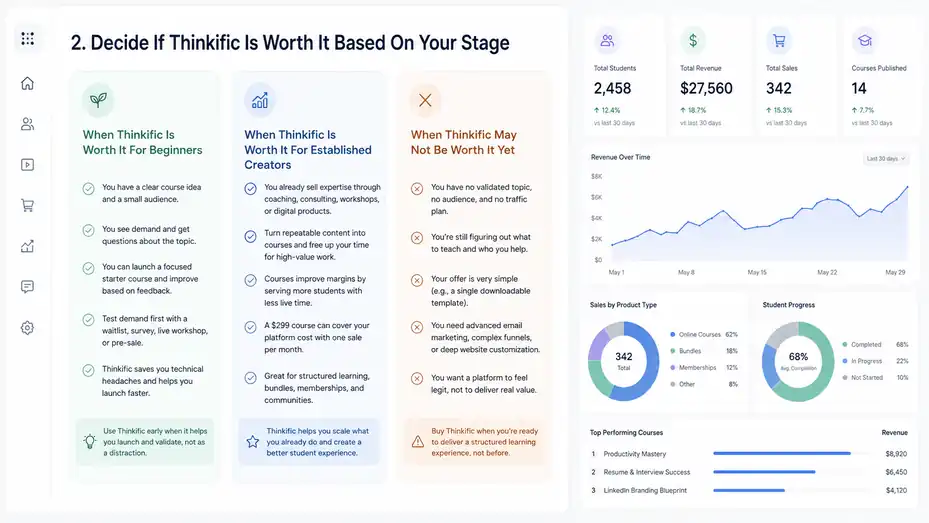
The real answer depends on where you are in your creator journey.
A beginner with no audience has different needs than a coach already selling $2,000 programs.
When Thinkific Is Worth It For Beginners
Thinkific can be worth it for beginners when you already have a clear course idea and at least a small audience to validate it. You do not need thousands of followers, but you do need signs that people care about the problem you solve.
For example, imagine you have 800 email subscribers from a small blog about meal planning for busy families. You keep getting questions about weekly prep, grocery lists, and picky eaters.
In that case, Thinkific could be worth using because you already see demand. You can create a focused starter course, launch it to your list, and improve it based on student feedback.
Where beginners get into trouble is buying a platform before validating the offer. They spend weeks choosing colors, uploading videos, and building a polished course that no one asked for.
I recommend testing demand first with a simple waitlist, survey, live workshop, or pre-sale.
Thinkific is worth it early when it saves you technical headaches and lets you launch faster. It is not worth it if it becomes a fancy distraction from talking to potential buyers.
When Thinkific Is Worth It For Established Creators
Thinkific becomes much more compelling when you already sell expertise through coaching, consulting, workshops, memberships, or digital products. At that point, a course platform can help you scale what you already do manually.
Let’s say you are a career coach who repeats the same resume, interview, and LinkedIn advice on calls every week. You could turn the repeatable parts into a Thinkific course, then reserve your live coaching time for feedback and accountability.
That can improve margins because students get structure without needing you live for every explanation.
This is where the platform starts paying for itself. If you sell a $299 course and your platform costs less than one sale per month, the math can work. Of course, you still need to consider payment processing fees, taxes, extra tools, and your time.
Thinkific is especially useful when you want students to move through a clear curriculum at their own pace. It also helps when you want to bundle products, sell memberships, add communities, or create a more professional customer experience than a folder of links.
When Thinkific May Not Be Worth It Yet
Thinkific may not be worth it if you have no validated topic, no audience, no clear outcome, and no realistic traffic plan. I do not say that to discourage you. I say it because many creators confuse platform setup with business progress.
If you are still figuring out what to teach, start lean. Interview your audience, run a free workshop, sell a low-cost live session, or create a simple resource first. You can always move into Thinkific when people prove they want the result.
It may also be overkill if your product is very simple. For example, if you only sell a single downloadable template, a full course platform may be more than you need. If you primarily want advanced email marketing, complex funnels, or deep website customization, you may need other tools alongside Thinkific.
My honest rule: Buy Thinkific when you are ready to deliver a structured learning experience, not when you are just trying to feel like a “real” course creator.
Review Thinkific’s Core Features For Course Creators
Thinkific’s value comes from how well it handles the everyday work of building and selling courses.
The features are useful because they reduce technical friction and help you create a more organized learner experience.
Course Builder And Lesson Structure
Thinkific’s course builder lets you organize content into chapters and lessons. You can add videos, text, images, PDFs, downloads, audio, presentations, quizzes, surveys, assignments, and other learning materials.
Thinkific’s official course feature page highlights multimedia lessons, progress measurement, certificates, live lessons, self-paced courses, scheduled courses, cohort delivery, and connected communities.
This is important because most learners need structure more than they need more information. A good course should guide someone from confusion to confidence. The platform’s lesson structure helps you create that path.
In practice, I suggest building your curriculum around outcomes, not content piles. Instead of “Module 1: Introduction,” use a practical promise like “Set Up Your First Client Workflow.” Each lesson should help the student complete one small milestone.
A simple course structure could look like this:
- Module 1: Understand the problem and set your goal.
- Module 2: Build the first version.
- Module 3: Practice with examples.
- Module 4: Troubleshoot common issues.
- Module 5: Apply the system in real life.
The shortcut is to write the student’s before-and-after first. Then build only the lessons needed to move them across that bridge.
Website, Landing Pages, And Branding
Thinkific includes site-building tools so you can create a course website and landing pages without hiring a developer. You can customize your branding, organize product pages, and use a custom domain on paid plans depending on your setup.
This matters because trust affects conversions. A student may like your content, but if the checkout page feels confusing or the course page looks unfinished, they may hesitate. A clean branded experience can reduce that hesitation.
That said, Thinkific’s site builder is not the same as a fully custom website builder. It is designed around course selling, not unlimited design freedom. For many creators, that is a good tradeoff. Too much design freedom can turn into procrastination.
In my experience, the best course landing pages do not need to be visually wild. They need a clear promise, a specific audience, proof, curriculum preview, instructor credibility, pricing, FAQ, and a direct call to action.
A practical approach is to build one focused landing page per main offer. Do not send buyers to a cluttered homepage and hope they figure it out. Make the next step obvious.
Commerce, Checkout, And Payment Options
Thinkific includes selling tools through its commerce and payment setup. Its pricing page lists features such as order bumps, gifting, group orders, abandoned cart, flexible student payment options, payment plans, PayPal acceptance, coupons, product bundles, after-purchase flows, affiliate reporting, and analytics, though feature availability depends on the plan.
For creators, these features matter because revenue often improves through small checkout improvements. A payment plan can make a $600 course easier to buy. A coupon can support a launch campaign.
A bundle can increase average order value. An abandoned cart email can recover people who were interested but got distracted.
One Thinkific claim worth noting is that Thinkific Payments users can increase average order value by up to 31%, according to Thinkific’s own marketing pages.
I would treat that as a platform-reported figure, not a guarantee for every creator, but it does show why checkout design and payment flexibility matter.
My practical advice is simple: Do not launch with every sales feature turned on. Start with one clear price, one payment plan if the course is higher-ticket, and one relevant order bump only if it genuinely helps the student.
Compare Thinkific Pricing Against Real Creator ROI
Pricing is where many creators get nervous, and honestly, they should.
A platform is only worth it when the value it creates is greater than the subscription, fees, and time investment.
What You Should Count Beyond The Monthly Plan
Thinkific plans are offered as monthly or yearly subscriptions, and Thinkific notes that taxes such as sales tax or VAT may apply depending on location.
Its support article also explains that payment processors commonly charge transaction and payment processing fees, often around 2.9% plus $0.30 per successful transaction, though exact fees vary by country and payment method.
That means the real cost is not just the plan price. You should also count payment processing, possible tax obligations, email marketing software, design assets, video production, customer support time, and any apps you add later.
Here is a practical way to think about ROI. If your course sells for $199 and your platform plus related tools cost $99 per month, you need roughly one sale per month to cover the basic software cost before processing fees and taxes. If your course sells for $49, you need more sales to justify the same monthly expense.
I recommend doing this before you subscribe:
| Cost Area | What To Check | Why It Matters |
|---|---|---|
| Platform subscription | Monthly or annual cost | Your fixed baseline expense |
| Payment processing | Card, PayPal, regional fees | Reduces net revenue per sale |
| Taxes | VAT, sales tax, local rules | Affects pricing and compliance |
| Email software | Broadcasts and automations | Needed for launches and follow-up |
| Apps or integrations | Extra features | Can quietly increase monthly costs |
| Support time | Refunds, questions, onboarding | Impacts your real profit margin |
How To Calculate If Thinkific Pays For Itself
Let me break it down for you with a realistic mini scenario. Suppose you sell a $299 course. You launch to a small email list and make 12 sales. That is $3,588 in gross revenue.
After processing fees, taxes, and software costs, your net revenue will be lower, but the platform is likely justified for that launch.
Now imagine you sell a $29 mini-course and make six sales per month. That is $174 in gross revenue. Depending on your plan and extra tools, the platform might still be okay, but your margin is tighter.
You would need either more volume, a higher price, a recurring membership, or a stronger upsell path.
The platform is worth it when it supports a business model that can absorb the cost. It is not about whether Thinkific is “cheap” or “expensive” in isolation. It is about whether your course economics work.
Use this quick formula:
- Monthly break-even sales: Monthly platform and tool cost divided by average net profit per sale.
- Example: $150 monthly cost divided by $120 net profit per course sale equals 1.25 sales needed to break even.
- Decision: If you can reasonably sell two or more courses per month, the platform may be financially sensible.
This simple math cuts through a lot of emotional decision-making.
Pricing Verdict For Different Creator Types
Thinkific is usually easier to justify for mid-ticket and high-ticket courses than very low-ticket products. If you sell a $497 signature course, a few sales can cover your software. If you sell $17 templates, you need more volume.
For coaches and consultants, Thinkific can be valuable because it turns repeated explanations into reusable assets. For educators selling certification-style programs, the structure and student management features can support a more premium experience.
For hobby creators testing a brand-new topic, the cost may feel heavier until sales are proven.
Here is a simplified verdict table:
| Creator Type | Is Thinkific Worth It? | Best Use Case |
|---|---|---|
| New creator with no audience | Not yet, in most cases | Validate topic first |
| Beginner with engaged audience | Often yes | Launch first structured course |
| Coach or consultant | Yes | Productize repeatable expertise |
| YouTuber or newsletter creator | Yes, if demand is clear | Turn content into paid curriculum |
| Low-ticket template seller | Maybe | Works better with bundles or upsells |
| Training company | Strong yes | Centralized learning and reporting |
My view: Thinkific is not the cheapest way to sell knowledge, but it can be a smart investment when your offer is structured, priced properly, and connected to real demand.
Build Your First Thinkific Course The Smart Way
A course platform only becomes valuable when you use it to create a clear student outcome.
The smartest setup starts with strategy, then curriculum, then content, then launch.
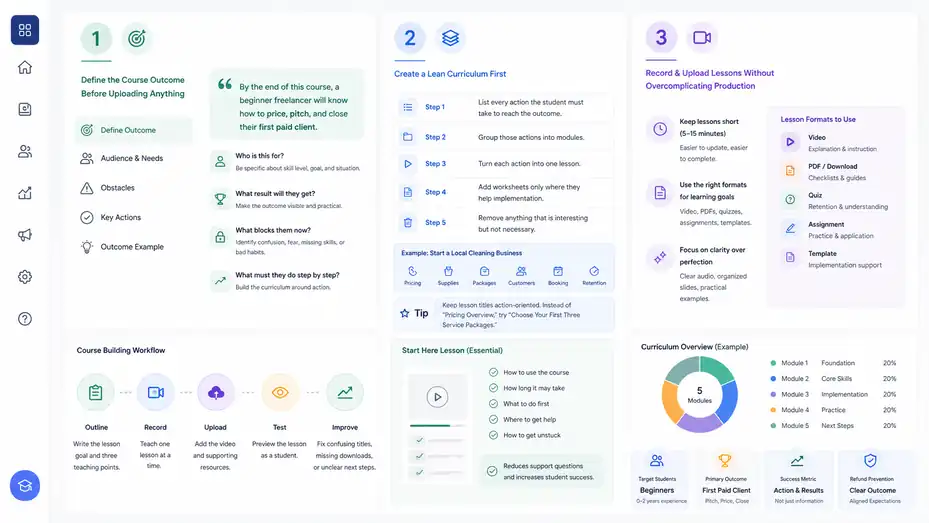
Define The Course Outcome Before Uploading Anything
Before you record lessons, write one sentence that defines the transformation. For example: “By the end of this course, a beginner freelancer will know how to price, pitch, and close their first paid client.”
That sentence keeps your course focused. Without it, you may add too many lessons because everything feels useful. Students do not pay for more information. They pay for a clearer path to a result.
I suggest answering these questions first:
- Who is this for? Be specific about skill level, goal, and situation.
- What result will they get? Make the outcome visible and practical.
- What blocks them now? Identify confusion, fear, missing skills, or bad habits.
- What must they do step by step? Build the curriculum around action.
Imagine you are creating a course for beginner Etsy sellers. A weak outcome is “Learn Etsy.” A stronger outcome is “Set up your first optimized Etsy listing and understand how to price it profitably.” The second one is easier to teach, sell, and measure.
This is also where refunds often get prevented. When buyers understand exactly what the course helps them do, expectations are cleaner from the beginning.
Create A Lean Curriculum First
Your first course version should be complete, but not bloated. I recommend building the minimum curriculum that gets the student to the promised result.
A common mistake is thinking a bigger course feels more valuable. In reality, overwhelmed students often complete less. A tight course with five strong modules can outperform a huge course with thirty scattered lessons.
Use this simple curriculum method:
- Step 1: List every action the student must take to reach the outcome.
- Step 2: Group those actions into modules.
- Step 3: Turn each action into one lesson.
- Step 4: Add worksheets only where they help implementation.
- Step 5: Remove anything that is interesting but not necessary.
For example, a course on “start a local cleaning business” might include pricing, supplies, service packages, first customers, booking process, and retention. It probably does not need a long history of the cleaning industry.
In Thinkific, keep lesson titles action-oriented. Instead of “Pricing Overview,” try “Choose Your First Three Service Packages.” That small shift tells students what to do, not just what to watch.
Record And Upload Lessons Without Overcomplicating Production
You do not need a studio-level setup for your first course. Clear audio, organized slides, and practical examples matter more than cinematic lighting. Many creators delay launch because they want every video to look perfect.
I suggest recording in short lessons of 5 to 15 minutes when possible. Shorter lessons are easier to update, easier to complete, and less intimidating for students. If a topic needs 40 minutes, split it into smaller sections.
Inside Thinkific, use different lesson formats when they serve the learning goal. Use video for explanation, PDFs for checklists, quizzes for retention, assignments for practice, and downloadable templates for implementation.
Here is a realistic workflow:
- Outline: Write the lesson goal and three teaching points.
- Record: Teach one lesson at a time.
- Upload: Add the video and supporting resources.
- Test: Preview the lesson as a student.
- Improve: Fix confusing titles, missing downloads, or unclear next steps.
One shortcut I like: Create a “Start Here” lesson that explains how to use the course, how long it may take, and what students should do when they feel stuck. That one lesson can reduce support questions.
Optimize The Student Experience
A good course is not just content. It is a guided experience that helps students stay motivated, take action, and finish.
Make The Learning Path Obvious
Students should never wonder, “What should I do next?” Your course should guide them like a calm coach. Clear module names, lesson objectives, progress markers, and recap lessons make the experience easier.
Thinkific supports learner progress tracking and course organization, which helps students see where they are in the program. Its course feature page also mentions tools such as assignments, surveys, AI-generated quizzes, completion certificates, and analytics for tracking engagement and revenue.
A simple course flow works better than a clever one. Start with orientation, move into core lessons, add practice, then include troubleshooting and next steps.
For each lesson, consider this structure:
- Goal: Tell the student what they will accomplish.
- Context: Explain why it matters.
- Action: Show the step or framework.
- Example: Demonstrate how it looks in real life.
- Next step: Tell them exactly what to do after watching.
Imagine you teach copywriting. After a lesson on headlines, do not just explain formulas. Ask students to write five headlines, choose the strongest one, and compare it against a checklist. That is learning by doing.
Use Engagement Features With Purpose
Engagement features are helpful only when they support the outcome. Quizzes, certificates, communities, and assignments can improve motivation, but they can also become noise if added randomly.
For many courses, a short quiz after each major module helps students check understanding. For skill-based courses, assignments are more useful because students need practice. For professional training, certificates can add perceived value and provide a completion milestone.
Communities can work well when students benefit from feedback, accountability, or peer examples. But a quiet community can make a course feel abandoned. If you add community, plan how you will seed discussions, answer questions, and create prompts.
A compact engagement plan might look like this:
- Beginner course: Quizzes and worksheets.
- Skill course: Assignments and examples.
- Cohort program: Live sessions and community discussion.
- Certification-style course: Assessments and certificates.
My advice is to add one engagement layer at a time. Watch how students behave, then improve. Do not build a giant student experience based on guesses.
Reduce Friction For Paying Students
Every extra step can cause confusion. After someone buys, they should know how to log in, where to start, how to get help, and what result to expect.
Thinkific includes after-purchase flows on some plans, allowing creators to customize thank-you pages, add upsells, or send buyers to a specific product or URL after purchase. Used well, this can improve onboarding and reduce buyer’s remorse.
A strong post-purchase flow should include:
- Confirmation: Reassure students that their purchase worked.
- Access: Tell them how to enter the course.
- First action: Send them to the Start Here lesson.
- Support: Explain how to ask for help.
- Expectation: Tell them what to complete first.
This is not just customer service. It protects revenue. A confused student is more likely to refund, stop logging in, or blame the course when the real issue was unclear onboarding.
One simple improvement: Send a welcome email that says, “Your only job today is to watch the Start Here lesson and download the course checklist.” That lowers pressure and increases the chance they begin.
Use Thinkific’s Sales Tools Without Making Your Funnel Messy
Thinkific offers selling features, but more features do not automatically mean more sales.
The goal is to create a clean buying path that matches the student’s decision process.
Create A Course Offer That Feels Easy To Understand
Your landing page should answer the buyer’s silent questions: Is this for me? What will I get? Can I trust you? Is it worth the price? What happens after I buy?
A strong offer is not just a course title and curriculum. It includes the outcome, audience, timeline, support level, proof, guarantee or refund policy, and bonuses if they genuinely help.
For example, “Social Media Course” is vague. “30-Day Instagram Content System For Handmade Shop Owners” is clearer. It tells the reader who it is for, what channel it covers, and what kind of result they can expect.
In your Thinkific sales page, prioritize clarity over hype. Use specific language like “create your first four-week content calendar” instead of broad promises like “master marketing.” Specificity builds trust.
A simple page structure can work well:
- Headline: Name the outcome.
- Pain point: Show you understand the problem.
- Promise: Explain what changes after the course.
- Curriculum: Preview the path.
- Proof: Add testimonials or examples.
- Price: Make the buying options clear.
- FAQ: Remove final objections.
- CTA: Invite the next step.
Use Payment Plans And Bundles Strategically
Payment plans can increase accessibility for higher-priced offers. Bundles can raise average order value when products naturally fit together. But both need to be used carefully.
If your course is $499, offering two or three payments may help students who trust the offer but need cash-flow flexibility. If your course is $49, a payment plan may not be necessary and can add complexity.
Bundles work best when they solve a bigger problem. For example, a “Freelance Starter Bundle” could include a pricing course, proposal templates, and client onboarding resources. That feels cohesive. A random bundle of unrelated products feels like clutter.
Thinkific’s pricing page lists product bundles, additional pricing options, coupons, and payment plans among its sales tools, with availability varying by plan. These features are useful when they support a thoughtful offer strategy.
I recommend starting with one core offer, then adding one logical upsell later. Do not create five pricing tiers before you have traffic. Complexity can make buyers freeze.
Track Revenue And Learner Behavior
Thinkific includes analytics features for tracking revenue, learner behavior, engagement, and performance. Its official pages describe analytics as a way to surface actionable insights for learning businesses, including revenue growth and learner performance metrics.
The beginner mistake is only tracking sales. Sales matter, of course, but they do not tell the whole story. You also want to know where students stop, which lessons create questions, which products convert, and whether buyers complete the course.
Track these core metrics:
- Landing page conversion rate: How many visitors become buyers.
- Checkout abandonment: How many start but do not finish purchase.
- Course start rate: How many buyers begin the course.
- Completion rate: How many finish the core path.
- Refund rate: How many buyers ask for money back.
- Repeat purchase rate: How many buy another product.
A course with high sales and low completion may still be a problem. It can lead to weak testimonials, more support, and fewer referrals. A course with moderate sales but excellent student results can become easier to scale because proof compounds.
Know Thinkific’s Strengths And Limitations
No platform is perfect. Thinkific is strong in course delivery and creator-friendly setup, but there are situations where it may not match your exact business model.
Where Thinkific Shines
Thinkific shines when you want a clean, professional learning environment without building a custom tech stack. It is especially strong for structured courses, academies, self-paced programs, memberships, and creators who care about the student experience.
The platform’s official homepage says it is used by 35,000+ businesses and shows a 4.5/5 rating from over 395 G2 reviews. Thinkific also highlights customer examples involving revenue growth, large enrollment numbers, and structured learning paths.
From a creator’s perspective, the big strengths are:
- Course structure: Easy to organize lessons and modules.
- Student experience: Learners get a dedicated login and progress flow.
- Brand control: You can create a branded education hub.
- Sales features: Checkout, coupons, bundles, and payment options help monetization.
- Scalability: You can start simple and grow into more advanced use cases.
I believe its biggest advantage is focus. Thinkific is not trying to be every possible marketing tool. It is built around learning products. For course creators, that focus can be refreshing.
Where Thinkific Can Feel Limited
Thinkific can feel limited if you expect it to replace every part of your marketing system. Depending on your business, you may still need dedicated email marketing, advanced funnels, webinar software, design tools, analytics tools, or a full website.
Some users also want deeper design control. One G2 review praised Thinkific as customizable and useful as a centralized learning platform, but also mentioned wanting better heading and branded template options, and noted that setting up the whole course was a lot of work even though account setup was easy.
That feedback feels realistic. Course platforms reduce technical work, but they do not remove the work of organizing curriculum, writing sales pages, designing assets, and supporting students.
Thinkific may also be less ideal if your primary business is a complex marketing funnel with heavy automation. In that case, you may need integrations or a different platform stack.
My practical take: Thinkific is strong enough for most course creators, but not magic. It solves delivery and many selling problems. It does not replace offer strategy, audience building, or clear teaching.
Thinkific Vs Marketplace Platforms
One big decision is whether to sell on your own platform like Thinkific or publish on a course marketplace. Marketplaces can provide built-in discovery, but they usually give you less control over branding, pricing, student relationship, and customer data.
With Thinkific, you are responsible for traffic. That can feel harder at first. But you also own more of the customer relationship. You can build your email list, create branded offers, set your own pricing, and design the student journey around your method.
A marketplace may be useful if you want exposure and do not care as much about brand control. Thinkific is better when you want to build an education business asset.
Here is the simple comparison:
| Option | Best For | Main Tradeoff |
|---|---|---|
| Thinkific | Branded course businesses | You bring the traffic |
| Marketplace | Discovery and beginner exposure | Less control and stronger competition |
| Custom website | Full control | More technical work |
| Simple checkout tool | Small digital products | Weaker learning experience |
If your goal is a long-term creator brand, I would usually lean toward owning the student relationship.
Avoid Common Mistakes That Make Thinkific Feel “Not Worth It”
Many creators blame the platform when the real issue is strategy, offer clarity, or weak execution. Avoiding these mistakes can make Thinkific much more valuable.
Mistake 1: Building Before Validating Demand
The most expensive mistake is building a full course before proving people want it. A beautiful Thinkific school cannot create demand out of thin air.
Before you build, look for evidence. Are people asking you questions about the topic? Have they paid you for related help? Do your posts get saves, replies, or comments? Are people searching for the problem? Have you tested a workshop or pre-sale?
A simple validation path could be:
- Step 1: Ask your audience what result they want.
- Step 2: Offer a free or low-cost live training.
- Step 3: Pitch the course idea at the end.
- Step 4: Pre-sell to a small beta group.
- Step 5: Build the first version based on real questions.
I like beta launches because they keep you honest. If five to twenty people pay for the first version, you get revenue, feedback, testimonials, and proof before overbuilding.
Thinkific becomes worth it faster when you upload a course people already want, not a course you hope they might want someday.
Mistake 2: Creating Too Much Content
Creators often think more lessons equal more value. Students usually think differently. They want the shortest credible path to the result.
A bloated course can reduce completion because students feel behind. When they feel behind, they stop logging in. When they stop logging in, they do not get results. When they do not get results, testimonials become harder to collect.
Ask this question for every lesson: “Does this help the student achieve the promised outcome?” If not, remove it or place it in a bonus section.
For example, if your course teaches new virtual assistants how to land their first client, they need services, pricing, outreach, portfolio, and discovery call guidance. They probably do not need advanced agency scaling in the core curriculum.
A tighter course is easier to sell, easier to update, and easier to complete. In my experience, creators often improve their course by cutting 20% of the content and adding better examples, templates, and action steps.
Mistake 3: Ignoring Onboarding And Support
A student’s first 10 minutes after purchase matter more than most creators realize. If the login feels confusing, the course looks overwhelming, or the first lesson is vague, excitement drops.
Create a simple onboarding experience. Tell students where to begin, how to use the course, how long it may take, and what to do if they need help. You can also add a checklist so they get a quick win immediately.
A good welcome lesson might say: “Start by downloading the workbook, watching the first two lessons, and completing the setup checklist. You do not need to binge the whole course today.”
Support also affects perceived value. You do not need to be available 24/7, but students should know where questions go and when to expect a reply. A clear support boundary is better than vague access.
This is where Thinkific helps with structure, but you still need to design the human experience. The platform can host the course. You create the feeling of guidance.
Optimize Thinkific For More Sales And Better Results
Once your course is live, optimization becomes the real growth lever.
Small improvements in positioning, checkout, student success, and follow-up can create meaningful revenue gains.
Improve Your Course Sales Page
Your sales page should not just describe the course. It should help the reader make a decision. That means addressing pain points, desired outcomes, objections, proof, and next steps.
Start by rewriting your headline around the student’s goal. Instead of “The Complete Canva Course,” try “Create Branded Social Graphics In Canva Without Starting From Scratch Every Time.” The second version speaks to a real pain point.
Then improve the body of the page. Add specific examples of what students will create, who the course is for, who it is not for, and what they need before joining. Clear boundaries build trust.
Useful page elements include:
- Outcome section: Explain the transformation.
- Curriculum section: Show the step-by-step path.
- Proof section: Add testimonials, screenshots, or student wins.
- Instructor section: Explain why you can help.
- FAQ section: Answer objections about time, skill, access, and support.
- CTA section: Repeat the offer clearly.
I suggest reviewing your sales page every 30 days after launch. Look at questions people ask before buying. Those questions are usually missing pieces on the page.
Increase Completion And Testimonials
More sales are great, but student success is what makes a course sustainable. Completion, implementation, and visible wins lead to testimonials, referrals, case studies, and repeat buyers.
To increase completion, reduce overwhelm. Add progress milestones, short lessons, clear assignments, and recap checkpoints. Give students a reason to keep moving.
For example, after Module 1, ask them to post or submit one completed action: a pricing sheet, a content calendar, a pitch draft, a portfolio page, or whatever matches your course. That turns passive watching into progress.
To collect testimonials ethically, ask after a meaningful milestone, not only at the end. A student who completed the first important outcome may already have a useful win.
Try this prompt: “What changed for you after completing the first three modules, and what result or clarity did you gain?” This invites specific feedback instead of generic praise.
A course with strong student results becomes easier to market because you are no longer relying only on your own claims. You can point to real transformation.
Use Upsells And Follow-Up Offers Carefully
Once your main course works, you can add follow-up offers. This might include a coaching package, advanced course, membership, templates, live workshop, or group program.
The key is relevance. An upsell should feel like the next logical step, not a cash grab. If someone buys a beginner photography course, a natural next offer might be a photo editing workshop or portfolio review. An unrelated productivity bundle would feel random.
Thinkific’s sales features such as order bumps, product bundles, and after-purchase flows can support these offers when available on your plan. But I recommend using them only after your core offer converts.
A simple growth path could be:
- Entry offer: Low-cost workshop or mini-course.
- Core offer: Signature course with full framework.
- Support offer: Group coaching or community membership.
- Advanced offer: Certification, mastermind, or implementation program.
That kind of ladder helps students continue growing with you instead of buying once and disappearing.
Scale A Thinkific Course Business
Scaling is not just selling more. It means improving systems so more students can succeed without burning you out.
Turn One Course Into A Product Ecosystem
Once your first course proves demand, you can build a small product ecosystem around the same audience. This is usually smarter than creating random courses for different audiences.
For example, if you help beginner freelancers, your ecosystem might include a mini-course on choosing services, a signature course on landing clients, templates for proposals, and a membership for accountability.
This works because each product serves the same buyer at a different stage. You do not have to rebuild trust from scratch every time.
Thinkific supports multiple learning products, including courses, communities, memberships, and digital downloads according to its official pages. That makes it possible to create a more complete education business over time.
A simple ecosystem map:
| Stage | Product Type | Example |
|---|---|---|
| New lead | Free training | “3 Mistakes New Freelancers Make” |
| Beginner buyer | Mini-course | “Build Your First Service Package” |
| Core student | Signature course | “Land Your First 3 Clients” |
| Ongoing support | Membership | Monthly reviews and accountability |
| Advanced buyer | Group coaching | Scaling systems and pricing |
The goal is not to make endless products. The goal is to serve the same person better as their needs mature.
Add Community Or Cohorts When Students Need Accountability
Self-paced courses are scalable, but some students need accountability. That is where communities and cohort-based experiences can help.
A cohort means students move through the course together during a set period. This can increase urgency, interaction, and completion. A community gives students a place to ask questions, share progress, and learn from each other.
Thinkific’s course pages mention unified courses and communities, allowing learners to move between connected courses and community spaces. That can be useful if your course benefits from discussion or feedback.
I suggest adding community when at least one of these is true:
- Students need feedback to improve.
- Students benefit from seeing peer examples.
- The course has implementation challenges.
- Accountability increases the chance of results.
- You can consistently show up as the host.
Do not add a community just because everyone says community is valuable. A quiet community can make your brand feel less active. Start small with weekly prompts, office hours, or milestone threads.
Use Analytics To Decide What To Improve
Scaling should be guided by data and student feedback. Guessing is expensive.
Look for patterns. If many students stop after Module 2, that module may be too hard, too long, or unclear. If buyers ask the same question before purchasing, your sales page needs that answer. If refunds mention “not what I expected,” your positioning needs work.
Thinkific’s analytics can help you track revenue and learner behavior, while your emails, surveys, and customer conversations reveal the why behind the numbers.
A monthly optimization review could include:
- Sales: Which traffic sources created buyers?
- Conversion: Where did prospects drop off?
- Engagement: Which lessons were completed or skipped?
- Support: What questions repeated?
- Results: What wins did students report?
- Revenue: Which products or bundles performed best?
I recommend improving one bottleneck at a time. If traffic is low, work on audience growth. If traffic is decent but sales are low, improve the offer and page. If sales are good but completion is weak, improve onboarding and course design.
Final Verdict: Is Thinkific Worth It For Online Course Creators?
Thinkific is worth it for many online course creators, but only when it matches your stage, offer, and growth plan.
It is a platform for delivering and selling structured learning, not a shortcut around audience building or product-market fit.
The Real Verdict
Yes, Thinkific is worth it for online course creators who have a clear topic, a defined student outcome, and a plan to attract buyers. It is especially worthwhile for creators who want a branded course site, organized student experience, built-in commerce tools, and room to grow into memberships, communities, bundles, or training programs.
It is less worth it if you are still guessing what to teach, have no audience, or only need to sell a very simple download. In that case, validate first. You can always move into Thinkific when your offer is clearer.
The real value is not just the software. It is the business system you build with it. Thinkific helps you package expertise, deliver it professionally, and improve the student journey. But your strategy still decides the outcome.
My honest recommendation: use Thinkific when you are ready to treat your course like a real product, not just a content dump.
Who Should Choose Thinkific
Choose Thinkific if you want your own branded course business and care about student experience. It fits especially well if you sell transformation-based education, professional training, coaching programs, or repeatable expertise.
You are likely a good fit if:
- You have a clear course promise: Students know what result they are buying.
- You want control: You care about branding, pricing, and student relationships.
- You need structure: Your content works best as modules, lessons, and resources.
- You plan to grow: You may add bundles, memberships, communities, or advanced programs.
- You value simplicity: You want fewer technical headaches.
From what I’ve seen, Thinkific rewards creators who think like educators and business owners at the same time. You need to care about both the learning outcome and the sales system.
What To Do Next Before Paying
Before choosing a plan, do a simple readiness check. Write your course promise, outline the first version, estimate your price, calculate break-even sales, and validate demand with real people.
A practical next step is to draft your course offer on one page. Include the audience, outcome, modules, price, launch audience, and first traffic source. If that page feels clear, Thinkific may be a smart next move. If it feels fuzzy, refine the offer first.
Here is the clean decision:
- Use Thinkific now: You have demand, a course outcome, and a launch plan.
- Wait a little: You are still validating the topic or audience.
- Choose something simpler: You only sell tiny downloads or one-off resources.
- Consider a broader stack: You need advanced marketing automation more than course delivery.
So, is Thinkific worth it for online course creators? For the right creator, yes. It can be a strong foundation for a serious online education business. Just make sure you are buying it to support a validated offer, not to avoid the harder but more important work of understanding your students.
FAQ
Is Thinkific worth it for online course creators?
Yes, Thinkific is worth it for online course creators who want a branded course platform, structured lesson delivery, payment tools, and a professional student experience. It works best when you already have a clear course idea, validated audience demand, and a plan to sell your course consistently.
Is Thinkific good for beginners?
Thinkific can be good for beginners if they have a focused course topic and some audience interest. It removes many technical barriers, such as hosting lessons, creating student logins, and taking payments. However, beginners should validate their course idea before paying for advanced features.
What are the main benefits of Thinkific?
The main benefits of Thinkific include easy course creation, branded course websites, payment processing, student progress tracking, certificates, communities, and sales tools. These features help creators organize content, deliver a smoother learning experience, and sell digital education products without building everything from scratch.
What are the downsides of Thinkific?
Thinkific may feel limited if you need advanced website design, complex marketing funnels, or deep automation. It also does not create demand for your course. You still need a strong offer, audience, traffic strategy, and clear positioning to make the platform profitable.
Who should use Thinkific?
Thinkific is best for coaches, consultants, educators, content creators, and training businesses that want to sell structured online courses. It is especially useful for creators who value brand control, student experience, payment flexibility, and the ability to grow into memberships, bundles, or communities.

I’m Juxhin, the voice behind The Justifiable.
I’ve spent 6+ years building blogs, managing affiliate campaigns, and testing the messy world of online business. Here, I cut the fluff and share the strategies that actually move the needle — so you can build income that’s sustainable, not speculative.