Table of Contents
Some links on The Justifiable are affiliate links, meaning we may earn a small commission at no extra cost to you. Read full disclaimer.
Elementor review for affiliate marketing websites is a topic worth taking seriously if you want a site that looks polished, loads reasonably fast, and gives you more control over where clicks happen.
I have seen a lot of affiliate sites lose revenue because their pages were either too rigid or too messy. Elementor sits in that interesting middle ground: flexible enough to build high-converting layouts, but easy to overdo if you are not careful.
In this guide, I’ll walk you through what Elementor does well, where it can hurt performance, and whether it is actually a smart move for your affiliate business in 2026.
What Elementor Actually Is For Affiliate Marketers
Elementor is a visual WordPress website builder, which means you can design pages, templates, headers, footers, single posts, archives, forms, and popups without needing to hand-code everything.
For affiliate marketers, that matters because layout control often decides whether a visitor reads, trusts, and clicks. WordPress still dominates CMS usage on the web, so building inside that ecosystem gives you flexibility that many affiliate site owners want.
Elementor Gives You More Control Over Buyer-Focused Layouts
Most affiliate marketers do not fail because they picked the wrong product. They fail because their page design makes the recommendation hard to scan, hard to trust, or hard to act on.
Elementor helps with that by letting you visually control sections like hero areas, product grids, call-to-action blocks, comparison areas, pros and cons boxes, and custom article templates.
Elementor’s official feature and plan pages also show support for Theme Builder, dynamic content controls, custom code, popups, forms, and display conditions, all of which are relevant when you want more than a plain blog layout.
Here is why that matters in the real world. Imagine you run a site reviewing espresso machines.
A default WordPress editor can publish the content just fine, but Elementor lets you shape the journey: comparison table near the top, a featured pick card after the intro, sticky buttons on mobile, and a cleaner author box to build trust.
That does not magically create commissions, but it does remove friction.
My view is simple: Elementor is not the conversion hack by itself. Control is the conversion advantage. Elementor just gives you more of that control than the default setup.
It Is Best For Affiliates Who Care About Design Without Wanting Full Custom Development
There is a sweet spot where Elementor shines. If you are a solo affiliate, niche site builder, media-site operator, or small content team that wants custom-looking pages without hiring a developer for every tweak, Elementor makes a lot of sense.
If you want to change a section today, test a CTA tomorrow, and launch a comparison page next week, a visual builder can save a huge amount of time.
That said, not every affiliate site needs it. If your business model is purely SEO-driven with ultra-light content pages and almost no design complexity, a lean block-based setup may outperform Elementor on simplicity alone. I recommend Elementor most when your monetization depends on one or more of these:
- Higher-value clicks: You need stronger layouts around money pages.
- Visual trust signals: You want badges, guarantees, author areas, brand styling, and better structure.
- Lead capture: You are building an email list alongside affiliate revenue.
- Template reuse: You publish a lot of similar review, roundup, and comparison content.
From what I’ve seen, Elementor becomes more valuable as your affiliate site becomes more commercial. The more you care about conversion design, the more useful it becomes.
Why Elementor Appeals To Affiliate Marketing Websites

Affiliate sites live or die on page clarity. You are usually asking a visitor to do three things fast: understand the recommendation, trust the recommendation, and click through.
Elementor is attractive because it helps shape those moments visually instead of leaving them to whatever your theme gives you by default.
It Makes Commercial Content Easier To Structure
One overlooked benefit of Elementor is not just “design freedom.” It is structured persuasion. That sounds fancy, but it really means putting the right content in the right order.
Elementor supports single post templates, archive templates, loop or listing-style design, display conditions, and template-level controls, which makes it easier to standardize how your reviews and buying guides look across the site.
For affiliate content, consistency helps more than many people realize. When every review page has the same clean flow, readers learn how to consume your content faster. A good structure might look like this:
- Above the fold: Quick verdict and recommended use case.
- Mid-page: Comparison blocks and decision help.
- Lower down: Deep analysis, objections, and FAQ.
- End section: Final CTA and alternative picks.
That kind of structure is easier to repeat when you can save templates and reuse sections. I believe this is one of Elementor’s biggest hidden advantages. It does not just help you build prettier pages. It helps you operationalize a format that can scale across dozens or hundreds of money pages.
It Supports Conversion Elements Without Heavy Workarounds
Affiliate sites often need small but important UI pieces that standard themes do poorly: sticky columns, custom product cards, expandable pros and cons, promo banners, contact buttons, forms, and popups.
Elementor’s feature set includes marketing-oriented functions such as Form Builder, Popup Builder, contact buttons, floating elements, and custom attributes, which means many common conversion pieces can be handled inside the same system instead of patched together with random plugins.
That plugin reduction matters. Every extra plugin adds risk, maintenance, and sometimes conflict. A messy affiliate stack is one of the fastest ways to create slow pages, broken layouts, and weird tracking behavior. When one platform covers more of the design and conversion layer, the site becomes easier to manage.
A realistic example: Say you promote VPN software. You may want an exit-intent popup offering a “top 3 picks” guide, a sticky mobile button, and a comparison widget below the intro. Elementor lets you implement that type of experience without hiring a developer every time you change the offer.
Used well, that is not just convenient. It can directly improve how much revenue your existing traffic produces.
Where Elementor Fits In A Modern Affiliate Site Stack
Before you buy into any builder, it helps to see where it sits in the bigger setup. Elementor is not your SEO strategy, your tracking platform, or your affiliate network. It is the front-end design and experience layer.
That distinction matters because many site owners expect too much from it.
Elementor Handles Presentation Better Than Core Business Logic
I suggest thinking of your affiliate site in layers. WordPress is the publishing engine. Your theme creates the baseline structure.
Plugins handle specialty tasks like SEO, caching, schema, link management, analytics, or table creation. Elementor’s main job is to control what the visitor sees and how they move through your pages.
That separation is useful because it stops you from overbuilding. Elementor is excellent for:
- Landing page design
- Review page templates
- Category and archive layouts
- Custom headers and footers
- Lead capture sections
- Visual CTAs and promo blocks
It is not the ideal place to solve everything. For example, affiliate link cloaking, advanced rank tracking, and revenue attribution are separate jobs. If you try to turn Elementor into your entire business stack, you will eventually create unnecessary complexity.
In my experience, the best Elementor affiliate sites are the ones with a clean division of labor. Elementor handles design. Your other tools handle SEO, speed, analytics, and affiliate operations. When that boundary is clear, the site feels lighter and easier to scale.
It Works Best When Paired With A Clear Monetization Plan
A lot of people install Elementor first and figure out the business later. I think that is backwards. The right question is not “Can Elementor build my site?” It can. The right question is “What exactly am I trying to monetize, and what layout will help that happen?”
Here are a few examples:
- Product review site: Elementor is useful for reusable verdict boxes, pros and cons layouts, author trust sections, and product comparison modules.
- Roundup site: It helps with cards, tables, featured pick modules, and custom category pages.
- Lead-gen affiliate site: It becomes more valuable because forms and popups matter more.
- Programmatic or scaled publisher site: Use carefully, because performance discipline becomes more important at scale.
So yes, Elementor fits well in affiliate marketing. But it fits best when you already understand your page types, conversion goals, and publishing workflow. That is the difference between using a builder as a tool and using it as a distraction.
Elementor Features That Matter Most For Conversion
Not every Elementor feature matters for affiliate revenue. Some are nice to have. Others can genuinely influence click-through rate, lead generation, and trust. This is where I think the platform earns its keep.
Theme Builder And Templates Save Time While Improving Consistency
Elementor Pro includes Theme Builder, display conditions, dynamic tags, and reusable templates, which are incredibly useful when your site has repeating content structures.
For an affiliate site, that means you can create a template once and apply it across:
- review posts
- comparison posts
- category pages
- custom author pages
- header or footer promos
- archive layouts
Why is that a conversion win? Because consistency builds familiarity. Familiarity reduces friction. And friction reduction usually helps clicks.
Imagine every review on your site opens with the same high-trust layout: quick verdict, who it is for, pricing snapshot, top features, and a CTA button. Visitors do not need to relearn your formatting each time. They just move through it.
This also helps editorial speed. If you publish at scale, manually rebuilding money-page layouts wastes hours you could spend on research, links, testing, or content updates.
Elementor templates turn design into a repeatable system, which is exactly what affiliate publishers need.
Popups, Forms, And Floating Elements Can Add Revenue When Used Carefully
Elementor includes Popup Builder and Form Builder, and its help documentation shows popups can be created directly from the WordPress admin inside Elementor’s template system. That means list-building and promotional overlays are not awkward add-ons bolted to the side of the site.
Now, I want to be careful here: most affiliate sites overuse popups. That is one of the easiest ways to annoy readers and hurt trust. But used strategically, they can absolutely increase total revenue.
Good uses include:
- Content upgrade popup: Offer a buyer checklist relevant to the article.
- Exit-intent offer: Present your “best picks” summary before the user leaves.
- Sticky mobile CTA: Keep one subtle button visible on long pages.
- Lead magnet capture: Build a list for follow-up affiliate campaigns.
A practical scenario: You run a hosting comparison site. Someone reads 70 percent of a long guide but does not click. An exit popup offering a “3 hosting picks by budget” checklist might capture that visitor into email, where you monetize later. That is not just affiliate SEO anymore. That is full-funnel monetization.
Used lightly, Elementor’s conversion tools can do real work.
Custom Code, Display Conditions, And Dynamic Content Help Serious Operators
This is where Elementor starts feeling more like a business tool than a beginner page builder. The platform supports custom code insertion, display conditions, and dynamic content features. That gives advanced affiliate site owners the ability to personalize or control where certain elements appear.
For example, you can:
- show a CTA only on review posts
- hide certain sections on informational content
- insert tracking pixels or meta tags more cleanly
- display different content blocks by template rules
- build dynamic author or product layouts
I especially like display logic for content segmentation. Informational posts and buyer-intent posts should not feel the same. If your site treats every article identically, you are probably leaving money on the table.
This is one place where Elementor goes beyond “pretty pages.” It gives you system-level control over your site’s commercial architecture. For affiliate marketers who already have traffic and want to improve monetization, that matters a lot.
The Biggest Downsides You Need To Know
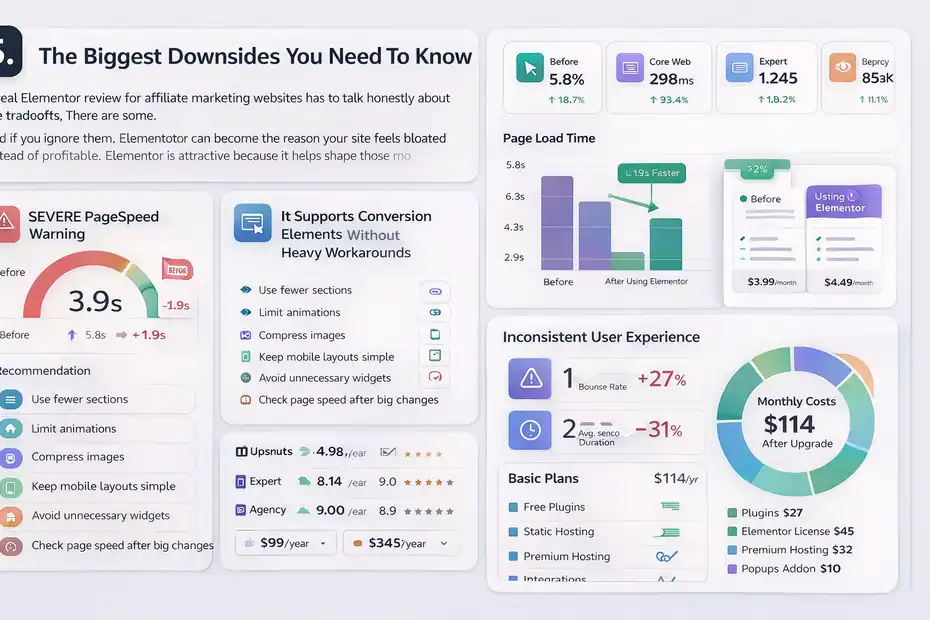
A real Elementor review for affiliate marketing websites has to talk honestly about the tradeoffs. There are some.
And if you ignore them, Elementor can become the reason your site feels bloated instead of profitable.
Performance Can Suffer If You Build Like A Designer Instead Of A Publisher
Google’s Core Web Vitals still matter, and responsiveness is measured in part through metrics like INP, while overall experience also includes load and layout stability considerations. If your pages are overloaded with sections, animations, giant images, or unnecessary widgets, Elementor can absolutely contribute to a sluggish experience.
This is not unique to Elementor, by the way. Most builders become heavy when users stack features on top of features. But Elementor makes it very easy to keep adding containers, motion, custom fonts, decorative effects, and scripts until the page looks impressive in the editor and mediocre in real life.
Here is the core mistake: affiliate pages should convert, not perform a design demo.
I recommend a “publisher first” approach:
- Use fewer sections
- Limit animations
- Compress images
- Keep mobile layouts simple
- Avoid unnecessary widgets
- Check real page speed after every big design change
If your review page is slower but prettier, that is not automatically progress. In many niches, fast and clear beats fancy and delayed.
Too Much Freedom Can Create Inconsistent UX
The second downside is subtle. Elementor gives you so much control that many site owners end up reinventing their design every time they publish. That feels creative, but it is terrible for scale.
One review page has three CTA buttons. Another has seven. One uses comparison cards. Another uses a table. One has huge spacing. Another feels cramped. Suddenly your site stops feeling like a brand and starts feeling like a collection of experiments.
This is why I believe Elementor is powerful only when paired with strict design rules. Set your templates. Set your CTA styles. Set your typography. Set your spacing. Then stop freelancing every page.
In other words, Elementor is not dangerous because it is weak. It is dangerous because it is flexible. Without discipline, flexibility turns into design drift, and design drift hurts trust.
Costs Are Reasonable, But Stacks Can Grow
Elementor’s current plan structure includes free and paid tiers, with higher plans unlocking broader pro features and “One” plans bundling additional connected services like AI, image optimization, email deliverability, and accessibility tools. The pricing page also shows that plan tiers vary by number of sites and included capabilities.
That can be good value if you are actually using those features. But many affiliate site owners quietly overspend because they keep layering on premium themes, third-party add-ons, popups, form tools, hosting upgrades, and performance plugins.
So the real question is not “Is Elementor expensive?” Usually, no. The real question is “What does my full operating stack cost after I build around Elementor?”
That number is what matters.
Setup Advice For Building An Affiliate Site With Elementor
If you decide to use Elementor, the way you set it up matters almost as much as the tool itself. A clean foundation makes everything easier later, from speed optimization to conversion testing.
Start With Site Structure Before You Touch Design
I always suggest building the information architecture first. That means deciding your core templates, money pages, category pages, and supporting content before you start styling buttons.
A practical order looks like this:
- Step 1: Define your main page types: homepage, review post, roundup post, comparison page, blog post, and category archive.
- Step 2: Decide where monetization happens: in-content buttons, tables, sidebars, banners, email capture, or dedicated landing pages.
- Step 3: Create template rules so buyer-intent pages and informational pages do not use the exact same layout.
- Step 4: Build reusable sections instead of custom-designing every page from scratch.
Elementor’s template and display features make this workflow realistic, and that is one of its biggest practical wins.
A beginner usually wants to jump straight into page design. I get it. It is the fun part. But the real leverage is in deciding what should repeat. If you do that early, Elementor becomes a system. If you do not, it becomes a pile of custom pages you will eventually hate updating.
Build For Mobile First, Not As An Afterthought
Elementor includes responsive controls for desktop, tablet, and mobile, and that is especially important for affiliate sites because a large share of commercial browsing happens on phones.
When I review affiliate sites, mobile is where I usually see the most damage. Buttons are buried. Comparison boxes break. Headings are oversized. Spacing gets awkward. Popups become unbearable.
A better process is to design with mobile behavior in mind from the start:
- Keep CTA buttons obvious
- Reduce clutter above the fold
- Shorten intro sections
- Use touch-friendly spacing
- Avoid giant image stacks
- Check sticky elements carefully
Think about the user scenario. Someone is searching “best running shoes for flat feet” while standing in a store, commuting, or half-distracted on the couch. That person is not studying your page like a design portfolio. They want confidence and speed.
A mobile-first Elementor setup usually converts better because it forces you to simplify. And simple tends to sell.
How Elementor Affects SEO On Affiliate Websites
This is where many people get nervous. Can Elementor rank? Yes. Can Elementor also hurt rankings if misused?
Also yes. The tool itself is not the ranking factor. The way you implement it is the real issue.
Elementor Is SEO-Capable, But Not SEO-Automatic
Elementor’s official materials mention built-in SEO-related options such as meta tag control through custom code and broader site customization, but that does not mean it handles your SEO strategy for you.
Here is the practical truth: Elementor can support strong SEO because it helps you create better page structure, clearer hierarchy, improved internal linking design, and more usable layouts. Those things can improve user engagement and content presentation. But it can also create bloated HTML, oversized sections, and asset-heavy pages if you are not disciplined.
For affiliate SEO, I would focus on these questions instead of obsessing over the builder itself:
- Is the content satisfying search intent?
- Is the page easy to scan?
- Are the main recommendations visible early?
- Does mobile UX feel clean?
- Are internal links strategically placed?
- Is the page lightweight enough to feel responsive?
That is what moves the needle. I have seen Elementor pages outrank simpler pages because the content and user experience were better. I have also seen Elementor pages underperform because the design was overbuilt. The tool is neutral. Execution is not.
Speed Discipline Matters More Than Builder Debates
Google’s Web Vitals guidance emphasizes performance, responsiveness, and layout stability as part of page experience. That means your Elementor implementation needs monitoring, not assumptions.
A solid Elementor SEO workflow for affiliate sites looks like this:
- Check Core Web Vitals regularly
- Optimize images before upload
- Minimize third-party scripts
- Limit font variations
- Avoid stacking multiple heavy widgets above the fold
- Test pages after each major redesign
Elementor also offers hosting and optimization-related services, including managed hosting claims around Google Cloud C2, Cloudflare Enterprise CDN, and advanced caching, while some “One” plans include image optimization credits. Those can help, but I still would not rely on hosting promises alone. Test your actual pages.
My honest opinion is this: most affiliate sites do not have an Elementor problem. They have a discipline problem. If you treat every article like a sales page and every sales page like a design playground, your SEO will eventually feel it.
The Best Use Cases For Elementor In Affiliate Marketing
Not every affiliate model benefits equally from Elementor. Some do extremely well with it. Others only need a small part of what it offers.
Best For Review Sites, Roundups, And High-Intent Content Hubs
Elementor is strongest when the page itself has selling work to do. Review pages, “best X” roundups, alternative pages, versus pages, and buyer guides are where layout control can create an advantage.
These page types benefit from:
- custom verdict boxes
- featured pick modules
- cleaner CTA placement
- comparison layouts
- FAQ sections
- stronger trust design
- reusable commercial templates
If your affiliate revenue depends on those page types, Elementor can absolutely pull its weight. It lets you present your recommendation more clearly and build more persuasive content journeys.
I especially like Elementor for sites in niches such as software, SaaS tools, consumer electronics, home equipment, finance lead-gen, and premium hobby products. In these categories, buyers often compare carefully, which means your presentation matters.
Less Ideal For Ultra-Lean Publishing Models
If your strategy is built around publishing large amounts of low-friction informational content with minimal design complexity, Elementor may be more tool than you need. A very lean editorial setup can be easier to maintain, lighter by default, and faster for pure content publishing.
For example, if your site publishes hundreds of simple informational posts designed mainly to earn topical authority and internal links toward a smaller set of money pages, you may not need Elementor on every template. You might reserve it for:
- homepage
- category hubs
- key money pages
- email capture pages
- sponsored landing pages
That hybrid setup is often smarter than forcing Elementor into every corner of the site. I recommend using the builder where design leverage is highest, not where it is merely possible.
Common Mistakes Affiliate Site Owners Make With Elementor
A lot of the frustration people blame on Elementor actually comes from bad implementation decisions. I have seen the same patterns over and over.
Mistake 1: Designing For Impressiveness Instead Of Action
This is the big one. Affiliates often mistake visual complexity for persuasion. They add background effects, layered containers, long hero sections, carousels, oversized badges, and animated blocks that look “premium” but slow the user down.
A high-converting affiliate page usually does not need more drama. It needs more clarity.
Ask yourself:
- What should the visitor notice first?
- What information removes doubt fastest?
- Where should the first click happen?
- What objection is most likely here?
Then design around those answers. Not around what looks trendy.
In my experience, the best Elementor affiliate pages feel restrained. They use hierarchy well. They highlight the recommendation early. They avoid clutter. They respect the reader’s attention.
Mistake 2: Ignoring Reusability And Maintenance
The second mistake is building one-off pages that are painful to update later. This becomes a nightmare when affiliate offers change, prices shift, programs close, or your positioning improves.
A smarter Elementor workflow uses reusable sections and template logic. That way, when you need to update a trust badge, compliance note, CTA style, or top-pick disclosure, you are not hunting through 80 pages manually.
For affiliate sites, maintenance is not optional. Links change. products change. Brand claims change. Templates reduce future pain.
Mistake 3: Forgetting Measurement
Elementor can improve conversion design, but you still need to measure outcomes. Too many site owners redesign pages based on taste instead of data.
At minimum, track:
- affiliate link click-through rate
- email signup rate
- bounce or engagement patterns
- device-level performance
- page-level conversion trends
A simple scenario: You redesign a review template with stronger CTA buttons and a shorter intro. If click-through rate rises from 2.8 percent to 4.1 percent, that is meaningful. If revenue per thousand sessions increases, even better. Without measurement, though, it is all guesswork.
Design is not the goal. Lift is the goal.
Final Verdict: Is Elementor A Conversion Hack For Affiliate Websites?
Elementor is not a magic button, but it can absolutely become a conversion advantage for affiliate marketing websites when used with discipline. The platform gives you meaningful control over templates, buyer-intent layouts, popups, forms, display logic, and mobile presentation. Those are not small benefits. For the right affiliate operator, they can create a real revenue lift.
Here is my honest verdict.
Use Elementor if you want to build a site that feels more commercial, more intentional, and more optimized for action than a standard blog layout. It is especially strong for review sites, roundup content, and affiliate brands that care about presentation, email capture, and template-driven scaling.
Be cautious if you tend to overdesign, ignore performance, or use too many add-ons. Elementor makes good decisions easier, but it also makes bad decisions very possible.
So, is it a conversion hack? Not in the lazy sense. It will not rescue weak content, poor offers, or vague positioning. But if your affiliate site already has decent traffic and decent recommendations, Elementor can help you package those assets better.
And better packaging often means more clicks, more leads, and more commission.
That is why I would call Elementor a smart conversion tool, not a shortcut.
For many affiliate marketers, that is actually better.
FAQ
What is Elementor and how does it help affiliate marketing websites?
Elementor is a visual WordPress builder that lets you design pages without coding. For affiliate marketing websites, it helps structure content clearly, improve user experience, and place calls-to-action more effectively, which can increase click-through rates and conversions.
Is Elementor good for SEO on affiliate websites?
Elementor can support SEO if used correctly. It allows better content structure and internal linking, but performance depends on how optimized your design is. Keeping pages lightweight, mobile-friendly, and fast is essential for maintaining strong search rankings.
Does Elementor slow down affiliate marketing websites?
Elementor can slow down a site if overused with heavy designs, animations, or too many widgets. However, with proper optimization like image compression, minimal layouts, and clean structure, it can perform well without negatively impacting page speed.
Can Elementor improve affiliate conversion rates?
Elementor can improve conversion rates by giving you control over layout, CTA placement, and user flow. Well-designed comparison sections, clear product highlights, and strategic buttons can make it easier for visitors to take action and click affiliate links.
Is Elementor worth it for beginners in affiliate marketing?
Elementor is beginner-friendly and useful for those who want design control without coding. It helps new affiliate marketers create professional-looking pages quickly, but success still depends on content quality, niche selection, and consistent optimization.

I’m Juxhin, the voice behind The Justifiable.
I’ve spent 6+ years building blogs, managing affiliate campaigns, and testing the messy world of online business. Here, I cut the fluff and share the strategies that actually move the needle — so you can build income that’s sustainable, not speculative.