
Table of Contents
Some links on The Justifiable are affiliate links, meaning we may earn a small commission at no extra cost to you. Read full disclaimer.
Becoming a freelance personal assistant is one of the most flexible and rewarding online careers you can start with just a laptop and solid organization skills.
Whether you’re tired of the 9-to-5 grind or want more control over your time, working remotely as a virtual personal assistant lets you earn from anywhere.
But where do you actually begin—how do you find clients, set your rates, and stand out in a growing digital market?
This guide breaks down everything you need to know to start, build, and grow your freelance personal assistant career online with confidence.
Understand What a Freelance Personal Assistant Does
Being a freelance personal assistant means offering remote administrative, scheduling, and support services to clients—from entrepreneurs to small business owners—without being tied to a physical office.
It’s about helping others stay organized, productive, and focused while you manage the details behind the scenes.
Learn the Core Responsibilities of a Virtual Personal Assistant
At its core, your role as a virtual personal assistant (VPA) revolves around organization and support. You’re the right hand for your client, handling anything that keeps their workflow smooth.
Common tasks include:
- Managing emails and calendars
- Booking appointments and travel
- Coordinating meetings or projects
- Handling customer inquiries
- Updating spreadsheets or CRM systems
Let’s say your client uses Google Workspace. You might manage their Gmail inbox, color-code their Google Calendar for meetings, and use Google Drive to organize shared documents.
Or if they’re an eCommerce seller, you could track inventory and handle order updates using tools like Shopify or Trello.
In short: your goal is to remove friction. The better you anticipate your client’s needs, the more indispensable you become.
Identify the Skills That Make You Stand Out to Clients
Every freelancer can “organize” or “communicate,” but few excel at making clients feel understood. I believe this emotional intelligence separates good assistants from great ones.
Here’s what truly makes you stand out:
- Responsiveness: Replying fast, even if it’s a short “Got it, I’ll handle this.”
- Attention to detail: Catching the small things your client overlooks.
- Problem-solving mindset: Offering solutions, not excuses.
- Tech fluency: Knowing tools like Notion, Slack, or Asana inside out.
Pro tip: Clients don’t just want a helper—they want a proactive thinker. Anticipate their next step before they ask for it. That’s how you turn a short-term gig into a long-term partnership.
Explore the Difference Between a PA, VA, and Administrative Assistant
These titles often overlap, but understanding the nuances helps position your services correctly.
- Personal Assistant (PA): Handles both business and personal tasks—like managing appointments, ordering gifts, or even coordinating family logistics.
- Virtual Assistant (VA): Focuses on remote, digital, and often business-oriented support. Tasks include managing CRM systems, data entry, or content scheduling.
- Administrative Assistant: Usually works in-house, performing operational or clerical work for one team or department.
As a freelance personal assistant, you combine all three roles—but with independence. You decide your hours, tools, and clients, blending flexibility with professionalism.
Develop Essential Skills to Succeed Online
Succeeding as a freelance personal assistant isn’t just about being “good with emails.”
It’s about mastering the blend of communication, tech, and self-management that remote work demands.
Strengthen Communication and Time Management Skills
Remote work thrives on clarity. Since you’re not in an office, your written communication becomes your reputation.
Here’s how to sharpen it:
- Overcommunicate proactively: Send summaries of tasks completed or confirm next steps in Slack or email.
- Use scheduling tools: Platforms like Calendly automate meeting booking, saving hours of back-and-forth.
- Apply time blocking: Use Clockify to reserve hours for deep work, client calls, and admin.
I suggest practicing short, direct communication. F
or instance, instead of writing, “I was wondering if you had time for a quick chat,” try, “Are you available for a 15-minute call at 3 PM?” Clients love that clarity.
Master Digital Tools Used by Successful Personal Assistants
Digital fluency is your competitive edge. Clients expect you to navigate modern platforms seamlessly.
Must-know tools include:
- Project Management: Trello, ClickUp, or Asana to track tasks and deadlines.
- Communication: Slack for daily messaging; Zoom or Google Meet for video calls.
- Organization: Notion or Evernote for notes; Google Workspace for shared docs.
Example: A client might say, “Please update our campaign board.” You’d open Trello → click the board name → drag tasks between “To-Do” and “In Progress” lists → tag teammates. Knowing these simple flows saves your client time and builds trust.
Improve Your Organizational Systems and Client Coordination
A great assistant doesn’t just organize—they create systems that run smoothly on their own.
Try this workflow approach:
- Use templates for repetitive tasks (e.g., weekly check-in emails).
- Create a shared folder in Google Drive or Dropbox for easy access.
- Document processes in Notion or ClickUp so your client can onboard others easily.
In my experience, clear systems not only impress clients but also make scaling your freelance work far less stressful. When everything’s documented, your business runs like a well-oiled machine.
Set Up Your Freelance Personal Assistant Business
Before you start applying for gigs, treat your freelance work like a real business.
You’re not “just helping out online”—you’re offering professional support that saves companies time and money.
Choose a Niche or Specialization to Attract Better Clients
Clients pay more for specialists. Instead of being a general assistant, focus on a niche where your skills shine.
Popular niches include:
- Real estate (calendar management, lead tracking)
- E-commerce (inventory coordination, customer support)
- Executive support (meeting prep, presentation creation)
For instance, if you love travel planning, position yourself as a remote executive travel assistant. That kind of focus makes your offers irresistible to high-level clients who value precision.
Create a Professional Profile on Freelance Platforms
Your profile is your digital storefront. Whether it’s on Upwork, Fiverr, or Freelancer.com, you need to make it memorable.
Profile essentials:
- A professional headshot with good lighting
- A clear headline: “Reliable Freelance Personal Assistant for Entrepreneurs”
- A short description that highlights your niche, tools, and results
Example snippet:
“I help busy founders manage their schedules, inboxes, and projects using tools like ClickUp and Google Workspace. My goal? To make your day run smoother so you can focus on growth.”
I recommend adding 2–3 strong testimonials early, even if they’re from unpaid projects. Social proof converts faster than fancy words.
Decide Your Pricing Strategy and Service Packages
Your pricing signals your professionalism. Don’t just pick a random hourly rate—price for value.
Here’s a simple framework:
- Hourly rates: Start between $20–$40 for beginners; increase as you specialize.
- Packages: Offer flat rates for recurring tasks (e.g., $300/month for email + scheduling).
- Retainers: Secure consistent income through monthly contracts.
If you’re unsure, research competitors on Upwork and adjust based on your experience. I advise starting slightly lower to build reviews, then raising your rates every few months as your client base grows.
Pro Tip: Always include your tools and turnaround times in your proposals. Clients love clarity. Something like, “I use Trello for task tracking and respond within 24 hours,” can make the difference between getting hired or overlooked.
Build an Online Presence That Attracts Clients
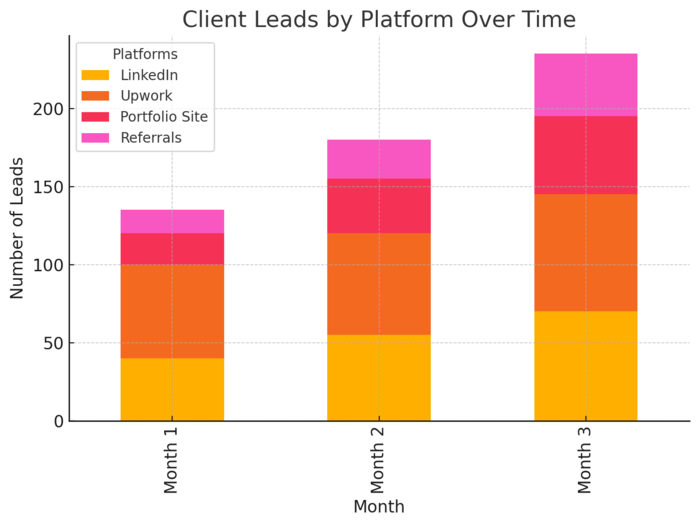
Your online presence is your storefront. It’s how potential clients decide whether you’re reliable, professional, and worth hiring as a freelance personal assistant.
The goal isn’t just to look good—it’s to build instant trust and make it easy for people to picture working with you.
Create a Personal Website or Portfolio That Sells Your Services
Think of your website as your 24/7 sales agent. Even if you’re just starting, a clean and simple site can make you look established.
Key sections to include:
- About Me: Share your story briefly. Explain who you help and how.
- Services: List your offerings clearly—calendar management, inbox organization, travel booking, etc.
- Testimonials: Social proof turns browsers into buyers.
- Contact Form: Make it effortless for clients to reach you.
I suggest using Wix or WordPress, as both let you drag and drop elements easily. A basic path looks like this: Dashboard → Pages → Add New Page → About → Publish.
If you don’t want a full website yet, create a digital portfolio using Notion or Google Sites. It can showcase your client projects, system templates, or screenshots of organized workspaces. The idea is to demonstrate your process visually—not just describe it.
Optimize Your Social Media for Freelance Branding
Clients often check LinkedIn or Instagram before hiring. Treat your social profiles like a mini landing page.
Here’s how to make them work for you:
- Use a professional headshot and consistent bio across platforms.
- Write a short, clear headline like: “Freelance Personal Assistant Helping Busy Founders Stay Organized.”
- Post helpful tips once a week. For example, share a quick time-management hack or your favorite tool for inbox zero.
I believe showing your personality helps, too. Clients want someone approachable, not robotic. If you’re using LinkedIn, use the “Featured” section to showcase portfolio links or client testimonials.
On Instagram, use Highlights to show your process—like setting up Notion dashboards or organizing Google Calendars.
Collect Testimonials and Build Credibility Quickly
When you’re new, credibility is your currency. The fastest way to earn it is through authentic testimonials.
Try these strategies:
- Start with small, unpaid projects for friends or startups in exchange for honest reviews.
- Ask happy clients for a short quote about your reliability or organization skills.
- Showcase testimonials visually—use Canva to create branded review cards for your website or LinkedIn banner.
I advise being proactive. Don’t just wait for clients to volunteer feedback—ask right after completing a project when satisfaction is high.
Something as simple as, “Would you be open to writing a short line about your experience?” can get powerful results.
Find Freelance Personal Assistant Jobs Online
Finding work as a freelance personal assistant requires strategy, not luck.
The key is knowing where clients look and how to position yourself so they can’t ignore you.
Best Platforms to Find Clients (Upwork, Fiverr, Freelancer, etc.)
The right platform depends on your experience level and niche.
Top choices to start with:
- Upwork: Great for long-term administrative contracts. Use filters like “Virtual Assistant” + “Remote” + “Part-time” to find relevant projects.
- Fiverr: Best for task-based gigs. Create service packages like “Manage your inbox for a week” or “Organize your calendar for $50.”
- Freelancer.com: Offers flexible project types for beginners.
A quick workflow example: On Upwork, go to Find Work → Search → Freelance Personal Assistant → Save Search so you get notified of new listings daily.
If you prefer more personalized work, check LinkedIn Jobs and Remote.co for startups hiring assistants directly. These usually pay better and offer ongoing roles.
How to Write Winning Proposals That Get Responses
Your proposal is your first impression—it decides whether a client opens your profile or skips it.
Here’s a format that works well:
- Start with personalization: Mention something from their post.
- Show understanding: Explain their problem briefly.
- Offer a clear solution: Describe how you’d handle the task.
- End with a confident close: Invite them to chat.
Example:
“Hi [Client Name], I noticed you’re looking for someone to manage daily scheduling and emails. I’ve supported busy founders using Google Workspace and Slack, and I can help streamline your workflow within a week. Could we schedule a 10-minute chat to discuss your current setup?”
I recommend keeping proposals short—under 200 words—and skipping clichés like “I’m passionate about organization.” Instead, show results or specific skills.
Use Networking and Referrals to Secure Long-Term Work
Most consistent work comes through word-of-mouth, not job boards. Networking helps you move beyond one-off gigs.
Here’s how to do it effectively:
- Reach out to past clients every few months to check in.
- Join Facebook or Slack groups for virtual assistants—many have job postings daily.
- Partner with freelancers in other roles (like content writers or social media managers). They often refer clients who need admin help.
I once got three retainer clients through a web designer who didn’t want to handle admin work. That’s the power of relationships. Keep conversations genuine and helpful, not transactional.
Manage Clients and Deliver Outstanding Service
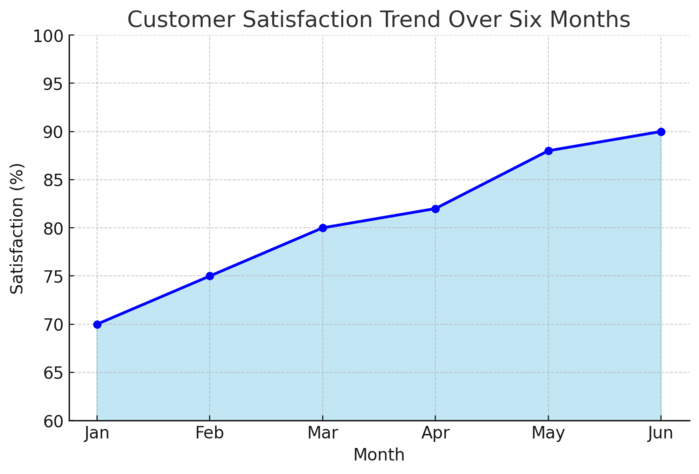
Once you land clients, your next goal is to keep them. Consistency, reliability, and professionalism are what transform short gigs into long-term contracts.
Set Clear Boundaries and Expectations from Day One
Boundaries protect both you and your client. Without them, burnout creeps in fast.
Before starting work, clarify:
- Work hours and response times (e.g., “I’m available 9 AM–5 PM EST, Mon–Fri”).
- Task scope (what’s included and what’s extra).
- Communication tools (Slack, email, or WhatsApp).
I suggest creating a simple client welcome packet in Google Docs that includes your availability, preferred tools, and process. It sets the tone early and avoids misunderstandings later.
Use Productivity Tools to Stay Organized and Efficient
The right tools can save hours every week. Think of them as your digital assistants.
My go-to tools include:
- ClickUp: For task tracking and project overviews.
- Toggl: To track billable hours for each client.
- Google Calendar: For daily scheduling and meeting reminders.
- Notion: For documenting SOPs (standard operating procedures) and client notes.
Example workflow: You can set up a ClickUp workspace, create a folder for each client, and then assign weekly tasks with deadlines. I’ve found clients love seeing transparent progress boards—it builds trust instantly.
Communicate Professionally and Handle Difficult Clients
Even the best assistants face tough clients. The key is staying calm, professional, and solution-oriented.
Here’s what works:
- Respond, don’t react. Take a breath before replying to complaints.
- Keep all communication written for clarity.
- Focus on the solution, not the emotion.
For instance, if a client complains about a missed task, reply with: “You’re right, I missed that update. I’ve already added a new check-in system to ensure it doesn’t happen again.” This response shows accountability and initiative.
From my experience, 90% of client conflicts can be solved through clear communication and consistent follow-up. When clients feel heard, they stay loyal—and often refer others.
Pro Tip: Treat every client like a partner, not a boss. When you shift from “taking orders” to “collaborating,” you’ll naturally attract better projects, higher rates, and long-term relationships that sustain your freelance business.
Scale Your Freelance Personal Assistant Career
Once you’ve built a stable income as a freelance personal assistant, the next step is scaling.
Scaling doesn’t just mean earning more—it means working smarter, taking on higher-value clients, and creating systems that allow you to grow without burning out.
How to Raise Your Rates and Transition to Premium Clients
Raising your rates isn’t about luck—it’s about strategy and confidence. When you’ve proven your reliability and built results, it’s time to charge what your expertise is truly worth.
Here’s how to approach it:
- Track measurable results: Show how your support improved client productivity or reduced workload. For example, “I cut meeting scheduling time by 40% using automated tools.”
- Upgrade your skills: Learn advanced tools like Notion dashboards, CRM systems, or Zapier automations that justify higher rates.
- Give clients notice: When increasing rates, send a polite message at least 2–4 weeks in advance.
I suggest positioning it as a value upgrade, not a price hike.
For instance: “I’ve recently expanded my services to include project automation, which has significantly improved client workflows. My new rate will reflect this added value starting next month.”
Premium clients—founders, executives, or established entrepreneurs—often pay more for initiative and discretion. To attract them, refine your branding, showcase testimonials from past clients, and emphasize reliability over affordability.
Outsource or Partner With Other Freelancers to Expand Capacity
There comes a point when you can’t do it all yourself—and that’s a good sign. Outsourcing allows you to take on more clients without lowering your standards.
Ways to scale efficiently:
- Hire subcontractors: Bring on other virtual assistants for specific tasks like inbox cleanup or research.
- Collaborate with specialists: Partner with a bookkeeper, social media manager, or writer to offer full-service support.
- Use automation tools: Platforms like Zapier or Make can handle repetitive workflows like sending meeting reminders or updating Trello boards automatically.
For example, you could delegate repetitive data entry tasks using ClickUp automations or hire a VA for 5 hours weekly to handle scheduling. That frees you up for client strategy and higher-paying responsibilities.
I believe the best freelancers don’t just “do”—they build systems that work even when they’re offline. That’s real growth.
Diversify Income Streams Through Retainers and Specialized Services
If you’re always chasing one-time gigs, you’ll never feel financially stable. Instead, focus on creating recurring income.
Three smart ways to diversify:
- Retainers: Offer packages for ongoing support (e.g., “20 hours per month of executive assistance”).
- Consulting: Teach small business owners how to streamline their own workflows.
- Digital products: Sell Notion templates, client management spreadsheets, or email automation checklists.
I once created a Notion-based task tracker and offered it as an add-on for my retainer clients. It became a small passive income stream—and impressed future clients who saw my systems expertise.
Scaling as a freelance personal assistant means thinking beyond hours worked. You’re not just trading time—you’re building a business that compounds value.
Overcome Common Challenges in Freelance Personal Assistance
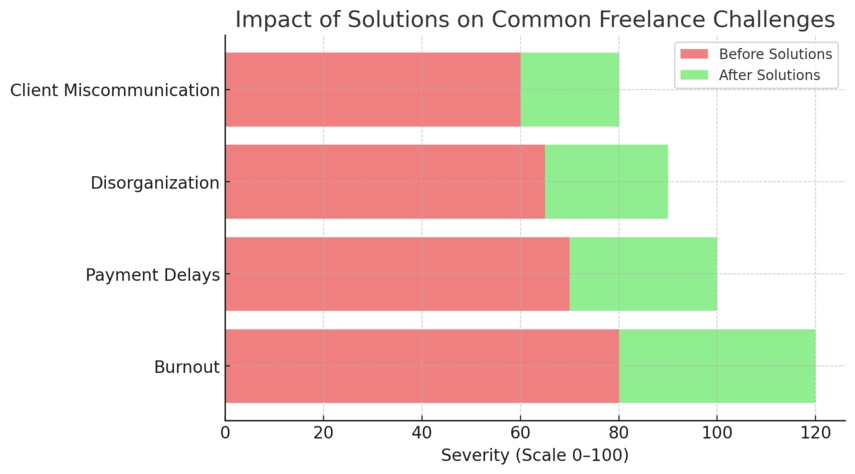
Every freelance personal assistant faces hurdles—juggling clients, managing payments, or staying focused when working solo.
These challenges are normal, but they can derail your progress if not managed properly.
Managing Multiple Clients Without Burnout
When you’re managing multiple clients, your calendar can become chaos fast. The secret is structure and honesty.
Here’s how to stay balanced:
- Use one central calendar (Google Calendar works best) with color-coded events per client.
- Schedule focused work blocks, then insert buffer time for switching tasks.
- Track total weekly workload—don’t exceed your mental bandwidth.
If you’re starting to feel stretched, I suggest communicating early. Clients appreciate honesty more than burnout. You might say, “I’m reaching my current capacity. Can we prioritize high-impact tasks for this week?” It shows professionalism and respect for their time.
Handling Payment Delays and Contract Issues
Payment issues are common, but they’re preventable with clear systems.
Best practices include:
- Always use contracts. Tools like HelloSign or PandaDoc let you sign and store agreements digitally.
- Use milestone or upfront payments for new clients (e.g., 50% before work starts).
- Send invoices through platforms like PayPal, Wise, or Wave that track payment status.
Example: If you invoice with PayPal, go to Tools → Invoicing → Create Invoice → Add Due Date → Send. The client receives automatic reminders before the deadline.
I advise adding a late payment clause—something simple like, “A 5% fee applies after 7 days.” It encourages timely payments without sounding harsh.
Staying Motivated and Consistent as a Remote Worker
Working alone can quietly drain your energy. The trick is building routines that keep you grounded.
Simple motivators that work:
- Start your day with a quick “stand-up”—list three main priorities.
- Join online communities like “Freelance Heroes” or “VA Savvies” for accountability.
- Reward yourself after major milestones (a walk, a good meal, a day off).
I’ve found that creating small wins keeps momentum alive. Even organizing your digital workspace at the end of the week can make Monday feel lighter. Freelancing is as much mental discipline as it is skill.
Tools Every Freelance Personal Assistant Should Use
The right tools are your secret weapon as a freelance personal assistant. They make you faster, more organized, and far more reliable in the eyes of your clients.
Project Management Tools (Trello, Asana, ClickUp)
These platforms help you visualize tasks and deadlines clearly.
- Trello: Uses drag-and-drop boards for to-do lists and projects. Example: Create a “Client Name” board → Add “To-Do,” “Doing,” “Done” lists → Move tasks across as you progress.
- Asana: Ideal for tracking larger team projects and dependencies. You can assign tasks, set due dates, and monitor progress on a single dashboard.
- ClickUp: My favorite for freelancers—it combines task management, docs, chat, and time tracking in one place.
I suggest picking one platform and mastering it deeply. Clients love when you introduce them to organized systems they can easily follow.
Communication Tools (Slack, Zoom, Google Meet)
Clear communication keeps your client relationships smooth.
- Slack: Perfect for day-to-day messages. Create dedicated channels for projects or departments.
- Zoom: Use for client check-ins and onboarding calls; record sessions for later review.
- Google Meet: Best for integrated scheduling if you use Google Calendar.
For instance, you can connect Google Meet with your calendar by selecting New Event → Add Conferencing → Google Meet. This saves time when sending invites. I advise testing your video and mic setup before every call—it shows professionalism.
Time Tracking and Payment Platforms (Toggl, PayPal, Wise)
Your hours and invoices need structure too.
- Toggl: Simple time tracker with reports you can export for clients.
- PayPal: Easy for international payments; integrates with many freelance platforms.
- Wise: Lower transaction fees for cross-border payments and multiple currencies.
I personally use Toggl to log time under each client, then export weekly summaries to include with invoices. It builds transparency and trust.
Expert Tips to Build a Sustainable Freelance Career
A long-term freelance career isn’t about working harder—it’s about working smarter and staying relevant. The goal is consistency, balance, and ongoing growth.
Keep Learning and Upskilling to Stay Competitive
The online world moves fast. What works today might be outdated next year.
Smart ways to stay sharp:
- Take short courses on Coursera, LinkedIn Learning, or Skillshare.
- Follow creators in the virtual assistant niche on YouTube for process ideas.
- Learn emerging tools like AI scheduling assistants or automation systems.
I recommend setting one “learning goal” every quarter—like mastering ClickUp automations or advanced Excel formulas. Small, consistent upgrades add immense value to your freelance profile.
Build Long-Term Client Relationships for Steady Work
Client retention is more profitable than constant outreach.
Practical strategies:
- Send monthly progress reports to show impact.
- Remember birthdays or milestones—small gestures build connection.
- Schedule quarterly feedback calls to refine your support.
In my experience, long-term clients often become referral sources too. One happy client can introduce you to three more, saving you endless marketing effort.
Create Work-Life Balance and Avoid Freelancer Burnout
Freelancing offers freedom—but without boundaries, that freedom can backfire.
Here’s how to protect your energy:
- Set “office hours” and stick to them.
- Use digital detox hours—no screens after a certain time.
- Schedule regular breaks or mini-vacations, even short ones.
I suggest blocking time in your calendar for yourself the same way you do for clients. Balance isn’t optional—it’s the foundation for longevity in freelancing.
Pro Tip: Treat your freelance personal assistant career as a living business, not a side hustle. The moment you invest in structure, clarity, and continuous growth, you stop chasing stability—you create it.

I’m Juxhin, the voice behind The Justifiable.
I’ve spent 6+ years building blogs, managing affiliate campaigns, and testing the messy world of online business. Here, I cut the fluff and share the strategies that actually move the needle — so you can build income that’s sustainable, not speculative.
Related posts:
 Best Freelancing Sites for Experienced Professionals: Maximizing Earnings
 Starting and Running a Successful Freelancing Business
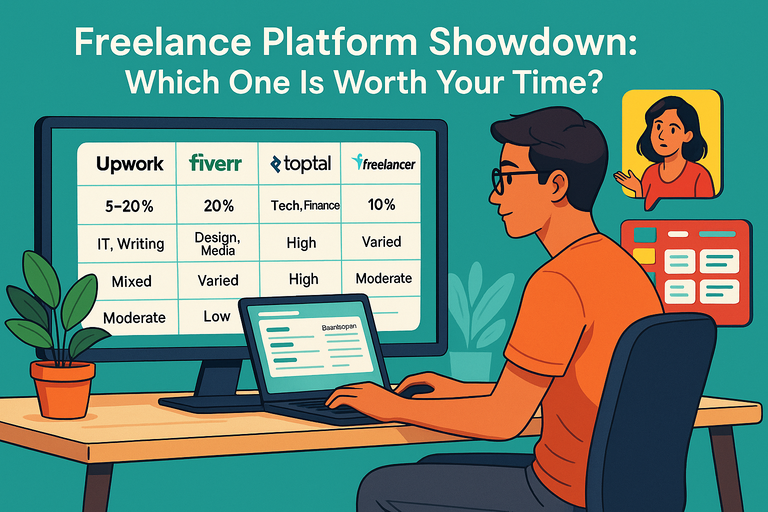 Freelance Platform Showdown: Which One Is Worth Your Time?
 How to Find Freelance Work Online in 2025
 Top Sites Similar to Fiverr for Creatives
 10 Skills to Master as a Freelance Administrative Assistant