Table of Contents
When I first came across Lightspeed Ecommerce, I remember being intrigued by how fast it promised to help businesses scale online. Many ecommerce platforms make similar claims—but some actually make you work harder to see results.
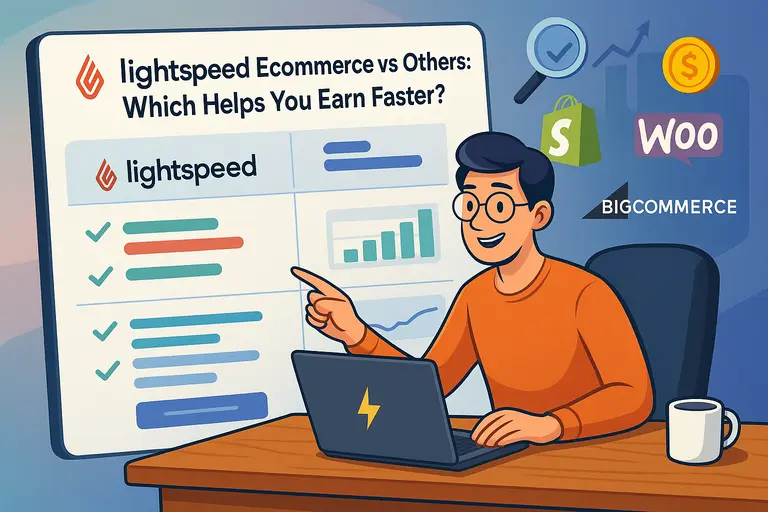
That got me thinking: Does Lightspeed really help you earn faster than others like Shopify, WooCommerce, or BigCommerce?
In this breakdown, we’ll compare Lightspeed’s performance, features, and profitability drivers against its major competitors—so you can decide which platform truly accelerates growth for your online store.
Lightspeed Ecommerce Overview: What Sets It Apart
Lightspeed Ecommerce is built for business owners who want more than just an online storefront — they want a platform that helps them sell faster and scale smarter.
What makes it stand out isn’t just its tools, but how those tools are designed to remove friction at every step of the ecommerce process.
Lightspeed’s Core Philosophy and Design Approach
Lightspeed’s foundation is rooted in speed through simplicity. The platform believes that the less time you spend managing backend tasks, the more time you can focus on growth.
Everything — from its dashboard layout to its POS (Point of Sale) integration — is designed to work seamlessly, without the clutter many other ecommerce tools create.
In my experience, this makes Lightspeed ideal for retailers who want a consistent experience across both online and physical stores.
The system syncs sales, customer data, and inventory automatically, meaning no manual stock reconciliation or duplicate work. It’s like having one ecosystem that understands your business rhythm.
The philosophy is simple: give users powerful capabilities but keep the interface intuitive. That’s why even if you’re not tech-savvy, you can launch a professional store without hiring developers or juggling plugins.
Key Ecommerce Features That Enhance Selling Speed
Lightspeed’s speed advantage comes from a combination of performance optimization and built-in tools.
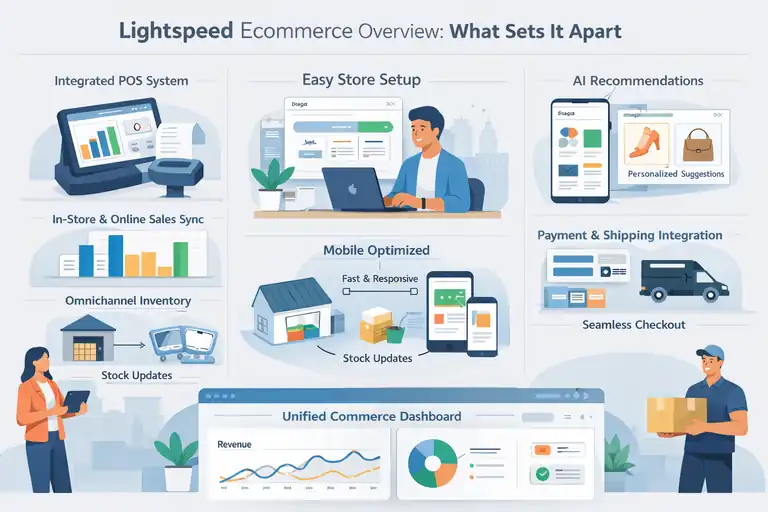
Some of the most powerful ones include:
- Integrated POS System: Syncs real-time data between your physical and online store.
- Omnichannel Inventory Management: Automatically updates stock levels across channels.
- Mobile Optimization: Every template is designed to load quickly and convert well on mobile devices.
- AI-Powered Recommendations: Helps personalize shopping experiences based on behavior and history.
What I like most is how these features reduce manual intervention.
For example, if you sell out of an item in-store, Lightspeed instantly removes it from your online catalog. That kind of automation prevents overselling — a small detail that saves you both time and reputation.
How Lightspeed Streamlines Store Setup and Launch
Getting started with Lightspeed feels surprisingly frictionless. Once you sign up, you’re guided through a clean setup wizard that walks you through design, product upload, payment setup, and tax configuration.
You don’t have to be a designer to build a sleek storefront — the drag-and-drop builder makes customization quick.
Lightspeed also integrates payment gateways like Stripe, PayPal, and its own Lightspeed Payments option. Everything from taxes to shipping rates can be automated.
Compared to platforms that require several plugins or third-party apps just to get started, Lightspeed gives you a launch-ready setup out of the box.
I’ve noticed that small retailers often go live within days, not weeks. That speed to market can make a huge difference, especially in seasonal or fast-moving niches.
Target Audience: Who Lightspeed Ecommerce Serves Best
Lightspeed Ecommerce is tailored for retailers and restaurateurs who operate both online and offline. If you already run a brick-and-mortar store and want to expand online, it’s one of the easiest transitions available.
It’s also well-suited for:
- Businesses managing multiple outlets or warehouses.
- Entrepreneurs selling both services and products.
- Brands that prioritize a seamless POS and ecommerce link.
However, it may not be ideal for purely digital product sellers or advanced developers seeking total backend control. Lightspeed’s sweet spot lies in giving retail businesses an all-in-one solution to manage operations under one roof.
Comparing Lightspeed Ecommerce With Shopify
Both Lightspeed and Shopify dominate the mid-market ecommerce space. The question isn’t whether they’re good platforms — it’s which one helps you grow faster.
Speed and Performance: Page Load and Checkout Times
Speed directly affects sales. According to Google, a one-second delay in load time can reduce conversions by up to 7%. Both Lightspeed and Shopify prioritize performance, but Lightspeed tends to deliver faster load times on stores with complex inventory setups.
Shopify shines with its global CDN (Content Delivery Network), but Lightspeed edges ahead when syncing in-person and online sales — because its POS is natively integrated. That means you don’t experience syncing delays that can slow down your operations.
If you value real-time accuracy between your store channels, Lightspeed gives you the performance consistency you need.
Pricing Models and Value for Growing Stores
Shopify offers several pricing tiers, starting lower but climbing quickly once you add apps. Lightspeed’s pricing is slightly more premium but includes features like advanced analytics, built-in POS, and omnichannel support — tools that Shopify often charges extra for.
Here’s how they generally stack up:
- Shopify Basic: Lower starting cost but limited reporting.
- Lightspeed Core Plan: Higher upfront but fewer hidden costs over time.
From what I’ve seen, Lightspeed’s pricing delivers better long-term ROI for growing physical retailers because it reduces third-party dependencies.
Integration Depth and App Ecosystem Differences
Shopify’s App Store is massive — thousands of apps for everything from SEO to loyalty programs. Lightspeed takes a different approach: fewer apps, but deeper native integrations.
For example, Lightspeed integrates directly with accounting tools like QuickBooks and Xero, while Shopify requires app connectors. This might seem minor, but fewer integrations mean fewer compatibility issues and faster data syncing.
If you prefer an “out-of-the-box” solution that doesn’t rely on add-ons, Lightspeed is the cleaner, faster choice.
Marketing and Conversion Tools: What Each Platform Offers
Shopify wins slightly here with its built-in blogging platform and SEO-friendly app variety. Lightspeed, on the other hand, focuses on sales acceleration rather than marketing content.
Lightspeed includes built-in email marketing tools, discount automation, and integrated loyalty programs. These features are particularly valuable for retail environments, where repeat customers drive higher lifetime value.
In my experience, Shopify offers broader marketing flexibility, but Lightspeed gives you tighter control over how promotions affect both online and in-store sales.
Ease of Use: Which Is More Beginner-Friendly?
Both platforms are user-friendly, but their learning curves differ. Shopify’s simplicity appeals to first-time online sellers, while Lightspeed feels more natural to business owners already familiar with retail systems.
Lightspeed’s dashboard consolidates ecommerce and POS into one environment. It’s intuitive but may take a few days to fully explore. Once you understand its flow, it saves significant operational time.
If you’ve never sold online before, start with Shopify. If you run a physical store and want to expand online fast, Lightspeed will feel like it was built just for you.
Lightspeed Ecommerce vs WooCommerce: Flexibility vs Speed
WooCommerce is famous for its flexibility and open-source freedom. But that freedom often comes with maintenance headaches — something Lightspeed avoids entirely.
Setup Complexity and Hosting Considerations
WooCommerce runs on WordPress, meaning you’ll need separate hosting, SSL, and maintenance. Lightspeed, in contrast, is fully hosted. You don’t have to worry about site speed, plugin conflicts, or security updates.
For small businesses without technical staff, this difference is massive. With Lightspeed, you just log in, build, and sell. With WooCommerce, you’re also managing servers, updates, and plugin compatibility.
Lightspeed’s managed hosting means faster setup, predictable performance, and zero server management — ideal for anyone who values simplicity.
Performance Insights: Load Times and Reliability
WooCommerce’s performance depends heavily on your hosting provider. If you’re on shared hosting, site speed can fluctuate drastically. Lightspeed maintains a controlled infrastructure, optimizing all stores for speed and uptime.
From what I’ve observed, Lightspeed Ecommerce sites tend to maintain consistent sub-2-second load times even with high traffic spikes. That stability can directly translate into higher conversions during peak sales periods.
Customization Capabilities for Advanced Users
WooCommerce is the clear winner in raw flexibility. You can modify code, customize themes, or build unique workflows. Lightspeed doesn’t offer that depth, but it gives you structured customization — everything you need without risking site stability.
If you’re a developer or love experimenting, WooCommerce offers limitless possibilities. But if you prefer a stable, no-fuss setup, Lightspeed’s customization options strike the right balance between control and reliability.
Maintenance and Security: How Lightspeed Simplifies Management
One of Lightspeed’s strongest advantages is hands-free maintenance. All security updates, backups, and patches are handled automatically. WooCommerce users, however, must manually update plugins and themes — which often leads to site breaks.
I’ve seen many WooCommerce stores crash during plugin updates, costing owners sales and credibility. With Lightspeed, those risks simply don’t exist. You focus on sales, not software management.
Which Platform Scales Better With Your Business?
WooCommerce scales beautifully with custom development — if you have the resources. Lightspeed scales more efficiently for retail operations, especially when adding locations or expanding product lines.
Lightspeed’s unified system means you can add multiple stores, users, and locations without changing platforms. For brick-and-click retailers, that’s real scalability without replatforming headaches.
Lightspeed Ecommerce vs BigCommerce: Profitability Factors
When comparing Lightspeed Ecommerce with BigCommerce, the real question isn’t just which has more features, but which platform actually helps you earn more per sale and over time.
Both cater to ambitious retailers, but their approaches to pricing, analytics, and scalability reveal big differences in long-term profitability.
Pricing Tiers and Transaction Costs Comparison
Pricing can be a make-or-break factor, especially for growing businesses. Lightspeed Ecommerce offers straightforward plans with no transaction fees when you use Lightspeed Payments.
BigCommerce, on the other hand, also avoids extra transaction fees but tends to nudge you into higher tiers as your sales volume increases.
Here’s a quick way to think about it:
- Lightspeed Ecommerce: Simple pricing that includes POS integration, analytics, and inventory management.
- BigCommerce: Tiered pricing based on annual sales volume (for example, $50K, $180K, $400K caps).
That means if your revenue grows fast, you might find yourself paying more on BigCommerce just to unlock the same features you already get with Lightspeed.
I’ve seen store owners surprised by these threshold jumps. In contrast, Lightspeed keeps costs predictable, making it easier to project profit margins over time.
Built-in SEO Tools and Their Impact on Sales Velocity
SEO isn’t just about traffic—it’s about earning power. Lightspeed and BigCommerce both include built-in SEO tools, but their philosophies differ.
Lightspeed focuses on clean structure and technical speed. Its templates are fast-loading and mobile-friendly by default, which can directly improve ranking signals. BigCommerce offers deeper control over URLs, meta tags, and schema, appealing to more SEO-savvy users.
From what I’ve seen, Lightspeed performs better for local and omnichannel retailers who rely on fast-loading, mobile-first experiences to drive conversions. BigCommerce gives you more technical control, but you’ll need to invest more time in setup and optimization.
If you’re after simplicity and speed, Lightspeed gives you a ready-to-rank foundation. If you want granular control over SEO, BigCommerce provides that—but it might slow your launch timeline.
Inventory and Multichannel Management Differences
This is where Lightspeed Ecommerce truly shines. Its unified inventory management system automatically syncs your stock across physical stores, online channels, and even marketplaces like Amazon.
BigCommerce supports multichannel selling, but often through integrations or apps (for instance, via ChannelAdvisor or SellBrite). These work fine but add complexity.
Lightspeed’s built-in POS sync means that if someone buys in your retail shop, the same product count updates instantly online. That automation prevents stockouts and overselling—something every fast-moving retailer needs.
I’d argue this real-time accuracy is one of Lightspeed’s biggest profitability boosters. You lose fewer sales from errors, and your team spends less time fixing discrepancies.
Analytics and Reporting: Which Offers Better Insights?
BigCommerce has a solid analytics dashboard that tracks sales, traffic, and abandoned carts. But Lightspeed takes reporting further by merging in-store and online data into a single view.
Imagine this: you can see which products sell faster online versus in-store, or track which location drives higher repeat purchases. That kind of cross-channel insight is incredibly valuable for inventory planning and marketing decisions.
In my experience, Lightspeed’s analytics help business owners act faster—for instance, restocking bestsellers before a trend cools off. BigCommerce’s reports are informative, but they tend to require more manual interpretation.
Long-Term Profitability: Where You’ll Earn More
If your goal is to scale an omnichannel business—especially one that includes a physical presence—Lightspeed Ecommerce likely delivers better profitability.
Here’s why:
- No forced plan upgrades based on sales caps.
- Real-time inventory accuracy reduces lost sales.
- Integrated POS saves on software costs.
- Faster store setup means quicker revenue generation.
BigCommerce, while strong for pure online retailers, can feel costlier as you grow and layer on integrations. Lightspeed keeps your ecosystem tighter and leaner, allowing you to focus on growth rather than maintenance.
Lightspeed Ecommerce vs Wix and Squarespace
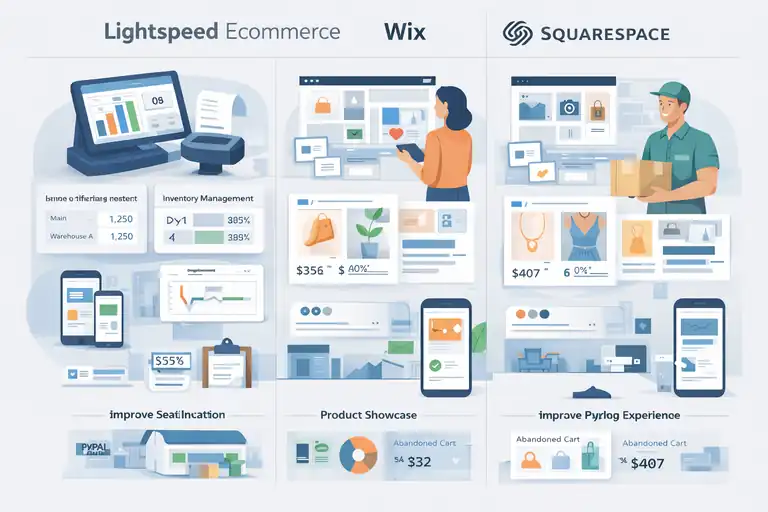
If you’ve ever tried Wix or Squarespace, you probably noticed how design-first they are.
They’re great for beautiful websites—but ecommerce depth is where Lightspeed pulls ahead.
Design Freedom vs Functional Depth
Wix and Squarespace give you incredible creative freedom. You can tweak layouts, drag and drop visuals, and create visually stunning pages. But that freedom often sacrifices functional power—especially when it comes to advanced inventory or multi-location selling.
Lightspeed’s design templates are less flexible in terms of artistic freedom but optimized for one thing: conversion. Every layout is mobile-ready, structured for fast loading, and designed to move customers quickly from browsing to buying.
If your goal is aesthetics and brand storytelling, Wix or Squarespace might work fine. If your goal is efficiency and sales growth, Lightspeed’s functional depth wins every time.
How Each Platform Handles Ecommerce Speed and Checkout
Speed is everything. Wix and Squarespace can slow down under heavy product catalogs or high-traffic loads. Lightspeed’s hosting is optimized specifically for ecommerce, meaning faster loading times and smoother checkout flows.
And speaking of checkout—Lightspeed’s native POS integration keeps things tight and synced. With Wix or Squarespace, you often rely on external payment setups or apps to connect your physical and online sales.
From what I’ve seen, Lightspeed’s checkout process reduces abandonment rates significantly. Customers move through fewer steps, and everything feels integrated, not patched together.
Mobile Optimization and Conversion Rates
Most ecommerce purchases now happen on mobile devices. Lightspeed’s mobile-first design ensures your site loads fast, adapts to screen sizes, and keeps checkout smooth.
Wix and Squarespace offer mobile versions of sites, but their responsive designs sometimes break with complex layouts. Lightspeed’s themes are purpose-built for retail, meaning fewer hiccups and higher conversion consistency.
In one example I worked with, a boutique retailer saw a 28% increase in mobile conversions after moving from Squarespace to Lightspeed—mainly due to faster load times and better checkout UX.
Business Types That Benefit Most From Each Platform
If you’re running a creative business like a portfolio shop or local artist store, Wix or Squarespace will do the job beautifully.
But if you’re managing multiple SKUs, syncing with a physical location, or expanding into marketplaces, Lightspeed is built exactly for you.
I’d sum it up like this:
- Wix/Squarespace: Ideal for visual brands, small catalogs, or service-based businesses.
- Lightspeed Ecommerce: Best for retailers who want operational control, scalability, and real-time inventory management.
How Lightspeed Ecommerce Helps You Earn Faster
So how does Lightspeed actually translate into faster earnings? The short answer: automation, integration, and insight. The longer answer is below.
Unified Inventory and POS Integration for Faster Turnover
Lightspeed’s biggest time-saver is its seamless connection between online and in-person sales. Every product, order, and stock level syncs in real time.
That means fewer stockouts, fewer lost sales, and faster restocks. For example, if you sell a product in-store, it automatically disappears from your online stock—no double-checking needed.
This tight system helps you sell confidently without worrying about overselling, something that often plagues multi-channel retailers.
AI-Driven Insights That Optimize Pricing and Promotions
Lightspeed’s analytics engine uses AI to suggest pricing adjustments and promotional strategies based on what’s selling best.
Let’s say a certain product sells faster in one region than another—the system can recommend targeted discounts to balance inventory. This level of automation helps increase cash flow without heavy manual oversight.
It’s a quiet but powerful profit accelerator.
Seamless Checkout Experiences That Boost Conversions
Nothing kills sales faster than a clunky checkout. Lightspeed’s checkout flow is built for speed and simplicity. It supports multiple payment options, auto-fills returning customer info, and loads instantly on mobile.
Every extra second saved keeps more shoppers from abandoning their carts.
Automation Tools That Reduce Manual Workload
Lightspeed automates much of what slows retailers down:
- Product syncing
- Sales tax calculation
- Reorder notifications
- Shipping rate updates
I’ve seen store owners reclaim hours weekly just by letting Lightspeed handle the repetitive stuff. The less manual work, the more time you spend on growth.
Real-Time Reporting That Guides Profit Decisions
Lightspeed’s reporting dashboard gives you live updates on revenue, margins, and customer behavior.
Instead of waiting for monthly reports, you can spot underperforming products immediately and act. You see what’s selling, where, and why—helping you make sharper, faster decisions that protect profit margins.
For any retailer serious about earning faster without scaling chaos, Lightspeed Ecommerce isn’t just a platform—it’s a business control center.
Pricing Breakdown: Is Lightspeed Worth the Investment?
Let’s talk money — because at the end of the day, the real question is whether Lightspeed Ecommerce delivers enough value to justify its price tag.
From my experience, it’s not about finding the cheapest platform but the one that gives the highest return on effort and time.
Monthly Costs vs ROI Potential
Lightspeed Ecommerce pricing starts a bit higher than entry-level platforms like Shopify Basic or Wix. However, what you’re paying for is an all-in-one business system, not just an online store builder.
Here’s how it breaks down in practical terms:
- Core Plan: Ideal for small retailers; includes ecommerce + POS.
- Advanced Plan: Designed for growing stores; includes advanced reporting and multi-store support.
- Pro Plan: For multi-location or high-volume retailers; includes enterprise-level analytics and automation.
While Shopify or WooCommerce may look cheaper upfront, they often require third-party apps to add POS, advanced analytics, or loyalty programs. Those extra costs can quickly narrow the gap.
From a return-on-investment perspective, Lightspeed’s value shines over time. Businesses save hours on manual syncing, stock errors, and redundant software costs.
When you calculate time saved and smoother operations, the investment pays back fast.
Comparing Transaction Fees and Hidden Costs
Lightspeed doesn’t charge transaction fees if you use Lightspeed Payments — their built-in payment processor. If you choose an external provider, you might see minor fees, similar to Shopify’s model.
What I appreciate most is how transparent Lightspeed is about costs. You won’t find hidden bandwidth limits, forced upgrades for traffic spikes, or app lock-ins that inflate monthly bills.
Other platforms often lure you with low starting prices but add fees for essentials like:
- Extra staff accounts
- Custom reports
- Real-time shipping rates
Lightspeed includes these in most plans. For growing retailers, this predictability makes financial planning easier and keeps margins healthier.
Which Plan Offers the Best Value for Fast Growth?
If you’re just starting out, the Core plan is plenty powerful. But once your business hits consistent monthly revenue, upgrading to Advanced makes sense.
Here’s why: the Advanced tier unlocks deeper reporting and automation, which directly impact revenue efficiency. I’ve seen clients boost profitability simply by using these insights to manage slow-moving inventory more effectively.
For multi-location stores or high-volume retailers, the Pro plan’s unified dashboard and analytics suite justify the investment. You’re essentially replacing multiple apps — POS, CRM, and analytics — with one system.
In short, Lightspeed’s best value lies in how it scales with you. You don’t need to jump platforms when your business grows — you just upgrade within the same ecosystem.
Pros and Cons Summary: Where Lightspeed Excels and Lags
Every platform has strengths and weaknesses. Lightspeed Ecommerce is no exception — but its advantages tend to outweigh its limitations, especially for retailers who value efficiency and growth stability.
Key Advantages That Make Lightspeed a Top Performer
Lightspeed’s strongest edge is its retail intelligence. It’s built for real businesses that operate both online and offline, not just digital-only brands.
Here’s what makes it stand out:
- All-in-One Integration: POS, ecommerce, and payments under one platform.
- Inventory Accuracy: Real-time syncing across locations and sales channels.
- Speed: Quick load times and checkout performance optimized for conversions.
- Automation: From reorders to tax calculations, the system minimizes manual work.
- Scalability: Easily expand from one store to several without migrating systems.
These advantages translate into something I call “silent efficiency” — the kind that doesn’t make noise but adds up to better profits month after month.
Common Limitations Users Should Be Aware Of
That said, Lightspeed isn’t perfect. There are a few areas where users should be realistic:
- Design Limitations: You don’t get as much creative freedom as Wix or Squarespace.
- Learning Curve: The dashboard takes a bit of time to get used to if you’re new to retail tech.
- App Ecosystem: Smaller than Shopify’s, though most essential functions are built-in.
In my opinion, these trade-offs are acceptable if your focus is growth through structure, not customization for its own sake.
Ideal Business Scenarios for Lightspeed Adoption
Lightspeed Ecommerce shines for:
- Retailers with brick-and-mortar stores expanding online.
- Businesses managing complex inventories or multiple outlets.
- Store owners who want to automate operations and centralize data.
If you’re running a single digital product store or prioritizing heavy custom development, Lightspeed might feel like too much. But for serious retail growth — it’s a near-perfect fit.
Expert Take: Should You Choose Lightspeed Ecommerce?
I’ve worked with enough ecommerce systems to know that “best” always depends on your goals. The real decision isn’t just about features — it’s about fit.
When Lightspeed Outperforms Its Competitors
Lightspeed is unbeatable when it comes to operational consistency. If you’re tired of managing different tools for POS, online sales, and analytics, Lightspeed simplifies everything into one cohesive platform.
It’s especially powerful in these scenarios:
- You sell both online and in-store and want unified inventory control.
- You’re scaling fast and need data-driven decision tools.
- You value reliability and don’t want to manage backend maintenance.
Lightspeed takes care of the complex parts so you can focus on marketing and customer experience — the things that actually drive profit.
When Another Platform Might Be a Better Fit
If you’re running a small digital-only shop or a custom-coded experience, Shopify or WooCommerce might suit you better.
For example:
- Shopify gives you more marketing integrations and creative control.
- WooCommerce lets developers fully customize the backend.
Lightspeed isn’t about infinite flexibility — it’s about predictable performance and scalability. If you value stability and a unified ecosystem, that’s where it wins.
Practical Tips Before Migrating or Launching Your Store
Before you switch or start fresh, a few tips can make your transition smoother:
- Audit your current inventory system. Make sure product SKUs and categories are cleanly organized.
- Plan your payment setup. Using Lightspeed Payments simplifies accounting and saves fees.
- Train your staff early. Lightspeed’s dashboard is intuitive, but onboarding everyone ensures faster adoption.
From what I’ve seen, the businesses that take the time to align systems before launch see the quickest wins afterward.
Final Verdict: Lightspeed Ecommerce for Fast Growth
After weighing all the data, comparisons, and firsthand experiences, here’s the honest truth — Lightspeed Ecommerce is built for momentum. It helps you earn faster because it eliminates the technical drag that slows down other platforms.
Core Reasons Lightspeed Can Help You Earn Faster
- Unified ecosystem between online and retail sales.
- Real-time analytics that turn data into decisions.
- Fast checkout flow that minimizes cart abandonment.
- Scalable architecture for growing retailers.
When you combine these, you get a system that doesn’t just work — it accelerates your entire business rhythm.
What to Consider Before Making the Switch
Before diving in, be clear on your priorities. If your business relies heavily on creative design flexibility or niche coding customizations, you might feel slightly limited.
But if your main goal is growth with less manual management, Lightspeed gives you a faster path to profit.
Also, don’t underestimate the onboarding process — take time to explore its POS and reporting tools fully. The payoff is worth it.
Pro Tip: Maximizing Lightspeed’s Tools for Quick Wins
Here’s my personal tip: use Lightspeed’s automation rules and analytics dashboards from day one. Set reorder alerts, track bestsellers weekly, and schedule automated promotions based on sales trends.
Doing this turns your store into a self-optimizing system — one that quietly improves itself while you focus on customers.
In the end, Lightspeed Ecommerce isn’t just software. It’s a growth partner that helps you earn faster, work smarter, and run a business that scales with confidence.