
Table of Contents
Some links on The Justifiable are affiliate links, meaning we may earn a small commission at no extra cost to you. Read full disclaimer.
If you’ve been searching for a transparent answer to Omnisend cost, you’re not alone. With so many pricing tiers and marketing automation tools bundled into its plans, it can be tricky to know what you’re really paying for—and what kind of value you’ll get in return.
So, how much does Omnisend actually cost, and which plan offers the best deal for your business? Let’s break it all down so you can make a confident, informed choice.
Understanding Omnisend Pricing Plans
Before diving into the details, it helps to know that Omnisend offers tiered pricing designed to match your business growth—starting with the Free plan, then moving up to Standard and Pro.
Each level unlocks more advanced tools for email, SMS, and automation as your needs scale.
Omnisend Free Plan Overview
Omnisend’s Free Plan is perfect if you’re just starting out or want to test the platform before committing. It’s not a limited-time trial—it’s genuinely free and includes many of the same automation and campaign tools that paid users get.
You can send up to 500 emails a month to 250 contacts. That means if you’re running a small shop or building your first email list, you can reach out without spending a dime. Y
ou’ll also get access to Omnisend’s intuitive drag-and-drop email builder, segmentation, and even web push notifications.
What I really appreciate is how hands-on the free version feels. You can still experiment with popups, landing pages, and signup forms, which makes it easy to start collecting leads and testing automation workflows.
Example setup path: From your Omnisend dashboard, go to Automations → Create Workflow → Welcome Series to set up your first automated greeting.
What You Get With The Free Plan
Even as a free user, Omnisend doesn’t hold back on core features. Here’s what’s included:
- Email Campaigns: Send promotional or newsletter-style messages to your list.
- Signup Forms & Popups: Build forms to grow your email and SMS subscribers.
- Segmentation: Create targeted lists based on subscriber behavior (e.g., “Visited product page but didn’t purchase”).
- Automations: Run basic workflows like Welcome Emails or Abandoned Cart reminders.
- Web Push Notifications: Send short, browser-based alerts to re-engage shoppers.
- Reports & Analytics: View key stats like open rates, click-throughs, and conversions.
This is enough to get small eCommerce brands or solopreneurs up and running with a real marketing system—not just a teaser.
Limitations Of The Free Plan For Growing Businesses
The free plan shines for testing and learning, but it quickly becomes restrictive as your contact list grows.
- Email Cap: You’re limited to 500 emails per month, which can be too tight for active stores.
- Contact Limit: Only 250 contacts are allowed, so scaling requires an upgrade.
- No Priority Support: You’ll rely on the help center and community instead of 24/7 support.
- Branding: Omnisend’s logo appears on your outgoing emails unless you upgrade.
- No SMS Credits: Text message marketing isn’t available under the free plan.
If you’re sending frequent campaigns, running multiple automations, or using SMS marketing, the Standard plan is usually the next logical step.
Omnisend Standard Plan Pricing Breakdown
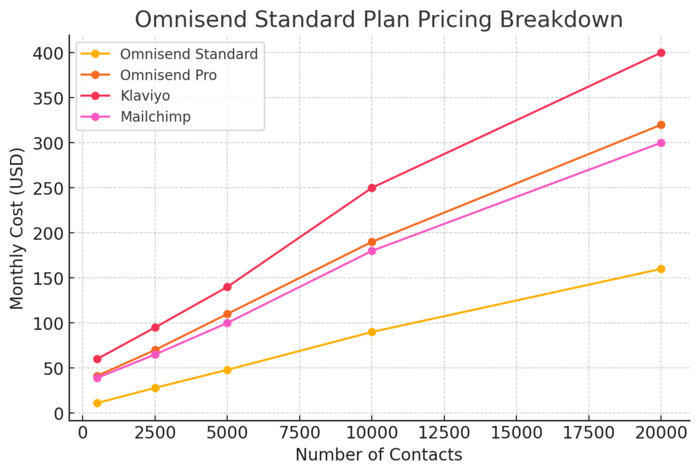
The Standard plan is where Omnisend starts to feel like a full-fledged marketing platform for small to medium-sized businesses.
It’s flexible, scalable, and removes most of the limitations from the Free plan.
Thinking About Upgrading?
How Much The Standard Plan Costs Per Month
As of the latest pricing, the Standard plan starts at around $11.20 per month when paid three months upfront. That covers up to 500 contacts and includes 6,000 monthly emails (12x your list size).
Pricing scales based on contact count:
- 2,500 contacts: roughly $25–$30 per month
- 5,000 contacts: around $45–$50 per month
It’s a simple sliding scale—you only pay more as your audience grows.
Omnisend also includes $1 in SMS credits to help you test text messaging before deciding if you want to add more.
Key Features Included In The Standard Plan
The Standard plan includes everything from the Free plan, plus several powerful upgrades that help you automate and personalize your marketing.
Here’s what you unlock:
- 6,000 Emails per Month: More breathing room for campaigns.
- Unlimited Web Push Notifications: Great for retargeting and urgency marketing.
- Email A/B Testing: Test subject lines, visuals, or call-to-action buttons for higher conversions.
- Campaign Booster: Automatically resend unopened emails with new subject lines.
- Account Expert Access (Optional): For tailored help with setup or strategy (available as an add-on).
- 24/7 Priority Support: Faster responses when you need help.
If you’re serious about building consistent communication with your audience, this plan gives you everything you need to do it efficiently.
When To Upgrade From Free To Standard
I usually recommend upgrading when:
- You’ve hit the 500-email monthly limit on the Free plan.
- You’re managing more than 250 contacts.
- You want branded, professional-looking emails without Omnisend’s logo.
- You’re starting to run multiple automation workflows (e.g., abandoned cart, post-purchase).
- You’re ready to explore A/B testing and optimization.
Think of it as the step where your marketing shifts from “trying it out” to “scaling strategically.”
Add-On Pricing For Personalized Content
One of Omnisend’s most valuable add-ons for Standard plan users is Personalized Content, starting from around $5 per month.
This feature allows you to:
- Dynamically recommend products based on a shopper’s browsing or purchase history.
- Display personalized blocks (e.g., “You might also like…” sections).
- Use behavioral data to tailor automations.
For example, you can create a conditional block that shows different products depending on whether a user viewed “Men’s Shoes” or “Women’s Apparel.”
I’d say this $5 add-on is well worth it—it turns ordinary campaigns into personalized experiences that can significantly increase conversion rates.
Omnisend Pro Plan Cost And Features
The Omnisend Pro Plan is designed for brands that are scaling fast and want powerful automation, deeper reporting, and integrated SMS marketing.
It’s best suited for teams that are already sending frequent campaigns and need more data-driven control over their marketing strategy.
See Omnisend’s Pro-level tools in action and check your real monthly cost. Start Free With Omnisend!
Pro Plan Monthly And Annual Pricing Details
The Pro plan starts at $41.30 per month when you pay for three months upfront.
This entry-level price covers up to 2,500 contacts and includes unlimited email sends, web push notifications, and SMS credits equal to your monthly plan price.
Pricing increases as your contact list grows. For example:
- Around $70–$80/month for 5,000 contacts.
- Approximately $100–$120/month for 10,000 contacts.
The best part is that Omnisend rewards commitment — paying upfront gives you a 30% discount, and you’ll also receive a monthly SMS credit bonus equal to your subscription amount.
If you prefer annual billing, you can save even more. From what I’ve seen, the yearly plan works out to roughly two free months compared to paying month-to-month.
Example UI path: From your dashboard, go to Billing → Manage Plan → Upgrade to Pro to see real-time pricing based on your contact volume.
Advanced Tools Included In The Pro Tier
The Pro plan goes beyond basic automation — it gives you everything needed to run a multi-channel marketing operation.
Here’s what makes the Pro plan stand out:
- Unlimited Emails & Web Push Notifications: No cap on your sends, perfect for larger mailing lists.
- Advanced Reporting & Analytics: Dive deeper into campaign metrics, automation performance, and sales attribution.
- SMS Marketing Integration: Send personalized messages globally with automation triggers like cart abandonment or birthday reminders.
- Custom Audience Sync: Automatically update Facebook and Google Ads audiences based on customer behavior.
- Account Expert Support: Personalized help from a dedicated specialist for setup, strategy, and optimization.
- Priority 24/7 Support: Instant access to Omnisend’s support team through chat or email.
If you’re handling serious email volume or running cross-channel campaigns, these features make a noticeable difference in efficiency and ROI.
Who Should Choose The Pro Plan
I suggest the Pro plan for eCommerce stores, marketing teams, or agencies that:
- Manage 5,000+ contacts and send frequent campaigns.
- Need data-driven reporting to optimize sales funnels.
- Run multi-channel automation, combining email, SMS, and push notifications.
- Want dedicated support to handle technical setup or strategic consulting.
In short, it’s the plan for marketers who don’t want to be limited by email volume or basic functionality. Once you start seeing consistent revenue from automation, the Pro plan usually pays for itself.
Monthly SMS Credits And Their Value
A key advantage of the Pro plan is the built-in monthly SMS credit bonus.
You get an amount in SMS credits equal to your monthly plan cost — so, if you’re paying $41.30 per month, you receive $41.30 worth of SMS messages.
Here’s why that matters:
- SMS messages typically cost between $0.015–$0.05 per text depending on the destination country.
- That means your monthly credits can easily cover 800–2,000 texts.
- These credits reset every month, ensuring consistent campaign potential.
If you’re running limited-time offers, flash sales, or restock alerts, those SMS messages are often the fastest way to drive conversions.
I’d say this inclusion alone makes the Pro plan worth it for any brand that takes mobile marketing seriously.
Custom Omnisend Pricing For Large Businesses
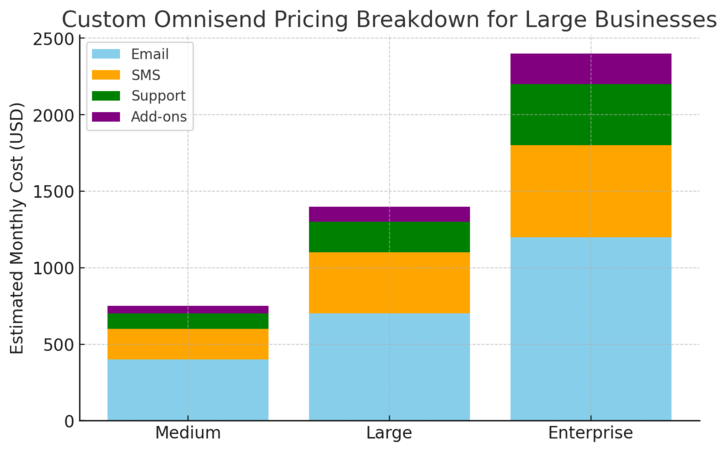
For enterprises or rapidly growing online stores, Omnisend offers a Custom plan that adapts to high-volume needs.
This plan provides more flexibility, deeper support, and enterprise-level features tailored to your operation.
What The Custom Plan Includes
Unlike preset tiers, the Custom plan is fully adjustable — you only pay for what you use. It includes everything from the Pro plan, plus extras like:
- Unlimited Contacts & Emails: No ceiling on growth or campaign volume.
- Dedicated Account Manager: Personalized onboarding and ongoing strategy support.
- Advanced Reporting Dashboards: Custom analytics tailored to your KPIs (Key Performance Indicators).
- Global SMS Messaging: Send campaigns to international audiences with better rates.
- Custom Integrations: API and developer support for advanced workflows.
- Free Migration Assistance: Omnisend’s team helps move your data, automations, and contacts seamlessly.
This is a truly “done-for-you” level of service, meant for brands managing tens or hundreds of thousands of contacts.
Benefits Of Custom Pricing For High-Volume Senders
The biggest advantage of the Custom plan is cost efficiency. When you’re sending millions of emails a month, paying per contact or per campaign becomes wasteful.
Omnisend negotiates pricing based on your specific send volume and frequency, which keeps costs reasonable.
Other benefits include:
- Scalability: You can add SMS, push notifications, or new users without hitting plan limits.
- Priority Support: Direct access to Omnisend’s expert team for faster issue resolution.
- Customization: Whether it’s automation rules or reporting formats, everything adapts to your business model.
I’ve noticed that brands using Omnisend’s custom tier often see smoother transitions when scaling campaigns internationally or adding new stores to their ecosystem.
How To Request A Personalized Quote
Getting a quote is easy and quick.
- Go to the Pricing page on Omnisend’s website.
- Scroll down to the Custom Pricing section.
- Click Request More Info or Let’s Talk.
- Fill in details like your monthly send volume, number of contacts, and key marketing channels.
After submitting, an Omnisend specialist usually responds within one business day with a tailored quote and feature breakdown.
It’s worth reaching out even if you’re unsure whether you qualify — the team often helps you find the best pricing structure, even for mid-sized businesses approaching enterprise scale.
Comparing Omnisend Plans Side By Side
Each Omnisend plan is designed for a different growth stage.
Understanding how they compare helps you decide which one delivers the best value for your goals.
Core Feature Comparison: Free vs Standard vs Pro
Here’s a quick comparison table based on current features:
| Feature | Free Plan | Standard Plan | Pro Plan |
| Email Sends | 500/month | 12x contact list | Unlimited |
| Contacts | 250 | 500+ | 2,500+ |
| SMS Credits | None | $1 trial | Equal to plan cost |
| Web Push Notifications | 500 | Unlimited | Unlimited |
| Email Automation | Basic | Advanced | Full Suite |
| Reporting | Basic | Standard | Advanced + Sales Tracking |
| Branding | Omnisend logo | Optional | Optional |
| Support | Standard | Priority | 24/7 Priority |
This table gives you a clear picture of where each plan fits in the growth curve.
Which Plan Offers The Best Value For Money
From my perspective, the Standard plan offers the best cost-to-feature balance for small to medium businesses. It gives you advanced automation, segmentation, and enough email volume to grow without breaking the bank.
However, if you’re running high-traffic campaigns or rely heavily on SMS marketing, the Pro plan quickly becomes the more cost-effective choice. The built-in SMS credit bonus alone can offset part of your subscription fee.
Meanwhile, the Free plan is ideal for newcomers but not sustainable once you pass 250–300 contacts.
Cost Efficiency Based On Business Size And Email Volume
Here’s how I’d sum up the cost efficiency by business size:
- Startups & New Stores: Free Plan – ideal for testing, learning, and small audiences.
- Growing Brands (500–5,000 contacts): Standard Plan – balance of automation, scalability, and affordability.
- Established Stores (5,000+ contacts): Pro Plan – powerful features with built-in SMS support.
- Enterprises or High-Volume Senders: Custom Plan – flexible pricing and unlimited capabilities.
If you’re still deciding, start small, track your engagement rates for a month, and then scale up when you see consistent ROI.
Hidden Costs And Add-Ons To Consider
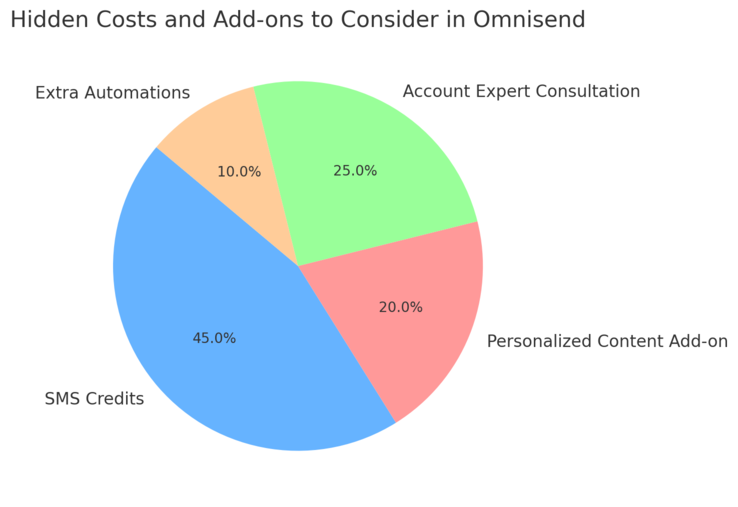
Omnisend is transparent about its pricing, but there are a few hidden or optional costs worth noting—especially if you’re planning to use SMS marketing or add personalization tools.
Knowing these details ahead of time helps you stay within budget while still getting the most out of the platform.
Understanding SMS Credit Costs
SMS marketing can be one of Omnisend’s most powerful features, but it’s also the main source of extra costs.
While the Pro plan includes monthly SMS credits equal to your plan cost, Standard users (and those on the Free plan) will need to buy credits separately.
Prices depend on where you’re sending messages:
- United States: Around $0.015 per SMS.
- Canada: Roughly $0.02 per SMS.
- United Kingdom: About $0.04 per SMS.
- Australia: Around $0.06 per SMS.
These small costs add up quickly if you’re running large promotional campaigns or global messages.
To manage spending, you can:
- Use SMS mainly for high-impact campaigns like flash sales or restock alerts.
- Segment your SMS audience to target only your most engaged customers.
- Monitor your SMS spend in Reports → Campaign Performance → SMS Summary.
I always advise testing a few small SMS campaigns before scaling. This way, you can see your conversion rate and calculate a realistic ROI before committing to bigger budgets.
Optional Add-Ons Like Personalized Content And Migration
Omnisend offers a few optional add-ons that can enhance personalization and ease your setup—especially if you’re migrating from another platform.
- Personalized Content (from $5/month): This add-on helps tailor campaigns by showing product recommendations, dynamic blocks, and behavioral triggers. For example, if someone viewed a specific category, you can show related products automatically in future emails.
- Migration Assistance (Free for Pro and Custom plans): Omnisend’s team will move your data, automations, and contact lists from another platform at no extra cost. If you’re on the Standard plan, this may incur a small one-time setup fee.
- Account Expert Consultation (around $400): For businesses that want help setting up advanced workflows or reports, this paid service connects you with a marketing expert directly inside Omnisend.
If you’re unsure which add-ons you need, start with none. You can always activate them later through Settings → Add-ons → Manage Subscriptions.
Tips To Avoid Overspending On Extra Features
Keeping costs efficient with Omnisend is all about strategy. I’ve noticed many users overspend because they unlock features too early or duplicate marketing workflows. Here are a few simple ways to avoid that:
- Start with Email First: Build consistent engagement through email before adding SMS automation.
- Review Reports Monthly: Identify underperforming workflows or low-ROI campaigns and adjust accordingly.
- Use Built-In Features: Many paid competitors charge extra for A/B testing or segmentation—Omnisend includes these by default, so use them fully.
- Set SMS Spend Alerts: Inside Billing → Credits → Manage SMS, you can enable usage notifications when you reach a certain threshold.
If you’re mindful about feature use, Omnisend’s pricing can stay remarkably fair—even as your contact list grows.
How Omnisend’s Pricing Compares To Competitors
Understanding how Omnisend stacks up against other marketing automation tools like Klaviyo, Mailchimp, and ActiveCampaign helps you see where its real value lies.
Each platform has its strengths, but Omnisend is unique for combining email, SMS, and web push automation in one affordable package.
Comparing Omnisend To Klaviyo, Mailchimp, And ActiveCampaign
Here’s a quick pricing comparison for around 2,500 contacts:
| Platform | Monthly Price | Email Sends | SMS Included | Web Push | Notable Features |
| Omnisend (Pro) | $41.30 | Unlimited | Yes (bonus credits) | Yes | Email + SMS + Push automation |
| Klaviyo | $60–$70 | 30x contact list | No | No | Advanced analytics, eCommerce focus |
| Mailchimp | $39–$60 | 10x contact list | No | No | Beginner-friendly, wide integrations |
| ActiveCampaign | $49 | Unlimited | No | No | CRM and sales automation |
Omnisend clearly wins on integrated channels and overall automation flexibility.
Klaviyo edges ahead slightly in analytics depth, while Mailchimp remains best for absolute beginners.
Value Analysis: Cost vs Functionality
From my experience, Omnisend hits the sweet spot for businesses that want serious automation power without enterprise pricing. You’re getting:
- Email, SMS, and push notifications under one dashboard.
- Unlimited sends on Pro and Custom plans.
- Advanced segmentation, product recommendations, and conditional content.
If you tried piecing these features together using separate tools, you’d likely spend double—or even triple.
For instance, combining Mailchimp for email, Twilio for SMS, and PushEngage for notifications could easily exceed $100 per month for a small business.
I believe Omnisend’s integrated model is what gives it the strongest long-term ROI.
Which Type Of Business Benefits Most From Omnisend
Omnisend works best for eCommerce and DTC (direct-to-consumer) brands, especially those using platforms like Shopify, WooCommerce, or BigCommerce. It’s also a solid choice for subscription-based businesses that need to nurture repeat buyers through automation.
You’ll benefit most if you:
- Sell products online and want email + SMS under one tool.
- Need behavior-driven automation (e.g., browse abandonment, upsells).
- Run frequent promotions or product launches.
- Value ease of use over steep learning curves.
If you’re a small service-based business, Mailchimp or Kit (ConvertKit) might feel lighter—but for anyone selling online, Omnisend usually delivers more marketing power for the cost.
How To Maximize Value From Your Omnisend Plan
Getting the most from your Omnisend cost isn’t just about picking the right plan—it’s about using its tools smartly.
The platform has incredible automation and segmentation potential if you know how to leverage it effectively.
Optimizing Email And SMS Automation To Justify The Cost
To fully justify your investment, focus on building automated flows that increase conversions and customer retention. Start simple:
- Welcome Series: Introduce your brand, offer a discount, and showcase bestsellers.
- Abandoned Cart Flow: Send a reminder 1 hour after cart abandonment, followed by an SMS 24 hours later.
- Re-engagement Campaign: Target inactive subscribers with a “We miss you” offer.
In Omnisend, you can set these up via Automations → Create Workflow → Prebuilt Ecommerce Flows.
Each of these flows drives measurable revenue, so tracking ROI becomes easier through Reports → Automation Overview.
Using Segmentation And A/B Testing Effectively
Omnisend’s segmentation is powerful because it lets you group customers based on behaviors like past purchases or email clicks. This makes campaigns far more targeted.
For example:
- Create a segment for “Opened 3+ campaigns in the last 30 days” and reward them with exclusive content.
- Build a “Cart Abandoners” list to send SMS reminders.
Then, pair this with A/B testing by experimenting with subject lines, visuals, or CTAs (call-to-action buttons). Go to Campaigns → Create Email → Enable A/B Test to start comparing versions.
Testing regularly can easily improve open rates by 10–20%, which compounds your ROI over time.
Pro Tip: Start With A Lower Tier And Scale Gradually
I always recommend starting with the Standard plan, even if your goal is to reach Pro later. It gives you enough room to learn Omnisend’s interface and optimize campaigns before committing to higher costs.
Once you begin seeing consistent results—say, a steady open rate above 25% and conversion growth—you can confidently upgrade to Pro for unlimited sends and SMS credits.
Scaling gradually ensures you’re not overpaying before you truly need the additional features. It’s how you stay lean while still building a sophisticated, automated marketing system.

I’m Juxhin, the voice behind The Justifiable.
I’ve spent 6+ years building blogs, managing affiliate campaigns, and testing the messy world of online business. Here, I cut the fluff and share the strategies that actually move the needle — so you can build income that’s sustainable, not speculative.
Related posts:
 Constant Contact Pricing: Which Plan Is Right for You?
 Pros and Cons of Omnisend Pricing for Startups
 Aweber Systems Review: Reliable Email for Marketers
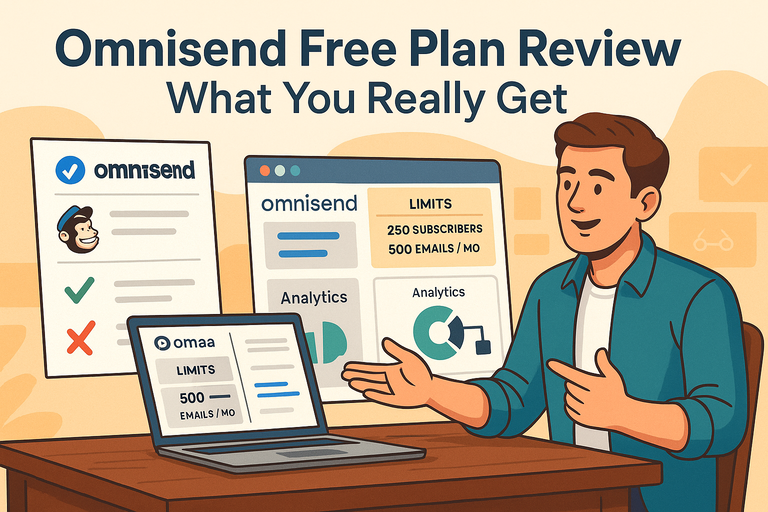 Omnisend Free Plan Review: What You Really Get
 How to Integrate Aweber with ClickFunnels
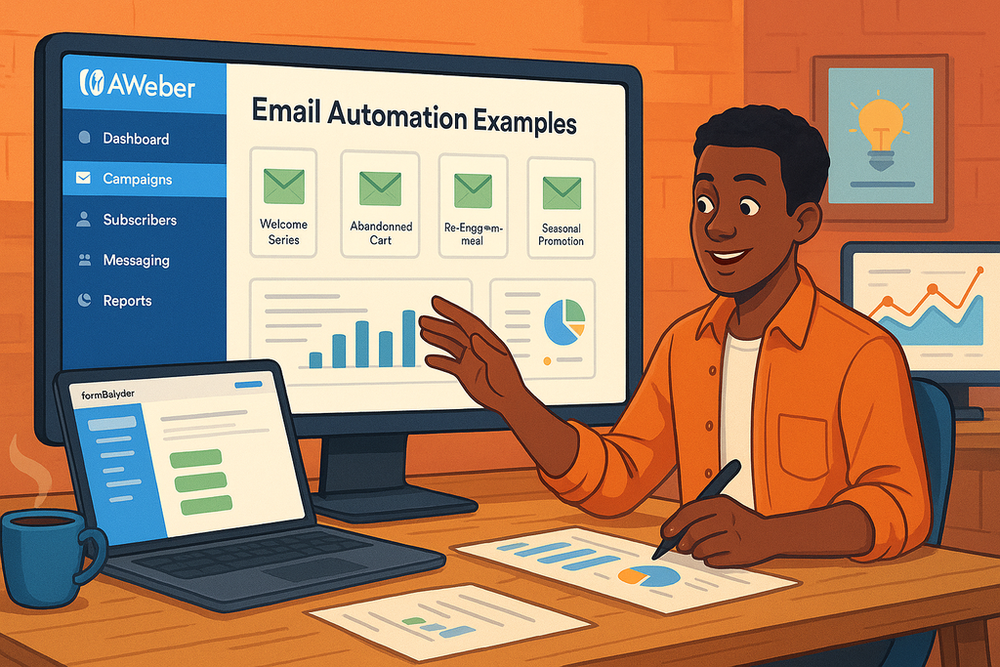 Aweber Email Automation Examples: Templates & Pro Insights