
Table of Contents
Some links on The Justifiable are affiliate links, meaning we may earn a small commission at no extra cost to you. Read full disclaimer.
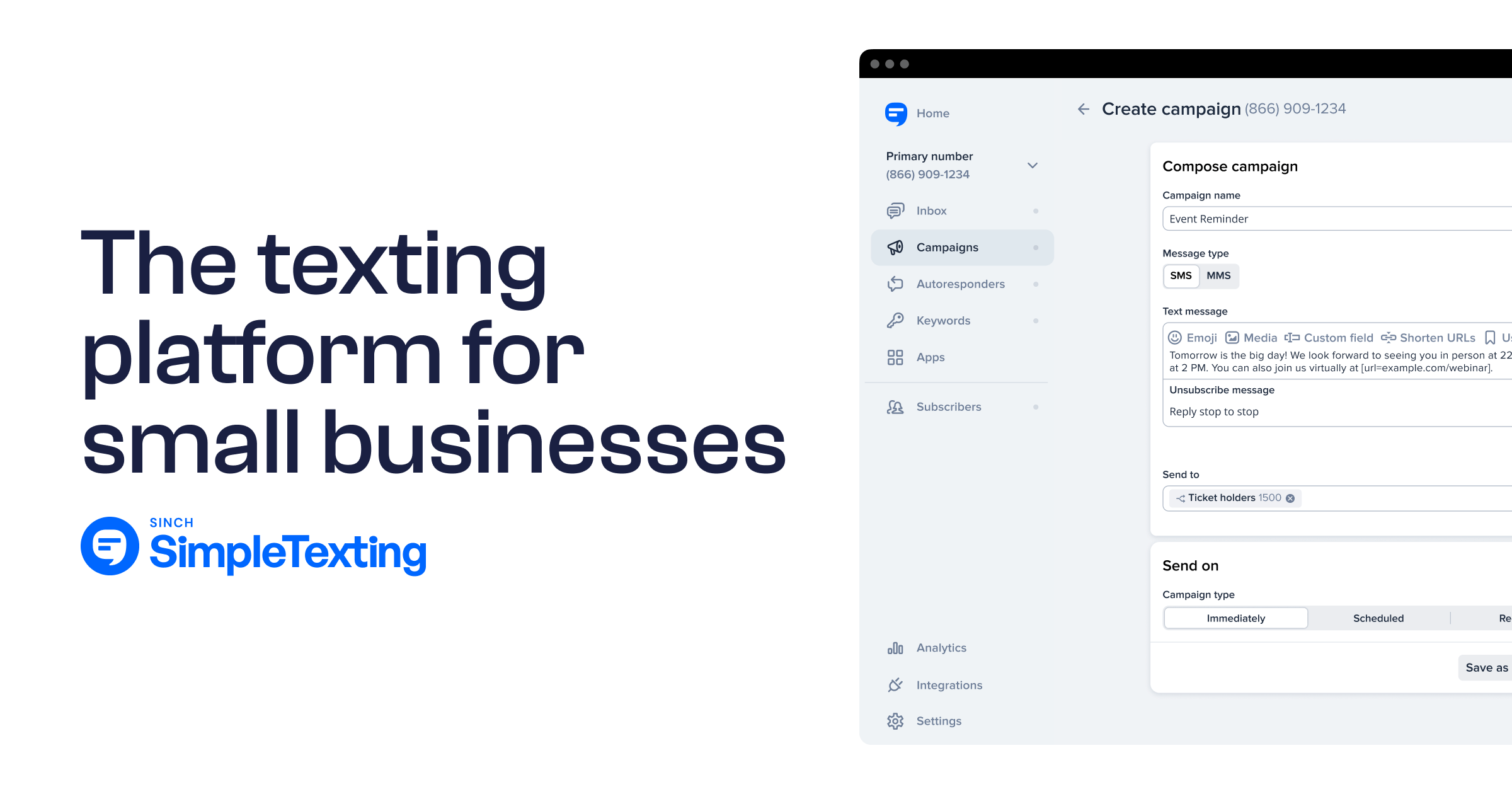
Simpletexting platform walkthrough guide is the kind of article I wish more software tutorials got right: less marketing fluff, more “show me exactly what to click, set up, and fix.”
If you’re trying to launch SMS for marketing, support, reminders, or list growth, SimpleTexting is built to get you live quickly with a free 14-day trial, no credit card required, plus core features like campaigns, two-way messaging, automations, keywords, and integrations.
In this guide, I’ll walk you through the platform step by step so you can set it up cleanly the first time.
Understand What SimpleTexting Is Built To Do
Before you touch settings, it helps to know what the platform is actually optimized for. SimpleTexting is not just a “send a mass text” tool.
It combines bulk SMS campaigns, one-to-one conversations, subscriber growth tools, automations, and integrations in one dashboard.
It also offers API access on all plans, which matters once you want your texting to connect with forms, ecommerce events, or internal systems.
What The Core Workspace Looks Like
When most people log into an SMS platform for the first time, they immediately jump to sending. I think that is the fastest way to create a messy account. In SimpleTexting, the smarter move is to understand the main operating areas first: contacts, campaigns, keywords, inbox, and automations.
Contacts are your subscriber database. This is where list quality either gets stronger over time or slowly turns into a compliance headache. Campaigns are for outbound sends, including promotional or informational blasts.
Keywords handle opt-ins, so when someone texts a word to your number, they can be added to a list and receive an automated response.
The inbox is where two-way conversations live. Automations help you send welcome texts, follow-ups, and more advanced behavior-based flows.
That setup is useful because it mirrors how SMS actually works in real life. First, someone joins. Then they get organized into a list or segment. Then you send campaigns or reply one-to-one. Then you automate the repetitive parts.
If you keep that mental model in mind, the dashboard starts to feel much more logical.
Choose Your Primary Use Case Before Setup
Here is the mistake I see again and again: people try to use one number for every possible workflow on day one. That usually creates confusing keywords, mismatched contact expectations, and reporting that is hard to interpret.
Instead, choose one primary use case before you configure the account. For most businesses, it will be one of these: promotional SMS marketing, customer service texting, appointment reminders, lead capture, or internal team communication.
SimpleTexting supports all of these directions, but your setup choices should reflect the one that matters most first.
Its platform specifically highlights two-way messaging, contact management, automations, and integrations as core strengths, which is why the platform works well for both marketing and conversational use cases.
Imagine you run a local salon. Your first use case might be appointment reminders and rebooking offers. A retail brand, on the other hand, may start with list growth and weekly campaign sends. A service company may care most about inbound support texts and quick replies.
I suggest writing your answer in one sentence before you start: “We are using SimpleTexting primarily to ___.” That sentence will guide every choice you make next.
Set Up Your Account And Pick The Right Number
This is the stage where you make foundational decisions that affect deliverability, cost, and how people experience your brand. Go slower here than you think you need to.
Start With The Trial And Learn The Pricing Model
SimpleTexting offers a 14-day free trial with no credit card required, which makes it easy to explore the platform before you commit. Pricing is usage-based and also depends on the type of number you want to use.
On the pricing page, SimpleTexting shows plan selection by message volume and number type, including local numbers, toll-free numbers, and dedicated short codes. It also notes that plans can be upgraded or downgraded as your needs change, and that extra credits are billed separately when you exceed your monthly allotment.
That matters because beginners often focus only on the monthly base price. In SMS, the real operating cost is usually a combination of message volume, number type, and carrier-related fees.
For example, the pricing page shows a local number option with same-day activation and additional carrier registration fees. It also shows that dedicated short codes start at $1,000 per month.
My advice is simple: Do not overbuy at the start. Estimate a realistic first-month volume, choose the lowest sensible plan, and adjust once you have actual send data. SMS scales fast, but waste scales fast too.
Decide Between Local, Toll-Free, And Short Code
Your number choice affects both brand perception and how you plan to use the channel. SimpleTexting’s pricing and feature pages highlight three main number paths: local numbers, toll-free numbers, and dedicated short codes.
| Number Type | Best Fit | What To Know |
|---|---|---|
| Local Number | Small businesses, regional brands, service teams | Shown in the pricing flow, with same-day activation noted for local numbers. |
| Toll-Free Number | National texting, support, broader brand reach | Available as a number-type option in the pricing flow. |
| Dedicated Short Code | High-volume programs, memorable opt-ins, large campaigns | SimpleTexting says short codes are 5–6 digits and pricing begins at $1,000/month. |
In my experience, most first-time users should not start with a short code unless they already have serious list size, budget, and a strong acquisition engine. A local or toll-free number is usually enough to prove the channel first.
A good rule is this: Pick the simplest number type that supports your immediate use case. You can always expand later.
Build A Clean Contact Structure Before Importing Anyone
This step looks boring, but it is where strong SMS programs quietly win. A clean account structure makes campaigns easier, replies easier, and reporting far easier.
Create Lists That Reflect Real Subscriber Intent
SimpleTexting lets you create lists and assign contacts as you import or collect them. In its contact import walkthrough, the platform shows creating a list first and then adding contacts manually or by file. When setting up keywords, it also lets you assign a keyword to an existing list or create a new one just for subscribers who join through that keyword.
That tells you something important: lists are not just storage bins. They should represent meaningful subscriber intent.
Here is a cleaner setup than most businesses use:
- Customers
- Leads
- VIP Buyers
- Event Attendees
- Support Conversations
- Employees
The point is not to create dozens of lists. The point is to separate people based on why they joined and what they expect from you.
Imagine someone texts in to get a coupon and someone else texts in for delivery updates. If they both land in the same list with no logic behind it, your next campaign risks feeling irrelevant to one or both groups. That is where unsubscribe rates start creeping up.
I recommend starting with three to five high-intent lists only. Keep them broad enough to manage, but distinct enough to target.
Import Contacts Carefully And Keep Consent Front And Center
SimpleTexting supports importing contact information, including phone numbers and additional fields like name, email address, and notes. That flexibility is helpful because personalization gets easier when your contact records are more complete.
But here is the part that matters more than convenience: SMS is permission-based. Even if you already know someone as a customer, that does not automatically mean you should drop them into a marketing list without documented consent.
SimpleTexting’s own nonprofit guidance emphasizes explicit permission and proof of consent before texting contacts.
So before you import, sort your contacts into three buckets:
- People with valid SMS consent.
- People who may have consent but need verification.
- People who should be invited to opt in first.
That one sorting step can save you a lot of pain later.
A realistic example: If you run an ecommerce store and you exported all customer phone numbers from checkout, do not assume every one of them opted in for marketing texts. Import only the compliant segment into promotional lists, then use email, website forms, or keyword campaigns to invite the rest to subscribe properly.
Set Up Keywords, Opt-Ins, And First Replies
This is where your list actually starts growing. And honestly, this is one of the strongest parts of the platform if you keep it simple.
Create Your First Keyword The Right Way
SimpleTexting explains that an SMS keyword is a word or phrase people text to your number to sign up for future text messages. It also says you can create multiple or unlimited keywords in your account and use them to build different contact lists by interest.
Its keyword setup walkthrough shows the flow clearly: go to Keywords, click Add Keyword, create the keyword, then connect it to an existing or new list.
This is one of those features that sounds basic but becomes powerful fast.
A good keyword should be easy to remember, easy to spell, and tied to a clear incentive or context. For example:
- SAVE10 for a first-purchase offer
- VIP for your loyalty club
- TOUR for an event venue walkthrough
- QUOTE for service estimates
I suggest avoiding clever words that require explanation. Cute branding is less important than frictionless opt-in.
Also, match one keyword to one intent whenever possible. If you use a single keyword for discounts, support, event reminders, and reviews, you are asking for a messy contact database. One keyword, one promise, one destination list. That structure pays off later when you begin segmenting and automating.
Write A Confirmation Message That Sets Expectations
Once a keyword is created, you need the first automated response to do more than say “thanks.” In SimpleTexting’s trigger and autoresponder materials, the setup process includes composing an auto-confirmation or autoresponder message after someone joins a list.
This message should do four jobs at once:
- Confirm the opt-in.
- Deliver the promised value.
- Set message expectations.
- Keep the tone human.
A weak version sounds like a system notification. A strong version sounds like a useful first interaction.
For example, a local gym might send: “You’re in. Welcome to FitZone texts. Here’s your free 3-day pass: [link]. We’ll text you 1–2 times a week with class updates and offers. Reply STOP to opt out.”
That works because it gives the benefit immediately and reduces uncertainty. People are far more likely to stay subscribed when the first message feels clear and honest.
I believe this is one of the easiest conversion lifts in the whole platform. A better confirmation message can improve trust before you even send your first campaign.
Launch Your First Campaign Without Burning Your List
Now that the account skeleton is in place, you can finally send. But this is where a lot of teams move too fast and create the wrong first impression.
Build A First Campaign Around One Goal
SimpleTexting’s two-way messaging page notes that SMS blasts can be sent from the Campaigns menu, while one-to-one texts can be sent from the inbox. That distinction is worth respecting. Campaigns should have one clear objective, not five competing ones.
A strong first campaign usually aims for one of these:
- Drive a purchase
- Confirm attendance
- Announce a launch
- Get a reply
- Bring people back after inactivity
The best beginner formula is simple: audience + one offer or update + one action.
Here is a realistic example for a boutique retailer: “Today only: take 15% off new arrivals with code TEXT15. Shop here: [link]. Reply if you want help picking a size.”
That message works because it is specific, timely, and easy to act on. It also opens the door to a reply, which gives you both conversions and conversations.
What I would not do is stuff your first message with a discount, store hours, support instructions, social media links, and a long brand intro. SMS rewards clarity. One message, one job.
Schedule, Test, And Segment Before Hitting Send
SimpleTexting supports scheduled sends, and its two-way messaging page also mentions features like templates and scheduled replies. Those may sound like small conveniences, but they are exactly the tools that help you avoid rushed mistakes.
Before you send any campaign, run this simple checklist:
- Send a test to yourself or your team.
- Check link formatting on mobile.
- Confirm the right list is selected.
- Make sure the message matches the reason people opted in.
- Schedule it for a time that fits the audience.
Imagine you are texting restaurant lunch specials at 4:30 p.m. That is not a platform problem. That is a workflow problem. Timing, relevance, and audience alignment still matter more than software.
Segmentation is what makes SMS feel personal without becoming manual. Even if you only have two segments at the start, that is better than blasting everyone with the same message every time. A list of 500 subscribers split into “new leads” and “active customers” will usually outperform one generic send to all 500.
That is not magic. It is just relevance.
Use The Inbox And Two-Way Messaging Like A Real Conversation Channel
One reason SimpleTexting stands out is that it is not built only for outbound blasts. It is also designed for actual back-and-forth texting.
Turn Replies Into Revenue Or Support Wins
SimpleTexting says its inbox holds replies to both individual texts and campaigns, and that users can reply there using tools like templates and AI Assist. It also highlights that incoming SMS messages are free on every plan and that all plans include unlimited contacts.
That combination matters more than many teams realize. Too many businesses treat replies as side effects when they should treat them as intent signals.
A reply often means one of three things: someone wants to buy, someone needs reassurance, or someone is confused. All three are valuable.
Let’s say you send a campaign for a service consultation and five people reply with pricing questions. That is not customer service noise. That is purchase intent. If your team answers quickly and clearly, the inbox becomes a conversion channel, not just a support queue.
I recommend creating a few reusable responses for common questions, but do not make everything sound robotic. Templates should speed up good conversations, not replace them.
Set Team Rules For Response Speed And Tone
This part is less glamorous, but it matters a lot once replies start coming in. If more than one person is handling conversations, you need operating rules fast.
Start with three:
- Who owns incoming replies?
- What response time is acceptable?
- Which messages need escalation?
SimpleTexting’s customer-service-oriented resources emphasize two-way texting and practical support use cases, which tells you the platform is meant to handle ongoing conversation workflows, not just one-off sends.
A simple service standard works well for most small teams: respond within 15 to 30 minutes during business hours, use first names when possible, and move edge cases to phone or email only when needed.
Tone matters too. Texting is naturally more personal than email. You do not need to sound casual in a sloppy way, but you should sound like a real human. Short, clear, helpful replies usually win.
In my experience, brands that respect the conversational nature of SMS get more value from the platform than brands that treat it like a one-way megaphone.
Add Automations After Your Manual Workflow Works
Automation is powerful, but only when it is built on a process that already makes sense. Do not automate confusion.
Start With Welcome, Follow-Up, And Triggered Replies
SimpleTexting promotes automated welcome messages, out-of-office texts, and more complex behavior-based texts on its main site. Its automation materials also describe workflows that tailor messages based on subscriber responses, while its autoresponder guidance explains that new subscribers to a selected list can receive a defined sequence.
That gives you a good starting roadmap. The first three automations I usually recommend are:
- Welcome text after opt-in.
- Follow-up message after a set delay.
- Keyword or trigger-based instant reply.
SimpleTexting also supports triggers, which act like subkeywords that send specific responses when certain words are received. The platform explains that you set these under a keyword by adding the trigger phrase and the matching response.
A practical example: A clinic could use a main keyword for joining reminders, then add trigger words like HOURS, LOCATION, or RESCHEDULE to answer common questions instantly. That cuts inbox load while still helping people quickly.
The key is to automate high-frequency, low-complexity interactions first.
Use Workflows To Personalize Without Overcomplicating
Once your basic automations work, you can move into smarter workflows. SimpleTexting’s automation pages describe behavior-based texts and workflows that branch according to user replies, which is useful for lead qualification, support routing, and nurture paths.
This is where many users go wrong by trying to build a giant chatbot on day one. I would not.
Instead, use lightweight branching logic around one practical decision. For example:
- Reply A if interested in product category one
- Reply B if interested in product category two
- Route follow-up based on that choice
That is enough to make the experience feel relevant without becoming fragile.
Imagine a real estate team using a keyword for property alerts. The first automated message asks: “Reply BUY for homes to buy or RENT for rentals.” That single split can improve the relevance of future campaigns dramatically.
Automation should reduce manual work and improve timing. If it creates more cleanup, more confusion, or more subscriber frustration, it is not good automation yet.
Connect Integrations And Measure What Actually Matters
Once the basics are live, the next leap is making SimpleTexting part of your broader workflow instead of a separate communication island.
Use Integrations Only When They Solve A Clear Problem
SimpleTexting has an integrations area and says it works with many common business tools. It also states that if a service has an API, its team can build advanced custom automations for specific needs, and the homepage notes API access on all plans.
That sounds exciting, but I want to be blunt here: most businesses do not need a complicated integration stack on day one.
Use integrations when they remove repetitive work or improve timing. Good reasons include syncing new leads from a form, pushing SMS subscribers into a CRM, sending order updates, or triggering texts from an event registration tool.
Bad reasons include “because automation is cool” or “because we want every tool connected to every other tool.”
I suggest waiting until you can clearly name the bottleneck. For example, if your team is manually exporting webinar registrants every week just to remind them by text, that is a solid automation candidate. If your current process takes two minutes and works fine, keep it simple for now.
Track Performance Beyond Just Sends
A lot of new users judge SMS success by how many messages went out. That metric is almost useless by itself.
What you really want to know is:
- How many people opted in?
- How many clicked?
- How many replied?
- How many converted?
- How many unsubscribed?
SimpleTexting’s platform and educational content repeatedly position the product around list growth, automations, segmentation, and real-time optimization through metrics and tracking.
For a beginner account, I would track five numbers every week:
| Metric | Why It Matters |
|---|---|
| Subscriber Growth | Tells you whether your opt-in system is working |
| Click Rate | Shows whether your offer and message are compelling |
| Reply Rate | Indicates conversation quality and buying intent |
| Unsubscribe Rate | Warns you when relevance is dropping |
| Conversion Rate | Connects texting to actual business results |
A healthy SMS program is not just “busy.” It is measurable. If you start tracking these from week one, optimization becomes much easier later.
Avoid The Common Mistakes That Make SMS Feel Spammy
By this point, the platform itself is usually not the problem. The mistakes are strategic and operational.
Sending Too Often, Too Broadly, Or Without Clear Value
The easiest way to wear out a text list is to overmessage people who never asked for that level of attention. Because SMS is personal and immediate, the tolerance for irrelevant messaging is much lower than with email.
This is where SimpleTexting’s keyword and list structure becomes important. Since the platform allows separate keywords, lists, automations, and segmented contact management, you have the tools to avoid broad, lazy sends.
The fix is usually straightforward:
- Text only when there is a real reason.
- Match the message to the subscriber’s intent.
- Keep frequency predictable.
- Give people a fast payoff for staying subscribed.
A realistic example: a boutique hotel might text reservation updates and an occasional upgrade offer. That makes sense. Daily generic promotions would probably feel intrusive.
I believe the best SMS programs protect attention like it is scarce, because it is.
Building The Account Backward
Another common mistake is configuring campaigns before fixing lists, automations before clarifying intent, or integrations before proving the core workflow. The result is a platform that technically functions but operationally drags.
The better sequence is the one we followed in this simpletexting platform walkthrough guide:
- Define the use case.
- Pick the number type.
- Structure contacts and lists.
- Build keywords and confirmation messages.
- Launch campaigns.
- Manage replies.
- Add automation.
- Connect integrations and reporting.
This order works because each step depends on the one before it. It is also how most mature SMS programs are built in practice, even if they look simple from the outside.
When things feel messy, I usually tell people not to add more features. I tell them to go back one step and clean the foundation.
Scale Your Setup Without Losing Simplicity
Once the basics work, scaling is less about adding complexity and more about increasing relevance, consistency, and useful automation.
Expand By Audience, Not By Random Feature Use
SimpleTexting offers enough functionality to support many teams at once, but that does not mean you should activate every feature immediately. Scale around audience needs instead.
A clean next phase might look like this:
- Add one new keyword for a second acquisition source
- Build one segment for high-intent contacts
- Create one nurture sequence for new subscribers
- Add one team workflow for inbox ownership
That kind of growth compounds because each addition solves a specific problem.
Imagine you run a multi-location service business. After proving one location can grow subscribers and book appointments through SMS, you can duplicate the framework for other locations with adjusted keywords, local offers, and routing rules. That is much smarter than rebuilding the system from scratch each time.
Know When To Get Help
SimpleTexting offers live support seven days a week, plus a help center and sales guidance, which is useful when you hit a setup wall or need to choose a more advanced path. Its contact page lists support availability as Monday through Friday from 8 a.m. to 12 a.m. ET and Saturday through Sunday from 10 a.m. to 5 p.m. ET.
I think this matters more than people admit. With SMS, small configuration mistakes can affect compliance, customer experience, and campaign performance. If something feels unclear, get it confirmed early instead of improvising.
That is especially true when you are evaluating advanced automations, custom API-driven setups, or higher-volume sending needs.
Final Thoughts
A good simpletexting platform walkthrough guide should leave you with a system, not just a screenshot tour. The platform gives you the building blocks: trial access, flexible number options, campaigns, keywords, two-way messaging, automations, integrations, and support.
The real win comes from setting them up in the right order and keeping the experience useful for the subscriber.
If I were starting today, I would do exactly this: pick one use case, build one clean list, launch one keyword, send one strong campaign, then improve based on replies and results. That approach is not flashy, but it is usually the fastest route to an SMS program that actually performs.

FAQ
What is the SimpleTexting platform used for?
The SimpleTexting platform is used for SMS marketing, customer communication, and automated text messaging. It allows businesses to send campaigns, manage contacts, collect subscribers through keywords, and handle two-way conversations. It is commonly used for promotions, reminders, support, and lead generation.
How do you set up SimpleTexting for the first time?
To set up SimpleTexting, create an account, choose a phone number type, organize contact lists, and set up a keyword for opt-ins. Then create a confirmation message and send your first campaign. This structured setup helps ensure better deliverability and a clean workflow.
What is a keyword in SimpleTexting and how does it work?
A keyword in SimpleTexting is a word people text to your number to subscribe to your list. When someone sends that keyword, they are automatically added to a specific contact list and receive a predefined response message, making it easy to grow and segment your audience.
Can you send automated messages with SimpleTexting?
Yes, SimpleTexting allows you to send automated messages such as welcome texts, follow-ups, and trigger-based replies. These automations are based on user actions like subscribing or replying with specific words, helping you save time and maintain consistent communication with your audience.
How does SimpleTexting handle two-way messaging?
SimpleTexting includes a shared inbox where you can send and receive text messages in real time. This allows businesses to respond to customer questions, provide support, and engage in conversations directly. Two-way messaging turns SMS into a communication channel, not just a broadcast tool.

I’m Juxhin, the voice behind The Justifiable.
I’ve spent 6+ years building blogs, managing affiliate campaigns, and testing the messy world of online business. Here, I cut the fluff and share the strategies that actually move the needle — so you can build income that’s sustainable, not speculative.
Related posts:
 SimpleTexting Features Overview: Tools That Drive Results
 10 Digital Marketing Affiliate Marketing Hacks That Work
 Easy Blog Maker Tools That Help You Earn Fast
 Blog Writing Format That Boosts Traffic and Earnings
 Make My Own Blog and Grow a Loyal Audience
 Create a Blog Post That Ranks and Brings in Traffic