
Table of Contents
Some links on The Justifiable are affiliate links, meaning we may earn a small commission at no extra cost to you. Read full disclaimer.
ClickMagick platform walkthrough guide is one of those searches people make when they are tired of guessing which clicks actually turn into leads and sales. If that sounds like you, you are in the right place.
I’ve seen a lot of marketers install tracking tools halfway, then wonder why the numbers feel messy or unreliable. This guide walks you through ClickMagick from setup to results in a practical way.
We’ll cover what it does, how to configure it, what to track first, how to read the data, and how to improve campaigns without getting buried in reports.
What ClickMagick Is And Why People Use It
ClickMagick helps you track clicks, conversions, traffic quality, and funnel performance in one place.
In simple terms, it shows you what happens after someone clicks your link, so you can stop relying on vague platform reports.
What The Platform Actually Does
At its core, ClickMagick is a link tracking and optimization platform. That means it creates trackable links, records where visitors came from, and helps you connect those clicks to results like opt-ins, purchases, upsells, or bookings.
If you run paid ads, email campaigns, affiliate promotions, or sales funnels, that visibility matters more than most people realize.
Many of us start out by trusting the built-in numbers inside ad platforms or affiliate dashboards. The problem is that those reports often live in silos. Your ad platform may report a click.
Your checkout tool may report a sale. Your email system may report an opt-in. But without a clean tracking layer in the middle, you still do not know which click created which result with confidence.
Here is where ClickMagick becomes useful:
- Trackable Links: Create custom links for campaigns, channels, and offers.
- Conversion Tracking: See which clicks lead to actions that matter.
- Traffic Quality Checks: Spot bots, low-quality visits, and suspicious activity.
- Funnel Visibility: Measure each step instead of only the final sale.
In my experience, this is why marketers stick with tracking tools after the initial setup pain. Once you can see cost per lead, earnings per click, and conversion rates by traffic source, your decisions become much less emotional and much more profitable.
Who This Guide Is Really For
This ClickMagick platform walkthrough guide is especially helpful if you fall into one of these groups. First, you might be a beginner trying to understand why everyone keeps talking about tracking links and postback URLs. Second, you might already have campaigns live but your reporting feels fragmented. Third, you may be scaling paid traffic and need cleaner attribution before spending more money.
Imagine you run a small ecommerce brand and send traffic from Meta ads, Google Ads, and email promotions. Without unified tracking, you may think one source is your winner simply because it produces the most clicks. But a different source might produce fewer clicks and far more buyers. That difference can completely change your budget decisions.
The same applies to affiliate marketers and lead generation businesses. If you are buying traffic and earning commissions, even a small gap in tracking can hide which placements are losing money. A campaign with a 2% conversion rate may look acceptable until you learn that half the clicks are low quality and never had a real chance to convert.
I believe the biggest value of ClickMagick is not “more data.” It is better judgment. The platform gives you a cleaner picture of what is working, what is leaking, and where to focus next.
How ClickMagick Works Before You Touch The Settings
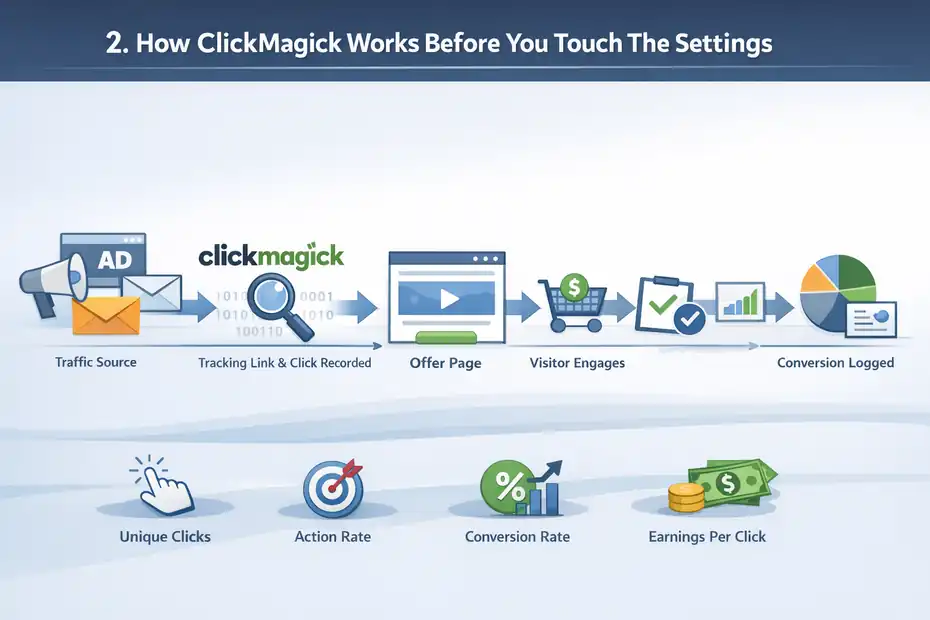
Before you build links or install tracking pixels, it helps to understand the basic logic behind the platform. Once the tracking flow clicks in your head, the setup becomes much easier.
The Basic Tracking Flow In Plain English
Here is the simplest way to think about it: someone clicks your tracking link, ClickMagick records that click, sends the visitor to your destination page, and then logs any conversion events that happen later.
That destination might be a landing page, checkout page, webinar registration, affiliate offer, or booking funnel.
The sequence usually looks like this:
- Traffic Source Sends A Click: This could be an ad, email, social post, or banner placement.
- ClickMagick Records The Visit: It stores useful details such as timestamp, source, device, and location.
- Visitor Lands On The Offer Or Funnel: They continue through your pages as normal.
- Conversion Event Fires: A pixel, postback, or page rule tells ClickMagick a result happened.
That is the whole game. ClickMagick sits between the traffic source and the result, giving you a bridge that connects both sides.
One practical point many beginners miss is that not every click has equal value. Two campaigns can send the same number of visitors but produce very different outcomes. That is why metrics like unique clicks, action rate, conversion rate, cost per acquisition, and earnings per click become more useful than raw click volume.
When I first started using tracking platforms, I thought the magic was in link creation. It is not. The real value is in understanding how clicks move through a funnel and where they drop off. Once you see that clearly, optimization becomes far less random.
The Core Terms You Need To Know
A lot of confusion comes from the vocabulary, not the platform itself. Let me simplify the main terms you are likely to see inside ClickMagick.
- Tracking Link: A special link that records the click before redirecting to your real destination.
- Campaign ID Or Sub-ID: A label attached to a click so you can identify traffic source, ad, placement, or audience.
- Unique Click: One individual visitor clicking, rather than every repeated click.
- Conversion: A tracked action such as an opt-in, sale, or appointment booking.
- Pixel Tracking: A small script or image call that reports an action back to ClickMagick.
- Postback Tracking: A server-to-server method where another platform sends conversion data directly.
- Split Test: Sending traffic to more than one page or offer to compare performance.
These terms sound technical at first, but each one maps to a practical business question. A unique click answers, “How many actual people clicked?” A conversion answers, “Did they take the action I wanted?” A split test answers, “Which page performs better?”
If you keep translating platform language into business questions, the tool becomes much easier to use. That mindset also keeps you from overcomplicating your setup. You do not need every feature on day one. You need enough structure to trust your numbers.
Setting Up Your Account The Right Way
This is where most people either build a clean foundation or create reporting headaches they carry for months. A little structure upfront saves a lot of cleanup later.
Organize Your Tracking Before Creating Anything
Before you create your first link, decide how you want to name campaigns, offers, and traffic sources. I strongly suggest using a naming system that tells you three things instantly: where the click came from, what the promotion is, and what stage of the funnel it belongs to.
A practical naming format could look like this:
- Source-Offer-Angle-Date
- Channel-Funnel-Step-Version
- Platform-Campaign-Audience-Creative
For example, a link name like meta-leadmagnet-retargeting-v1 is far more useful than test-link-3. Six weeks from now, that clarity matters. When accounts grow, vague names create friction every time you review reports or troubleshoot a drop in conversions.
It also helps to decide which outcomes you will track first. For most users, the smartest starting point is one primary conversion and one secondary conversion. A primary conversion might be a sale or qualified lead.
A secondary conversion might be a landing page opt-in or cart start. This gives you enough data to improve performance without making the setup too fragile.
Here is a simple structure I recommend:
| Tracking Element | What To Include | Why It Matters |
|---|---|---|
| Link Names | Source, funnel, audience, version | Makes reports readable |
| Conversion Goals | Primary and secondary actions | Prevents overtracking |
| Traffic Labels | Campaign, ad, placement | Helps isolate winners |
| Funnel Steps | Opt-in, checkout, upsell | Finds drop-off points |
In my experience, organized tracking is what separates people who “have ClickMagick” from people who actually use it well.
Connect Your Domain And Clean Up Link Branding
Most users eventually want branded tracking links instead of generic ones. A branded domain improves trust, looks more professional, and often leads to better click-through rates than ugly raw links. It also keeps your links consistent across campaigns.
For example, compare these two options in a real campaign:
trackingdomain.com/product-arandom-tracker-link.com/abc123
The first looks intentional. The second can feel suspicious, especially in email or social media environments where trust is fragile.
When setting up your custom tracking domain, the goal is simple: connect a domain or subdomain you control so ClickMagick can generate links under your branding. Many users choose a subdomain such as go.yourbrand.com or track.yourbrand.com. That keeps it separate from the main website while still feeling familiar to the user.
A few practical suggestions matter here. Use one consistent domain for most campaigns instead of changing it all the time. Keep slugs short and readable. Avoid cluttered naming with random numbers unless the campaign requires it. And test your links manually after setup so you know they redirect properly on both desktop and mobile.
I suggest thinking of your tracking domain as part of your brand experience, not just a technical detail. When people click links they recognize and trust, every step after that gets a little easier.
Creating Your First Tracking Links And Campaigns
This is the point where ClickMagick starts becoming useful in a visible way. Once your first links are live, you can begin collecting the kind of data that changes campaign decisions.
Build Links Based On Clear Intent
Not every link should be built the same way. The best structure depends on what you are trying to learn. A link for a lead magnet campaign should not necessarily be set up the same way as a direct-to-offer affiliate promotion.
Start by asking one question: what do I want this link to tell me? Usually the answer is one of these:
- Which source brings the best traffic
- Which ad creative generates the best conversion rate
- Which audience segment produces the most revenue
- Which landing page variant performs better
Once you know the question, link setup becomes much easier. Each link should have a single purpose. I advise against cramming multiple unknowns into one link because it makes the reports hard to interpret.
A simple campaign example might look like this:
- Google Search ad to a lead magnet page
- Email follow-up to a sales page
- Retargeting ad to a checkout page
- Affiliate promo to a bridge page
Each of these deserves its own tracking structure. If you lump them together, you lose the ability to see which campaign logic is actually driving results.
This sounds obvious, but it is a common mistake. People often create “master links” that hide too much detail. Then they cannot tell whether the drop in performance came from the source, the page, the audience, or the creative. Separate links create cleaner answers.
Use Sub-IDs And Labels Without Making A Mess
Sub-IDs are one of the most valuable parts of a link tracking workflow. They let you pass extra information with each click so you can break reports down later. That might include ad ID, placement, keyword, email segment, or creator name.
Let’s say you are running the same landing page from three paid placements. Without sub-IDs, all clicks may look identical in your dashboard. With sub-IDs, you can see that Placement A has a low opt-in rate, Placement B drives decent leads, and Placement C brings buyers who spend more.
Here is a simple way to keep sub-ID usage clean:
| Sub-ID Type | Example | Best Use |
|---|---|---|
| Campaign | spring-launch | Separate high-level promotions |
| Ad | video-hook-2 | Compare creatives |
| Placement | sidebar-blog-a | Measure traffic source quality |
| Audience | warm-list | Compare segments |
| Keyword | click-tracking-tool | Review search intent quality |
The key is restraint. Use labels that answer real business questions. Do not track ten variables just because the option exists. Too many dimensions create noisy reports and make optimization slower, not smarter.
From what I’ve seen, a lean structure wins. Track the main source, the main creative, and the main conversion. Once that works, add more detail only where it helps you make a better decision.
Installing Conversion Tracking That You Can Trust
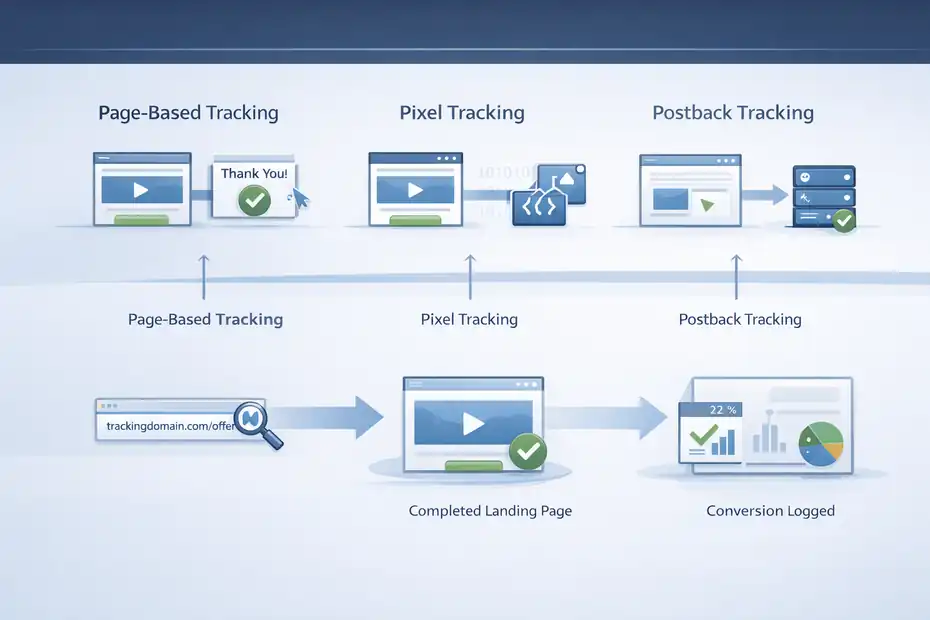
A tracking link is helpful, but without conversion tracking, it is only half the picture. This is the step that turns click data into business data.
Choose The Right Conversion Method
ClickMagick generally supports a few common ways to track conversions. The right method depends on your funnel setup, your level of control over the pages, and how precise you need the attribution to be.
The most common options are:
- Page-Based Tracking: A conversion is recorded when someone reaches a thank-you or confirmation page.
- Pixel Tracking: A script or code snippet fires when a key action happens.
- Postback Tracking: Another platform sends conversion data directly to ClickMagick.
For beginners, page-based tracking is usually the easiest place to start. If someone opts in and lands on a thank-you page, that page visit can represent the conversion. This works well for leads, webinar registrations, and simple sales funnels.
Pixel or postback tracking tends to be more robust for advanced setups, especially when you need to track order value, lead quality, or platform-to-platform attribution with more precision. These methods are often better when checkouts happen off-site or when multiple actions occur after the initial click.
I believe the smartest move is to start with the simplest method that still gives you accurate reporting. If your setup is fragile, you will spend more time debugging than optimizing. Reliable and slightly simple beats advanced and broken every time.
Test Every Conversion Path Manually
This is one of the least glamorous steps and one of the most important. After installing conversion tracking, run through the funnel yourself. Click your own tracking link, complete the desired action, and confirm that the conversion appears correctly.
Test at least these points:
- The tracking link redirects properly.
- The landing page loads fast and looks correct on mobile.
- The conversion event fires on the intended action.
- The result appears in your dashboard with the right label.
- Duplicate actions do not inflate your numbers unnecessarily.
Imagine you are tracking leads for a consulting business. You might have a landing page, booking form, and confirmation page. If the form works but the confirmation page does not load consistently, you could underreport conversions and think the campaign is underperforming. That leads to bad decisions fast.
A practical benchmark I use is this: If I cannot verify the full journey myself, I do not trust the campaign data yet. That small discipline prevents expensive errors later, especially with paid traffic.
The truth is, most “bad campaign performance” problems at the start are really tracking setup problems. Manual testing helps you separate the two.
Reading The Dashboard Without Getting Overwhelmed
Once the clicks start coming in, the next challenge is interpretation. A lot of users open the dashboard, see a dozen metrics, and freeze.
The answer is to focus on decision-making metrics first.
Know Which Metrics Matter Most First
Not every number deserves equal attention. When you are getting started, I recommend focusing on the small set of metrics that directly influence your next action.
These usually include:
- Unique Clicks: How many real visitors came through
- Conversion Rate: The percentage of visitors who took the desired action
- Cost Per Acquisition: What you spent to generate each lead or sale
- Earnings Per Click: How much value each click produced on average
- Traffic Quality Indicators: Whether the clicks look legitimate or suspicious
These metrics tell a story together. For example, a campaign with high click volume and poor conversion rate usually points to a message mismatch, weak landing page, or low-quality source. A campaign with low click volume but high earnings per click may deserve more budget even if it looks “smaller” at first glance.
Here is a quick reference table:
| Metric | What It Answers | Why You Should Care |
|---|---|---|
| Unique Clicks | How many real visitors arrived | Prevents false confidence from duplicate clicks |
| Conversion Rate | How well the page or offer works | Finds funnel inefficiencies |
| CPA | What each result costs | Protects margins |
| EPC | Revenue per click | Helps compare campaigns fast |
| Quality Score Signals | Whether traffic is trustworthy | Reduces wasted spend |
In my experience, most good optimization decisions come from comparing only three things at once: traffic quality, conversion rate, and profitability.
Learn To Diagnose Patterns Instead Of Chasing Noise
A single bad day does not always mean a campaign is broken. A single good spike does not always mean you found a winner either. The dashboard becomes useful when you learn to spot patterns over enough data.
Here are a few examples of what patterns can mean:
- High Clicks + Low Conversions: Traffic is curious but not qualified, or the page promise does not match the ad.
- Low Clicks + High Conversions: The message is strong but reach is limited.
- Good Opt-Ins + Weak Sales: The lead magnet may attract the wrong audience.
- Strong Desktop Results + Weak Mobile Results: The page or checkout may be clunky on phones.
This is where many marketers improve quickly. Instead of asking, “Is this campaign good?” ask, “Where is the friction?” That shift changes everything.
I suggest reviewing your data in layers. First check source-level performance. Then page-level performance. Then device or segment-level performance if needed. That process helps you find the actual issue without making random changes.
A useful mini scenario: Imagine your campaign gets a solid click-through rate, but the conversion rate drops by 40% after a landing page redesign. The source probably is not the issue. The page is. The dashboard helps you narrow the cause instead of guessing.
Using ClickMagick To Improve Funnel Performance
Tracking is only valuable if it leads to better outcomes. This is where you turn data into decisions and start improving leads, sales, and return on ad spend.
Identify Where People Drop Off In The Funnel
A funnel rarely fails all at once. More often, one step underperforms and drags the rest down. ClickMagick helps you see where people enter, where they convert, and where momentum disappears.
Let’s say your funnel has four stages:
- Ad click
- Landing page opt-in
- Sales page visit
- Checkout completion
If the ad click rate is strong and the opt-in rate is decent, but very few people reach checkout, the issue may be your email bridge, sales page positioning, or call to action. If people reach checkout but abandon there, the issue may be price presentation, friction, or lack of trust elements.
This kind of funnel analysis matters because it protects you from changing the wrong thing. Many people rewrite ad copy when the real issue is a slow checkout page or confusing offer sequence.
I recommend measuring one stage at a time, then asking what would need to be true for that stage to improve. Sometimes the fix is strategic, like better audience alignment. Sometimes it is practical, like faster page speed or clearer pricing. But you need visibility first.
From what I’ve seen, even a modest funnel fix can change economics fast. Raising an opt-in rate from 22% to 31%, or reducing checkout abandonment by 10%, often matters more than obsessing over tiny ad-level tweaks.
Run Split Tests With A Clear Hypothesis
Split testing can be incredibly useful, but only when it is structured well. A common mistake is testing random page variations without a real reason. That produces movement, not insight.
A stronger approach is to build each test around one hypothesis. For example:
- Changing the headline will improve opt-ins because the current promise is too vague.
- Shortening the page will improve mobile conversions because the scroll depth is too high.
- Using a stronger testimonial section will increase checkout starts by reducing skepticism.
When you run tests inside a funnel, isolate variables where possible. If you change the headline, button text, image, and form length at the same time, you may see a performance shift but not know why it happened.
I believe good split testing is really disciplined curiosity. You are not just trying things. You are learning how your market responds to specific changes.
A realistic benchmark: If one landing page converts at 24% and another at 31% with similar traffic quality, that difference is huge. On 10,000 clicks, that is 700 extra leads. Even if only 5% of those leads buy later, the revenue difference can be meaningful.
The goal is not endless testing. The goal is targeted improvements that compound over time.
Common Mistakes That Ruin Tracking Accuracy
This part matters because bad tracking leads to bad decisions, and bad decisions are expensive. Many campaign problems begin with setup habits that seem small at first.
Overcomplicating The Setup Too Early
One of the biggest mistakes is trying to track everything from day one. People create too many links, too many variables, too many events, and too many naming conventions. Then they end up with reports they do not trust or understand.
A simpler setup usually performs better in the real world. Track the main traffic source, the key campaign, and the main conversion. Add depth only after that core flow is stable. Most businesses do not need twenty custom labels to know whether a funnel is working.
Another early mistake is using inconsistent names. If one campaign is labeled YT-Webinar-April and another is labeled youtube_wbnr_a4, comparison becomes messy. Reporting should feel boring and obvious. That is a good thing.
I also see users tracking vanity events that do not affect decisions. Things like button hovers or shallow page interactions may look interesting, but they often distract from the metrics that matter. Unless an event helps you diagnose revenue, lead quality, or funnel movement, treat it as optional.
My advice is simple: start lean, prove accuracy, then layer in sophistication.
Trusting Data Without Sanity Checks
Even good tools need verification. If the numbers look strange, do not assume the platform is wrong or right. Investigate. Sanity checks protect you from making dramatic changes based on flawed assumptions.
A few practical checks go a long way:
- Compare ClickMagick results with your checkout or CRM totals.
- Confirm time windows match across platforms.
- Review traffic quality if conversion rates suddenly collapse.
- Check device-level performance when mobile results feel unusually weak.
- Inspect recent page changes if metrics shift overnight.
Imagine your reported conversions drop by 35% in a day. That could mean the campaign worsened. But it could also mean the thank-you page changed, the pixel stopped firing, or the form broke on mobile. Without a sanity check, you might pause a profitable campaign for the wrong reason.
I suggest building a simple troubleshooting habit: whenever performance changes sharply, first verify tracking, then diagnose funnel logic, then evaluate traffic source quality. That sequence keeps you grounded.
Advanced Optimization Once The Basics Are Working
Once your setup is clean and your baseline numbers make sense, you can use ClickMagick more strategically.
This is where the platform starts supporting growth instead of simple reporting.
Segment Traffic And Prioritize Quality
Not all traffic from the same source behaves the same way. One ad set may bring browsers, another may bring buyers. One placement may produce cheap leads that never convert later. Another may cost more upfront but produce better customers.
This is why segmentation matters. Segment by source, audience, device, placement, or creative only when that split helps you improve performance. The point is not complexity. The point is better resource allocation.
For example, imagine these results from the same campaign:
| Segment | CTR | Lead Rate | Sales Rate | EPC |
|---|---|---|---|---|
| Mobile Cold Traffic | 2.8% | 28% | 1.2% | $0.62 |
| Desktop Cold Traffic | 1.9% | 23% | 2.4% | $1.11 |
| Warm Retargeting | 3.5% | 39% | 4.8% | $2.84 |
At first glance, mobile cold traffic looks strong because it gets clicks. But warm retargeting and desktop traffic may be far more valuable once sales are considered. That is the kind of insight that helps you spend smarter.
I recommend prioritizing the segments with the best downstream value, not just the cheapest top-of-funnel activity. This is one of the fastest ways to improve campaign efficiency without creating more content or launching more offers.
Scale Only After You Know Your Real Numbers
Scaling before your tracking is accurate is risky. You might increase spend on a campaign that looks profitable but is actually misattributed. Or you might kill a campaign that looks weak but produces strong backend revenue you never connected correctly.
Before scaling, confirm these points:
- Your primary conversion data is stable.
- Traffic quality looks consistent.
- You know which funnel step is your current bottleneck.
- You understand your acceptable acquisition cost.
- You have at least one tested page or angle outperforming baseline.
This matters because scale magnifies both strengths and weaknesses. A page converting at 18% may limp along at low volume, but collapse under broader traffic if the message is too narrow. A profitable ad may turn negative if it relies on an unusually warm audience pocket.
In my experience, the best scaling mindset is cautious confidence. Increase budget or traffic only after you know why the campaign works, not just that it worked yesterday.
Turning ClickMagick Data Into Better Business Decisions
At this point, the platform should feel less like a dashboard and more like a decision engine. The final step is using what you learn to improve strategy, not just reports.
Build A Weekly Review Process You Will Actually Follow
A great tracking setup means very little if you never review it consistently. The easiest way to make ClickMagick useful long term is to create a simple weekly review routine.
A practical review could include:
- Traffic Review: Which sources delivered quality clicks?
- Conversion Review: Which links and pages produced results?
- Cost Review: Which campaigns stayed within target acquisition cost?
- Funnel Review: Where did drop-off increase or decrease?
- Action Review: What one or two changes will you make next?
Notice how small that list is. The goal is not to spend hours swimming in metrics. The goal is to find the next best action. That might mean pausing a source, improving a page, reallocating budget, or testing a stronger offer angle.
I recommend keeping a simple decision log. Write down what you changed, why you changed it, and what happened afterward. Over time, this becomes far more valuable than raw reports because it reveals patterns in your own market.
Many of us underestimate how powerful consistent review can be. A business that improves one key metric by a little each month usually beats a business that makes dramatic random changes.
Use The Platform As A Filter For Better Judgment
The biggest lesson in this ClickMagick platform walkthrough guide is that tracking should improve judgment, not create more confusion. Data is only useful when it helps you decide what to keep, fix, test, or cut.
For example, if a source sends cheap traffic but poor buyers, that is not a bargain. If a page converts well but only from warm traffic, that is useful to know before you scale it. If one email segment produces three times the earnings per click of another, that should influence how you write future promotions.
I believe the real win with ClickMagick is confidence. You stop guessing which clicks matter. You stop praising vanity metrics. You stop reacting emotionally to every spike or dip. Instead, you build a system where traffic, funnel performance, and results connect clearly enough to guide better decisions.
That is what moves you from setup to results. Not the platform alone, but the way you use it.
Final Thoughts
A good ClickMagick setup does not need to be fancy. It needs to be clean, intentional, and trustworthy. Start with the basics: organize naming, create purposeful links, install one reliable conversion path, and review the numbers that actually influence profit. Then optimize the funnel step by step.
If you treat tracking as part of your strategy rather than a technical chore, the platform becomes much more valuable. You will see what is working sooner, spot weak points faster, and make budget decisions with more confidence.
And honestly, that clarity is what most marketers were looking for in the first place when they searched for a ClickMagick platform walkthrough guide.
FAQ
What is ClickMagick used for?
ClickMagick is used to track clicks, conversions, and traffic quality across marketing campaigns. It helps you understand which traffic sources generate leads and sales, allowing you to optimize funnels, reduce wasted ad spend, and improve overall campaign performance with accurate data.
How do I set up ClickMagick for beginners?
To set up ClickMagick, create a tracking link, connect your custom domain, and define a primary conversion like a lead or sale. Then test your funnel manually to ensure clicks and conversions are recorded correctly before sending real traffic.
Does ClickMagick improve conversion rates?
ClickMagick does not directly increase conversions, but it helps identify weak points in your funnel. By analyzing data such as conversion rate and traffic quality, you can make informed changes that lead to higher performance and better return on investment.
What is a tracking link in ClickMagick?
A tracking link in ClickMagick is a special URL that records click data before redirecting users to your destination page. It allows you to monitor traffic sources, campaign performance, and user behavior across your marketing funnel.
Is ClickMagick good for affiliate marketing?
Yes, ClickMagick is widely used in affiliate marketing because it tracks which clicks generate commissions. It helps identify profitable traffic sources, filter low-quality clicks, and optimize campaigns to increase earnings per click and overall profitability.

I’m Juxhin, the voice behind The Justifiable.
I’ve spent 6+ years building blogs, managing affiliate campaigns, and testing the messy world of online business. Here, I cut the fluff and share the strategies that actually move the needle — so you can build income that’s sustainable, not speculative.
Related posts:
 ClickMagick Link Tracking Review: Boost Conversions Fast
 ClickMagick ClickBank Integration – Track, Optimize & Profit!
 ClickMagick Pros And Cons For Marketers: Honest Deep Dive
 ClickMagick Pricing Explained: Which Plan Saves Money?
 ClickMagick Affiliate Tracking Software Review For 2026
 10 Online Marketing Solutions That Turn Clicks Into Customers